
Last Updated:
Affiliate Disclosure: This post contains affiliate links — if you buy through them, we may earn a commission at no extra cost to you. As an Amazon Associate we earn from qualifying purchases. Learn more.
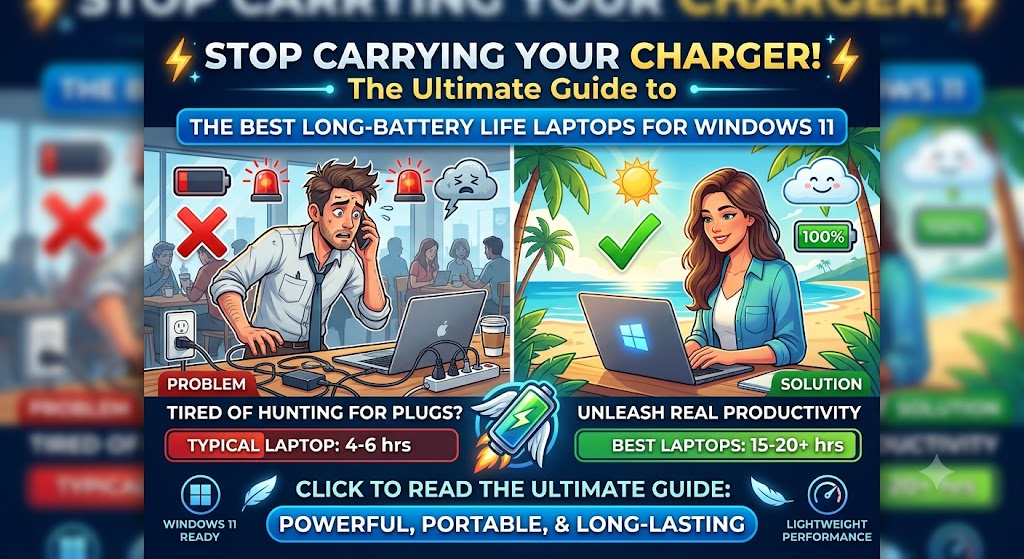
The best laptops longest battery life Windows 11 in 2026 are models running Qualcomm Snapdragon X or Intel Panther Lake processors, which deliver 14–26 hours of real-world runtime. Top picks include the HP OmniBook 5 (26+ hrs), Dell XPS 14 2026 (20+ hrs), and Lenovo ThinkPad X1 Carbon (14+ hrs).
INTRODUCTION
Battery life was once a major drawback for Windows laptops. Not anymore. In 2026, the best laptops with the longest battery life on Windows 11 are outperforming many MacBooks — thanks to Qualcomm Snapdragon X chips, Intel’s new Panther Lake architecture, and Windows 11’s improved power management built into the 24H2 and 25H2 updates.
For European users—whether you’re commuting in London, working from a café in Amsterdam, or travelling between client sites in Munich—carrying a charger everywhere is no longer necessary if you pick the right machine.
One advantage every laptop on this list shares: a built-in battery means a power cut never catches you off guard. Desktop users don’t have that safety net — if that’s your setup, a dedicated UPS battery backup for desktop PCs provides the same protection, keeping your system alive long enough to save your work and shut down safely.
This guide covers the 7 best Windows 11 laptops for battery life in 2026, based on real-world tested runtimes, not manufacturer claims. I’ll also explain what makes a laptop last longer, which settings to optimize on Windows 11, and what to watch for when buying in the EU market.
What Makes a Windows Laptop Last Longer in 2026?
Before the picks, here’s a quick summary of why some laptops last much longer than others in 2026:
| Factor | Why It Matters |
|---|---|
| Processor architecture | Snapdragon X and Intel Panther Lake have dedicated efficiency cores that switch off performance cores during light tasks |
| Display type and resolution | A 1200p LED panel uses significantly less power than a 2.8K OLED at the same brightness |
| Battery capacity (Wh) | A 86Wh+ battery is the baseline for 14+ hour runtimes in 2026 |
| Windows 11 power management | 24H2/25H2 added smarter sleep states, background process control, and Modern Standby improvements |
| GPU switching | NVIDIA Advanced Optimus and Qualcomm’s integrated GPU power-gate the discrete GPU when not in use |
Stat: According to Tom’s Guide (May 2026), the Dell XPS 14 (2026) lasts 20 hours 41 minutes on its LED panel configuration—the longest runtime ever recorded by Tom’s Guide for a Windows laptop in the Intel camp.
Battery life isn’t just about what happens away from the desk. When you dock your laptop at home or the office, the chargers, monitor, and peripherals around it quietly draw standby power all night. Pairing your setup with one of the energy-saving smart power strips we have tested automatically cuts that waste and also protects your gear with surge protection.
The 7 Best Laptops Longest Battery Life Windows 11 (2026)
1. HP OmniBook 5 14-inch — Best Overall Battery Life
Battery life (tested): 26+ hours Processor: Qualcomm Snapdragon X Elite Battery capacity: 64 Wh
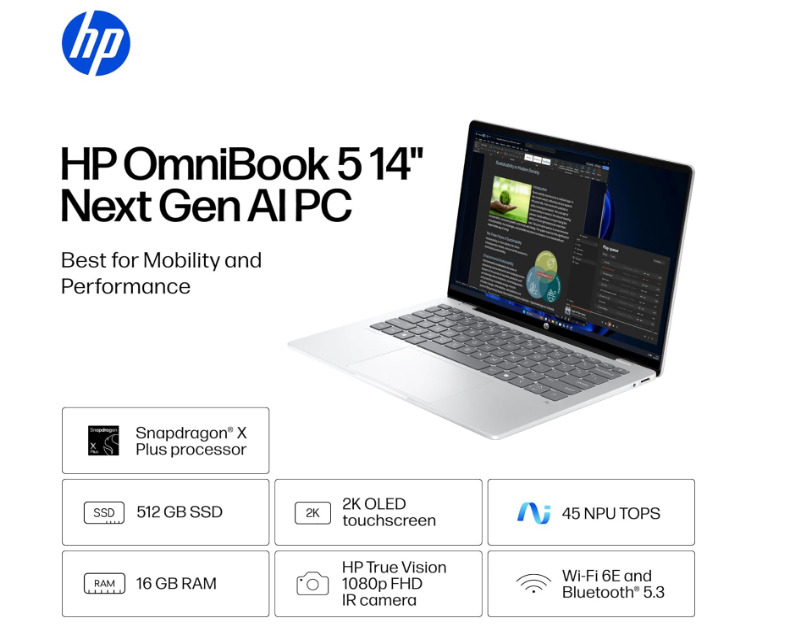
The HP OmniBook 5 is the longest-lasting Windows 11 laptop you can buy in 2026. HP officially claims up to 26 hours 30 minutes of video playback, and real-world testing from multiple outlets confirms the figure isn’t marketing hyperbole.
The Snapdragon X Elite chip deserves most of the credit. Its efficiency architecture, combined with Windows 11’s Arm-native power management, means the CPU draws remarkably little power during everyday tasks like document editing, browsing, and video calls.
✅ Pros
- Class-leading endurance: up to 25 hours of tested battery life, with multi-day real-world use from a modest 59Wh cell
- Standout keyboard with excellent key feel, plus a vivid OLED display
- Tiny 65W GaN charger included, with fast charging that adds up to 50% in 30 minutes
- Strong value: pre-built configurations around $699 make it one of the best-value AI laptops available
❌ Cons
- The Snapdragon X Plus X1P-42-100 is one of the least powerful chips in its family — great for battery, weak for gaming or heavy editing
- Some chassis flex, with build quality that’s average for the category
- 60Hz display only, and ARM compatibility trade-offs for older x86 apps
Best for: Remote workers, frequent travelers, and home office users who hate cables.
2. Dell 14 Premium (2026)—successor to the XPS 14—Best Windows Laptop for Battery Life
Battery life (tested): 20 hours 41 minutes (Tom’s Guide) Processor: Intel Core Ultra 5 325 (Panther Lake) Display: 1200p LED
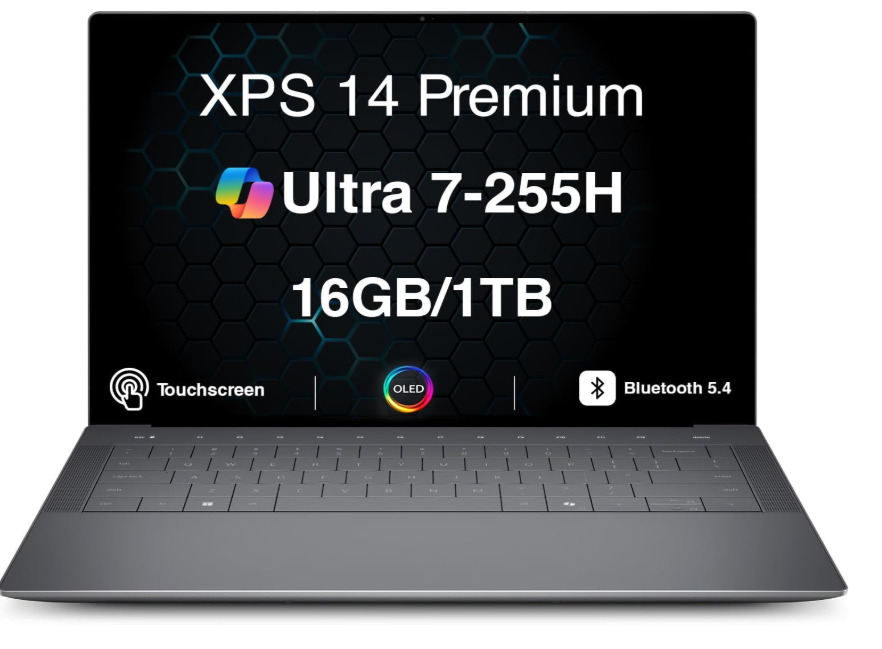
The Dell 14 Premium (2026) is the standout story of the year for the battery life of Windows laptops. Its Intel Panther Lake processor marks Intel’s strongest comeback in power efficiency since the Core 2 Duo era.
A critical buying note for European users: the 20-hour figure applies to the LED display configuration. The OLED model—also available in the EU—delivers 12 hours 23 minutes. Both are excellent, but if maximum battery life is the priority, choose the LED variant.
Best for: Office professionals, IT workers, anyone upgrading from a 2021–2023 Windows laptop.
3. Lenovo ThinkPad X1 Carbon (Gen 13) — Best Business Laptop
Battery life (tested): 14–16 hours Processor: Intel Core Ultra 7 (vPro) Battery capacity: 57 Wh

The ThinkPad X1 Carbon has been the default business laptop for a reason. The Gen 13 model continues that tradition with a sub-1.1 kg chassis, MIL-SPEC durability ratings, and a keyboard that European office users consistently rate as the best in the Windows laptop market.
Battery life is genuinely all-day for a standard European working day (8–9 hours) with several hours to spare. The 57Wh battery punches above its weight thanks to Intel’s efficiency cores doing the heavy lifting during document and browser tasks.
✅ Pros
- Terrific performance and battery life in a chassis cut down to just 2.17 pounds
- Bright, top-notch OLED display, better-than-average webcam, excellent speakers, and superb build quality
- Business-grade extras: a customer-replaceable 57Wh battery with Rapid Charge — 80% in 60 minutes
- Legendary ThinkPad keyboard and easy serviceability
❌ Cons
- Expensive: a roughly $2,000 starting price that’s hard to justify unless it’s a work expense
- Around 11.5 hours of tested endurance — good, but the shortest runtime on this list
- The 8-core Lunar Lake chip trails rivals in heavy multitasking
Best for: Business users, frequent flyers, and IT managers deploying at scale across the EU.
4. ASUS Zenbook A14 — Lightest with Excellent Battery Life
Battery life (tested): 15–17 hours Processor: Qualcomm Snapdragon X Plus Weight: 980g
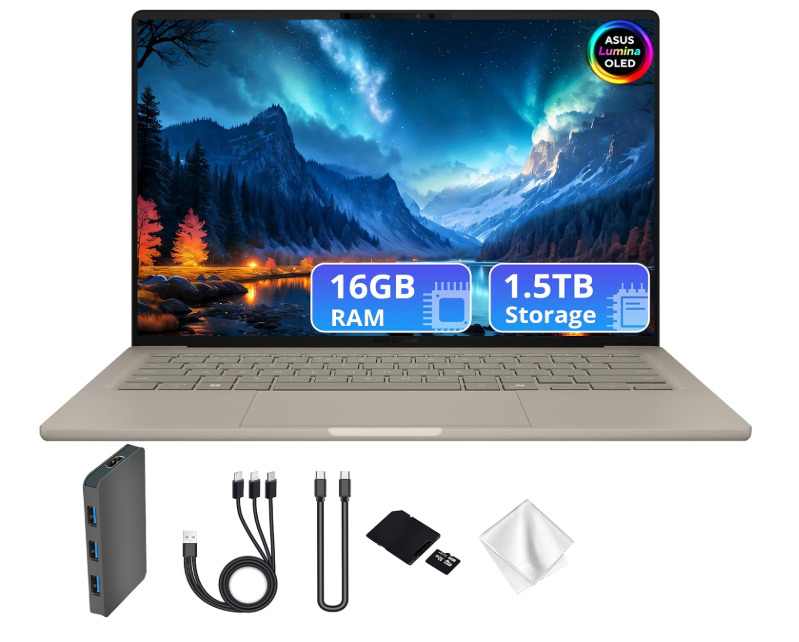
The ASUS Zenbook A14 is remarkable for one specific reason: it weighs under 1 kg and still delivers 15+ hours of battery life. Tom’s Guide rated the Zenbook A14 among the top 10 longest-lasting laptops tested in 2025, and the 2026 update refines performance further.
For European commuters on trains and metro systems where every gram matters, the Zenbook A14 is the most practical long-battery Windows 11 laptop available.
✅ Pros
- Absurdly light at roughly 980 grams (2.16 lb), yet delivers 21–22 hours of tested video playback
- A single charge comfortably lasts a couple of days of mixed work and evening viewing
- Durable, featherlight Ceraluminum chassis housing a 70Wh battery — unusual at this weight
- Battery Health Management can cap charging at 80% to extend long-term battery lifespan
❌ Cons
- Uses the slowest Snapdragon X chip — fine for everyday tasks, underpowered for demanding work at this price
- Noticeable lid flex, and the featherweight build can feel bouncy when typing on your lap
- Modest 60Hz, 1920×1200 non-touch OLED and tiny speakers
Best for: Commuters, students, and ultra-mobile workers.
5. Microsoft Surface Laptop 7th Edition — Best Premium Windows 11 Experience
Battery life (tested): 14–15 hours Processor: Qualcomm Snapdragon X Elite Display: 2.8K PixelSense
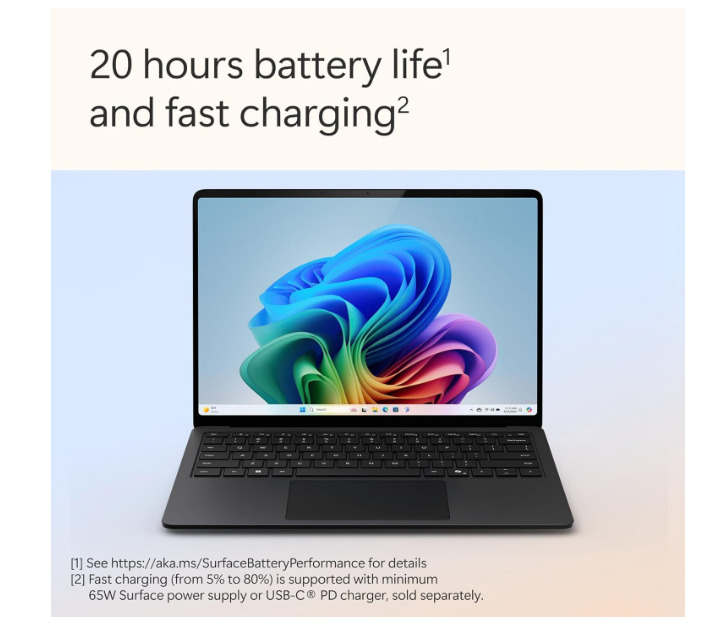
The Surface Laptop 7th Edition pairs exceptional battery life with the cleanest Windows 11 implementation you can get—no OEM bloatware, no third-party apps pre-installed, and no unnecessary background processes draining power.
The Snapdragon X Elite inside behaves differently from Intel chips: it runs cool, silent, and at peak efficiency during typical office tasks. Microsoft also offers a 15-inch model in the EU, which suits users who want a larger screen without sacrificing portability.
✅ Pros
- Exceptional endurance: 18–22 hours of tested video playback from only a 55Wh battery — remarkable efficiency for a Windows laptop
- Feels fast and fluid everywhere, thanks to the Snapdragon chip, 120Hz display, and one of the best trackpads on Windows
- Outstanding repairability, with easy internal access and official service documentation
- Premium all-metal build in four colors, with a strong webcam and AI camera effects
❌ Cons
- Shallow keyboard that not everyone will enjoy for long typing sessions, plus lingering ARM compatibility caveats for niche x86 software
- Higher memory/storage configurations get expensive quickly — more luxury purchase than value pick
- Limited ports: no HDMI, and microSD only on the 15-inch model
Best for: Home office users, creatives, anyone who wants Windows 11 as Microsoft intended it.
6. Lenovo Yoga 9i Gen 10 Aura Edition — Best 2-in-1 with Long Battery
Battery life (tested): 16+ hours Processor: Intel Core Ultra 7 (Aura Edition) Form factor: 2-in-1 convertible
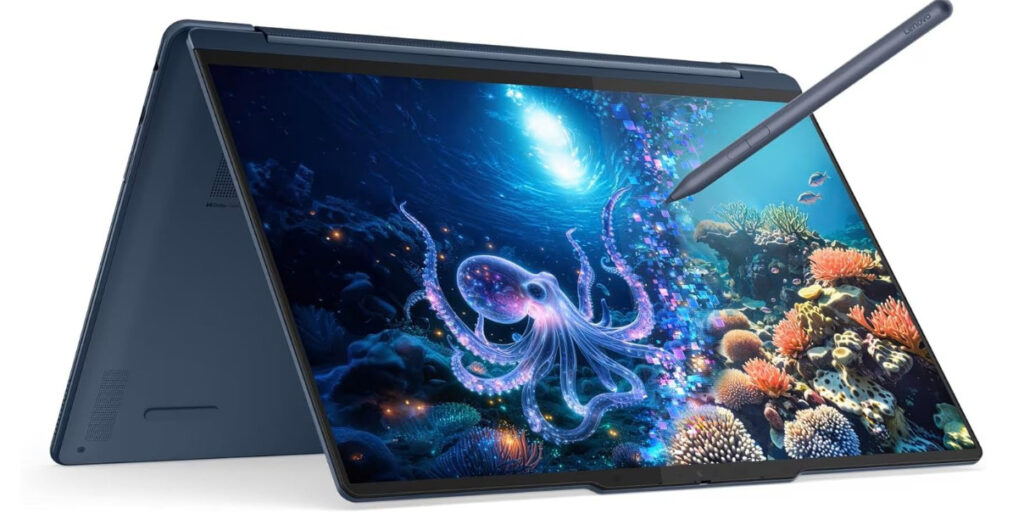
The Yoga 9i Gen 10 is Lenovo’s flagship 2-in-1, and its Aura Edition certification means it’s been tested and certified for AI performance, battery stamina, and display quality as a combined package. With 16+ hours of tested runtime, it outperforms most clamshell laptops in its class.
The 2-in-1 form factor makes it popular in European markets, where users mix tablet use (reading, signing PDFs, presentations) with traditional laptop work.
✅ Pros
- Nearly 17 hours of tested office-workload battery life from its 75Wh cell — a full workday of heavy multitasking still leaves plenty in reserve
- Stunning 120Hz OLED touchscreen in an aluminum unibody tough enough to meet military durability standards
- The only 2-in-1 convertible on this list — tablet and tent modes, high-end webcam, and an included color-matched stylus
- One of the best laptop keyboards available, paired with a snappy touchpad
❌ Cons
- Weak port variety — no HDMI port or microSD reader
- Priced high for the internal spec, with preloaded AI/Smart Mode software worth disabling
- Very difficult to open for upgrades or repair
Best for: Professionals who use their laptop in tent and tablet modes, as well as in legal and creative industries.
7. Acer Aspire 14 AI — Best Budget Battery Life
Battery: ~65 Wh | Processor: Intel Core Ultra 7 256V (Lunar Lake) | Display: 14″ WUXGA (1920×1200) IPS | RAM/Storage: 16GB LPDDR5X / 1TB SSD
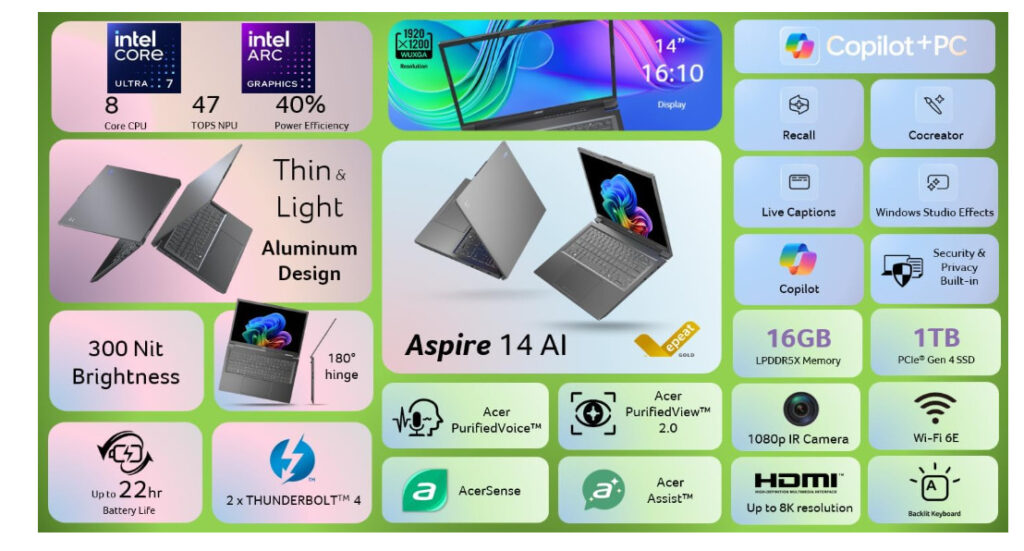
Acer’s Aspire 14 AI proves you don’t need flagship money for genuinely long runtimes. This configuration steps up to the Core Ultra 7 256V — the top Lunar Lake chip in the range — paired with 16GB of memory and a roomy 1TB SSD, yet it keeps the same efficiency-first design that makes this line punch above its price.
Acer rates the Aspire 14 AI at up to 22 hours, and independent testing of the line backs the spirit of that claim: reviewers have measured around 20 hours of web browsing, 15+ hours of 4K video playback, and 14–17 hours in continuous real-world tests. Whichever figure you trust, this is comfortably a two-workday laptop for everyday tasks. The Ultra 7 chip draws marginally more under sustained load than the entry Ultra 5, but for browsing, documents, and video the difference in unplugged time is small.
The efficiency comes from Intel’s Lunar Lake platform paired with a power-sipping matte IPS display — and that panel choice matters. As we covered earlier in this guide, LED/IPS screens draw meaningfully less power than OLED at typical brightness, and the Aspire is a textbook example of that trade-off working in your favor. This config also leans on strong silicon: a Copilot+ NPU rated up to 47 TOPS, Intel Arc 140V graphics (up to 64 TOPS on the GPU), Wi-Fi 6E, and Thunderbolt 4.
Be clear-eyed about where the money was saved, though: the display is the weak point. Reviewers consistently describe it as dim and ordinary, with a plastic keyboard deck reminding you this isn’t a premium chassis. If you mostly work indoors on documents, browsing, and video calls, you’ll rarely notice — if you edit photos or care about a vibrant screen, spend up on one of the picks above.
✅ Pros
- Exceptional tested battery life for the price (14–20 hours across independent tests)
- Top-tier Lunar Lake Core Ultra 7 256V with full Copilot+ AI features (up to 47 TOPS NPU) and capable Intel Arc 140V graphics
- Generous 16GB RAM and 1TB SSD as standard; power-friendly matte IPS display, aluminum lid, Thunderbolt 4, and Wi-Fi 6E
❌ Cons
- Dim, ordinary display — the defining budget trade-off
- Plastic keyboard deck with a somewhat mushy key feel
- LPDDR5X memory is soldered — no RAM upgrades later
Best for: Students, home users, and office workers who want maximum unplugged hours per dollar, plus generous memory and storage, and can live with an ordinary screen.
If you regularly dock your laptop to a bigger screen, remember the display often draws more power than the laptop itself. Choosing one of the external monitors with power management — with eco modes and presence sensors built in — keeps your whole desk setup as efficient as the laptop at the center of it.
Quick Comparison Table
| Laptop | Battery Life (Tested) | Processor | Check on Amazon (Paid Links) |
|---|---|---|---|
| HP OmniBook 5 14″ | 26+ hours | Snapdragon X Elite | Check Price |
| Dell XPS 14 (2026, LED) | 20h 41min | Intel Panther Lake | Check Price |
| Lenovo ThinkPad X1 Carbon G13 | 14–16 hours | Intel Core Ultra 7 vPro | Check Price |
| ASUS Zenbook A14 | 15–17 hours | Snapdragon X Plus | Check Price |
| Microsoft Surface Laptop 7 | 14–15 hours | Snapdragon X Elite | Check Price |
| Lenovo Yoga 9i Gen 10 Aura | 16+ hours | Intel Core Ultra 7 | Check Price |
| Acer Aspire 14 AI | 14+ hours | Intel Core Ultra 7 256V (Lunar Lake) | Check Price |
How to Maximise Windows 11 Battery Life on Any Laptop
Getting the most from your laptop’s battery isn’t just about the hardware—Windows 11 settings make a significant difference.
Top 5 Windows 11 battery-saving tips:
- Set Power Mode to Best Power Efficiency — Go to Settings → System → Power & battery → Power mode and select “Best power efficiency.” This alone can add 15–25% more runtime on all the laptops listed above.
- Reduce screen brightness to 50–60%—The display is the single largest power consumer on any laptop. Dropping from 100% to 60% brightness can add 2–3 hours of runtime.
- Enable Energy Saver automatically — Go to Settings → System → Power & battery → Energy saver and set it to activate at 20–30% battery.
- Disable background app activity — Go to Settings → Apps → Installed apps, click on individual apps, and set their background permissions to “Never” for apps you don’t need notifications from.
- Use powercfg /lastwake in CMD — If your laptop wakes overnight and drains the battery, this command identifies the exact device or task that woke it. Open Command Prompt as Administrator and type
powercfg /lastwake.
What to Look for When Buying in Europe
European buyers have specific considerations that US reviews sometimes overlook:
- EU voltage compatibility: All laptops on this list support 100–240V AC, so European power adapters are standard-included or easily available.
- EU warranty (Consumer Rights Directive): All laptops sold in the EU come with a mandatory minimum 2-year warranty. Lenovo, Dell, HP, and Microsoft all offer EU-specific warranty extensions.
- EU energy labeling: From 2025, laptops sold in the EU carry energy consumption labels. Look for Class A or B ratings on the label—the OmniBook 5 and Zenbook A14 both qualify.
- Keyboard layouts: Most retailers in the UK, Germany, France, and the Nordics stock region-specific keyboard layouts. Confirm layout before purchasing from non-EU online retailers.
- VAT included pricing: EU prices include VAT. The prices listed above reflect typical German/French market pricing with VAT included.
Every laptop we recommend here ships with NVMe storage, and it’s a bigger deal than the spec sheet suggests: it’s what makes waking from sleep feel instant. If you’re upgrading an older machine instead of buying new, swapping in one of the SSDs that speed up wake and boot times delivers much of that same responsiveness for a fraction of the cost.
Best Practices for Long-Term Battery Health
- Keep the charge between 20% and 80%—All 2026 laptops support Windows 11’s smart charging feature. Enable it in Settings → System → Power & battery → Battery → Smart charging.
- Never leave it at 100% plugged in for days—constant full charge degrades lithium cells faster. Use the 80% charge limit feature where available.
- If you are not using the laptop for a long period, store it at around 50% charge in a cool location.
- Update Windows and drivers regularly — Power management improvements are frequently delivered via Windows Update and OEM driver updates. Check monthly.
FAQ Section
Do Qualcomm Snapdragon laptops run all Windows 11 apps?
Most Windows apps run on Snapdragon X laptops via Windows 11’s built-in x64 emulation layer. Microsoft 365, Chrome, Firefox, Edge, Slack, Teams, Zoom, and Adobe apps all run natively or via emulation. A small number of legacy 32-bit apps and some specialist software may have compatibility issues — check with the developer before purchasing.
Does Windows 11 24H2 improve battery life compared to Windows 10?
Yes. Windows 11 24H2 and 25H2 introduced improved modern standby states, smarter background process management, and better arm-native support that significantly improves battery runtime on Snapdragon X laptops. Microsoft reports Windows 11 generally delivers 5–10% better power efficiency than Windows 10 on compatible hardware.
How do I assess my Windows 11 laptop battery health?
Open Command Prompt as Administrator and run powercfg /batteryreport. Windows generates a full HTML battery health report saved to your user folder. It shows your battery’s design capacity vs. current full-charge capacity—a capacity of 80% or above is healthy. Below 70% is when you should consider a replacement.
Which is better for battery life — Intel, AMD, or Qualcomm in 2026?
For maximum battery life, Qualcomm Snapdragon X leads in 2026, followed closely by Intel Panther Lake (new this year). The AMD Ryzen 8040 series remains competitive and offers better value at lower price points. For pure efficiency on Windows 11 over the full working day, Snapdragon X and Panther Lake are the top two choices.
What battery capacity (Wh) do I need for 15+ hours of battery life?
For 15+ hours of real-world Windows 11 runtime, look for laptops with at least 60Wh battery capacity when paired with a Snapdragon X or Panther Lake chip. Older Intel/AMD architectures typically need 80Wh+ for the same result. Battery capacity alone doesn’t determine runtime — processor efficiency is equally important.
Statistics and Key Facts
- The Dell XPS 14 (2026) achieves 20 hours and 41 minutes of battery life on its LED display configuration with an Intel Core Ultra 5 325 CPU, setting a new benchmark for Intel-powered Windows laptops (Tom’s Guide, May 2026).
- The HP OmniBook 5 is the standout performer, with HP officially claiming up to 26 hours and 30 minutes of video playback, corroborated by real-world testing from multiple tech outlets (BGR, May 2026).
- Tom’s Guide testing confirms that 14–18 hours of battery life is no longer a privilege reserved for Mac owners—Windows 11 machines running Qualcomm Snapdragon X chips are consistently delivering these results.
- Windows 11 24H2 delivers approximately 5–10% better power efficiency than Windows 10 on compatible hardware (Microsoft, 2025 power settings documentation).
Common Mistakes When Buying for Battery Life
- Trusting manufacturer claims directly — HP claims 26+ hours; real-world figures are typically 85–90% of claimed values. Always check Tom’s Guide, Notebookcheck, or RTINGS.com for independently tested results.
- Choosing OLED for a battery-first laptop — OLED displays are stunning but consume 20–35% more power than comparable LED panels. The Dell XPS 14 loses 8 hours of runtime just from the OLED upgrade.
- Ignoring the charger size—A 20-hour laptop paired with a bulky 130W charger defeats the purpose. Check that the laptop charges via USB-C PD (Power Delivery)—all picks in this guide do.
- Buying the wrong Snapdragon tier—Snapdragon X Plus and X Elite are different chips at different price points. The X Plus is sufficient for all-day office work; the X Elite is worth paying for if you also need AI workloads or heavier multitasking.
Related buying guides for your Windows 11 setup:
- Best UPS Battery Backups for Windows 11 Desktop PCs
- Best Smart Power Strips to Save Energy with Your Windows 11 PC
- Top External Monitors with Built-In Power Management
- Best SSDs to Improve Wake-from-Sleep Speed
Conclusion
The gap between Windows 11 laptops and MacBooks for battery life has effectively closed in 2026. The HP OmniBook 5 leads with 26+ hours — more than enough for two full European working days on a single charge. The Dell XPS 14 (2026, LED model) follows at 20+ hours, proving Intel is back in the efficiency race with Panther Lake.
For European buyers, the key decisions are whether you need Qualcomm (best battery), Intel Panther Lake (best balance of performance and battery), or AMD (best value) and whether you prioritize display quality (OLED) or maximum runtime (LED).
Whatever you choose from this list, pair it with Windows 11’s built-in power settings—Best Power Efficiency mode, Energy Saver at 20%, and the Smart Charging cap—and you’ll consistently add 2–4 hours to every one of these laptops’ rated runtimes.
