
Key Takeaways
- The GTA 5 0xc00007b error is a launcher problem, not a broken game. It almost always traces back to Social Club, the Rockstar Games Launcher, or a corrupt Visual C++ runtime—not your GTA V install itself.
- Two GTA-specific culprits cause most cases, and generic guides miss both. Windows Mandatory ASLR and Controlled Folder Access can each block Social Club from starting, even when DirectX and Visual C++ are perfectly healthy.
- Never download loose DLL files to fix it. Dropping stray DLLs into your GTA V folder is a leading malware route anthatsually breaks the install further. Every fix below uses official Rockstar and Microsoft sources.
Quick answer: To fix the GTA 5 0xc00007b error on Windows 11, install the Rockstar Games Launcher first, disable Mandatory ASLR in Windows Security, whitelist Social Club in Controlled Folder Access, and then reinstall Visual C++ (x86 and x64) and DirectX. Restart and relaunch.
Introduction
You waited hours for 90GB to download. You hit Play in Steam. And GTA V answers with a wall: “The application was unable to start correctly (0xc000007b). “ Occasionally it is Social-Club-Setup.exe that throws it. Sometimes the Rockstar Games Launcher opens, fails, and dies.
Here is the thing most guides get wrong. They tell you to reinstall DirectX and Visual C++; you do it, and nothing changes. That is because the GTA 5 0xc00007b error fix on Windows 11 often has nothing to do with those runtimes at all.
Two Windows security features—Mandatory ASLR and Controlled Folder Access—silently block Rockstar’s installer. Almost nobody mentions them. This guide covers those, plus the install order that matters, plus the standard runtime repairs, in the order that actually works. Home users and office users can follow every step.
What Does the 0xc00007b Error Mean in GTA 5? (Featured Snippet)
The GTA 5 0xc00007b error (STATUS_INVALID_IMAGE_FORMAT) means a required file could not load correctly when the game or its launcher started. In GTA V this usually points to the Rockstar Games Social Club, the Rockstar Games Launcher, or a corrupt Microsoft Visual C++ runtime—not a damaged GTA V installation.
Put simply: the launcher asked Windows for a file and got the wrong version, a blocked one, or a broken one. It gives up before the game ever loads.
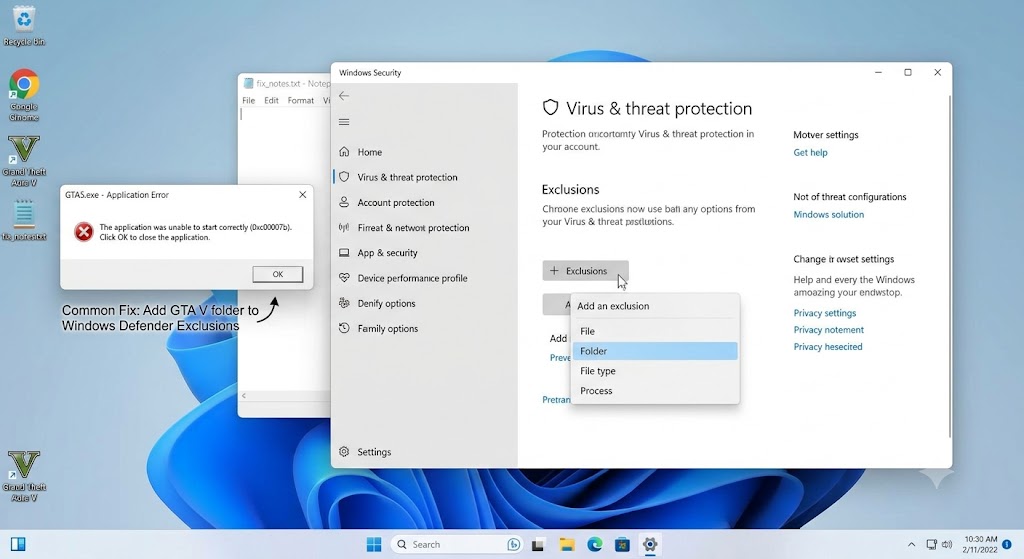
Why GTA 5 Throws 0xc00007b on Windows 11
GTA V is unusual. It stacks Steam or Epic on top of the Rockstar Games Launcher, which sits on top of Social Club, which depends on Visual C++ and DirectX. Any link in that chain fails, and you get 0xc00007b.
The common triggers:
- Social Club installation blocked. Windows Defender’s Controlled Folder Access has been known to prevent the Social Club install outright, producing this exact error.
- Mandatory ASLR conflict. Windows 11’s Force randomization for images setting can stop the launcher from loading its DLLs.
- Corrupt Microsoft Visual C++ Redistributable. Missing modules like MSVCP100.dll are a documented cause.
- Wrong install order. Installing GTA V before the Rockstar Games Launcher leaves prerequisites half-configured.
- DirectX confusion on Windows 11: Windows 11 ships DirectX 12 built-in, and you cannot uninstall or repair it—but GTA V still wants older D3D files like d3dx9_43.dll bundled in the end-user runtime.
- Antivirus interference. Third-party suites have been known to interfere with Social Club installs.
A real example from the Steam community: a player moved GTA V from an old Windows 11 PC to a brand-new Intel 14th-gen rig with a clean Windows 11 install. The game had run with zero problems before. On the new machine, the launcher buttons flipped between Play and back, Social Club crashed, and 0xc000007b appeared. The hardware was better. The chain was broken.
Before You Start: Skip the DLL Downloads
Search results for this error are full of “fix packs” — zipped DLL bundles you drop into your GTA V folder. Avoid them.
One Steam guide author who assembled such a pack admitted that the DLL files in these tutorials are often badly mangled, with copies of copies. Worse, loose DLLs from third-party sites are a well-known malware route, and they frequently break more than they repair. Another player reported deleting D3D files from System32 and SysWOW64, then reinstalling everything, and still ending up stuck.
Every fix below pulls files from Rockstar or Microsoft directly. That is slower to read and far faster to work.
GTA 5 0xc00007b Error Fix: Step by Step
Work through these in order. Do not rush ahead — troubleshoot one error at a time. Restart and test GTA V after each major step.
Step 1: Run GTA V and the Launcher as administrator.
Administrator rights let the game access resources it cannot reach in normal runtime. Right-click the launcher shortcut → Open file location → right-click the main launcher → Properties → Compatibility tab → tick Run this program as an administrator → OK.
Do the same for the GTA V executable. Simple, and it clears a surprising number of cases.
Step 2: Disable Mandatory ASLR (The Fix Most Guides Miss)
This step is the one that solved it for the Steam user above, and you will rarely see it mentioned elsewhere.
- Open Windows Security from the Start menu.
- Go to App & browser control → Exploit protection settings.
- Scroll to Force randomization for images (mandatory ASLR).
- Tick “Override system settings” and switch it off.
- Restart your PC.
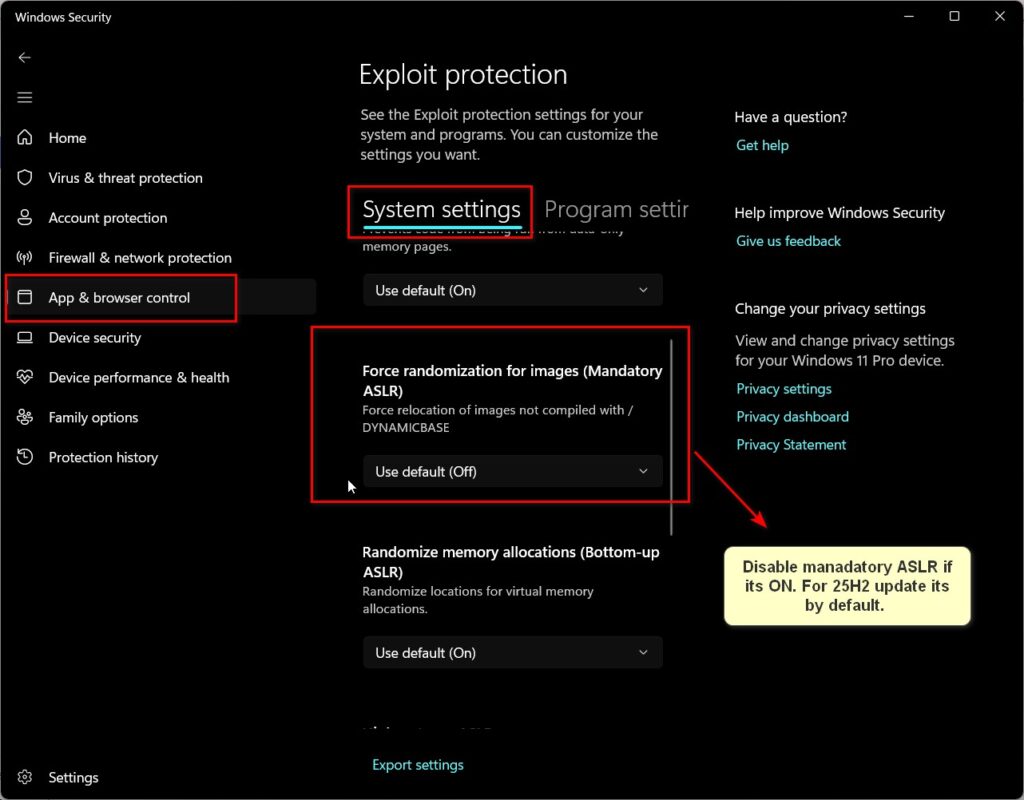
ASLR randomizes where DLLs load in memory. Rockstar’s launcher does not always cope. Turning it off restores predictable loading.
Step 3: Unblock Social Club in Your Antivirus
This step depends on which antivirus you run — and that ambiguity is why so many players get stuck here. Most guides assume Microsoft Defender. If you run something else, the Defender instructions simply will not apply, and you may waste an hour hunting for a panel that isn’t there.
Controlled Folder Access has previously blocked the Social Club installer, causing this error and “Social Club failed to load due to an incomplete installation (code 1).”
Check first: open Windows Security → Virus & threat protection. If it names a third-party product as your provider, skip to Option B.
Option A — If you use Microsoft Defender
Defender’s Controlled Folder Access previously blocked the Social Club installer, resulting in this exact error: “Social Club failed to load due to an incomplete installation (code 1).”
Go to Windows Security → Virus & threat protection → Ransomware protection → Manage ransomware protection. Either switch Controlled Folder Access off or, better, click Allow an app through Controlled Folder Access and whitelist the following:
- The Social Club installer
- The Rockstar Games Launcher installer
Program Files\Rockstar GamesSteam\steamapps\common\GTAV
Controlled Folder Access also blocks writes to Documents, which breaks GTA V saves and configs — so whitelisting fixes more than the launch error.
Option B — If you use a third-party antivirus
Running 360 Total Security, Avast, Norton, ESET, or similar? Then Defender has stepped aside, and the ransomware protection panel above will likely be hidden or greyed out. Your antivirus is the one to check.
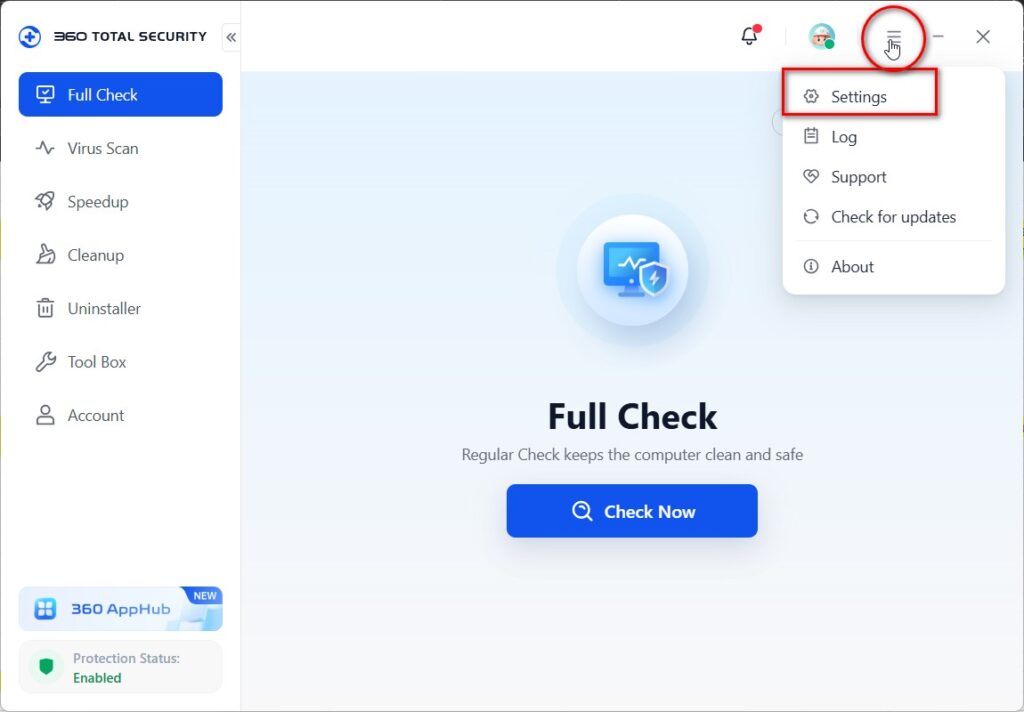
Third-party suites have been documented interfering with Social Club installs—in one reported case a user’s ESET installation could not be removed, and Social Club never finished installing.
Open your antivirus settings and look for Exclusions, Exceptions, Whitelist, or Allowed Apps—the wording varies by product. Add the same four items listed in Option A. If you cannot find the setting, temporarily disable real-time protection, install the Rockstar Launcher and GTA V, and then re-enable protection and add the exclusions afterwards.
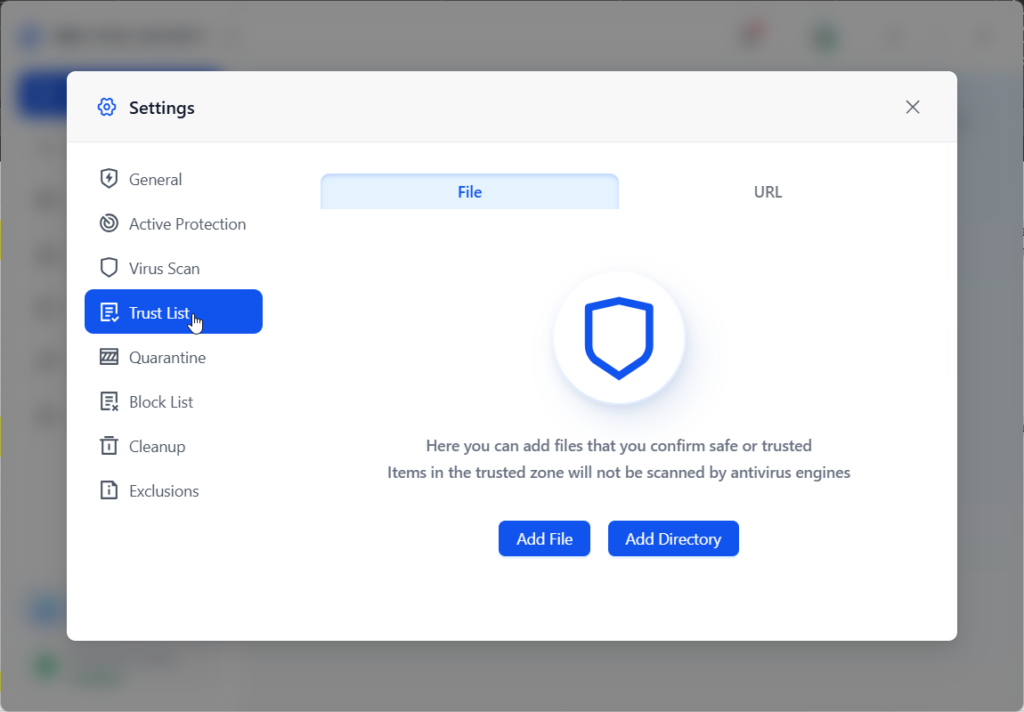
Restart and test the game either way.
Controlled Folder Access also blocks writes to Documents, which breaks GTA V save files and configs—so whitelisting fixes more than the launch error.
Step 4: Reinstall in the Correct Order
Install order genuinely matters here. The sequence that works:
- Uninstall everything — GTA V, Social Club, Rockstar Games Launcher. Delete leftover folders in Program Files, Documents, and My Games.
- Restart.
- Install the Rockstar Games Launcher first, and ensure it installs on C:, not another drive.
- Install GTA V from Steam, Epic, or Rockstar afterwards.
The Rockstar Games Launcher contains the required prerequisite files for their games, so it must land first.
Step 5: Reinstall Microsoft Visual C++ (x86 and x64)
Visual C++ components help the graphics card communicate with the processor and the game—when they corrupt, 0xc000007b appears.
Download the Visual C++ Redistributable packages from the official Microsoft site. The critical detail: x86 is 32-bit, x64 is 64-bit, and you need both on a 64-bit Windows 11 PC. GTA V’s launcher chain still calls 32-bit modules.
Older titles specifically reference MSVCP100.dll from the Visual C++ 2010 package, so include that alongside the current release.
Step 6: Install the DirectX End-User Runtime
Yes, Windows 11 has DirectX 12 built in. Please install the End-User Runtime anyway.
Here is why: DirectX 12 includes earlier versions, but GTA V explicitly wants legacy files like d3dcompiler_43.dll and d3dx9_43.dll, which only the End-User Runtime Web Installer places on disk. You may see a message saying a same-or-newer version is already installed—ignore it and let it finish.
Step 7: Run SFC to Repair System Files
Microsoft’s own support answer for this exact GTA 5 error recommends uninstalling the game, then running System File Checker.
Open Command Prompt as administrator and run the following:
sfc /scannowLet it complete, restart, then reinstall the game.
Step 8: Temporarily Disable Third-Party Antivirus
Third-party security suites have been documented interfering with Social Club installs—in one case a suite could not be uninstalled and the Social Club install never completed.
Temporarily disable your antivirus, install the launcher and game, then re-enable it and add exclusions for the Rockstar folders.
Step 9: Verify Game Files
If GTA V now launches but crashes, verify your install. In Steam, right-click on GTA V, select Properties, go to Installed Files, and choose Verify integrity of game files. Epic has an equivalent under the library’s three-dot menu.
Best Practices to Keep GTA V Launching
- Install the Rockstar Games Launcher on C: before the game.
- Keep the Rockstar folders whitelisted in Windows Security permanently.
- Update your GPU driver through the manufacturer’s official app.
- Create a restore point before large reinstalls, so you can roll back cleanly.
Common Mistakes to Avoid
- Downloading DLL repair packs. Malware risk is high, and the files are often corrupted copies of other files.
- Skipping ASLR and Controlled Folder Access. Most people reinstall runtimes five times but never adjust the two settings that actually block the launcher.
- Installing only the 64-bit Visual C++. You need x86 and x64.
- Installing GTA V before the launcher. The prerequisites end up half-set.
- You are trying to repair DirectX 12. You cannot uninstall or repair it on Windows 11—install the end-user runtime instead.
Recommended (Safe) Tools
- Rockstar Games Launcher — from Rockstar’s official Social Club site.
- Microsoft Visual C++ Redistributable — Microsoft Download Center.
- DirectX End-User Runtime Web Installer—Microsoft official.
- System File Checker (SFC) — built into Windows.
- Windows Security includes the ASLR and Controlled Folder Access fixes.
Everything here ships from Rockstar or Microsoft. No third-party “fixer” needed.
Microsoft Q&A — How to fix error code 0xc000007b in GTA 5
The user states they encountered the error with the Epic Launcher, and it was temporarily resolved by swapping some DLLs.
They had already gone through all the usual advice, including a full reinstall of Windows, .NET Framework, Visual C++, and DirectX, with Windows fully updated, and concluded that the issue was with the DLLs.
Another responder, Ivan, suggests first uninstalling the game, then running it from an admin command prompt, and finally restarting and installing VCredist and dxwebsetup. Note that the question is locked and was migrated from the Microsoft Support Community, so no further replies are possible.
Steam Community guide — GTAV Not Launching | DLL Error | 0xc000007b
The author mentions running GTA V and GTA Online on an older Windows 11 PC without any problems and then building a new Intel 14th-gen DDR5 rig with a fresh Windows 11 install, and the game completely stopped opening.
They show the play buttons for Steam and Rockstar Launcher switching states back and forth. Their diagnosis: Windows 11 comes with DirectX 12 built-in, and it won’t let you uninstall or repair it, which leads to Rockstar Launcher failures, Social Club crashes, and the 0xc000007b error with missing DLL requests.
The solution that worked for them was disabling force randomization for images (mandatory ASLR) in Windows Security with “Override system settings” checked.
They also talk about the proper order to install—strip everything first (game, Social Club, launcher, and also folders in drives and My Documents and My Games); install the Rockstar Launcher before the game; and keep it on C:.
They explicitly say that the DLL files floating around in these tutorials are badly mangled copies of copies. That’s your safety point, created by someone who put together such a pack himself.
Steam Community discussion—Error Social Club (0xc000007b)
The source of your Controlled folder access is.
The OP describes downloading approximately 85 GB, pressing Play in Steam, and immediately receiving an error from Social-Club-Setup.exe: “The application was unable to start correctly (0xc000007b).”
The Rockstar Launcher auto-starts, goes through the process of connecting and installing prerequisites, fails twice, and ends with “Social Club failed to load due to an incomplete installation (code 1).”
Their list of attempted fixes is long and worth citing as evidence of how stubborn this is: full uninstalls of GTA V and the launcher, removing D3D files from System32 and SysWOW64, stripping Visual C++ and .NET, reinstalling all of it, DirectX, and manual launcher install—none of it worked.
They ran Dependency Walker on Social-Club-Install.exe and got an error saying that at least one required implicit or forwarded dependency was not found.
Another responder identifies the real culprit: Controlled Folder Access in Windows Defender has previously blocked the Social Club install.
They suggest disabling it or whitelisting the Social Club installer, Rockstar Launcher installer, Program Files\Rockstar Games, and steam\steamapps\common\gtav—noting that CFA also blocks access to Documents, breaking saves and configs.
In a separate reply in that thread, a user described being unable to uninstall their third-party antivirus (ESET), preventing the Social Club install from completing.
How do I fix the GTA 5 0xc00007b error without downloading DLL files?
Disable Mandatory ASLR in Windows Security, whitelist Social Club and the Rockstar Launcher in Controlled Folder Access, then reinstall the Rockstar Games Launcher before GTA V. Add Visual C++ (x86 and x64) and the DirectX End-User Runtime from Microsoft. These official sources supply the same DLLs safely.
Why does GTA 5 show the 0xc00007b error when other games work fine?
Because GTA V depends on an unusually long chain—Steam or Epic, plus the Rockstar Games Launcher, plus Social Club, plus Visual C++ and DirectX. Other games skip most of that. A break anywhere in Rockstar’s chain triggers the error while unrelated titles launch normally.
Is the Social Club 0xc000007b error the same problem?
Yes, it is the same root cause as shown earlier in the chain. Social-Club-Setup.exe fails to start, so the launcher cannot install prerequisites and reports an incomplete installation. Controlled Folder Access blocking the installer is a common and frequently overlooked reason.
Can antivirus software cause the GTA 5 0xc00007b error?
It can. Third-party security suites and Windows Defender’s Controlled Folder Access have both been reported blocking Social Club and Rockstar Launcher installers. Temporarily disable your antivirus during installation, then re-enable it and whitelist the Rockstar Games folders to prevent the problem returning.
Should I reinstall Windows to resolve the GTA 5 0xc00007b error?
No. Players have completely reinstalled Windows but still encounter the error, which is caused by Rockstar’s launcher chain or a Windows security setting, not the operating system. Work through ASLR, Controlled Folder Access, install order, and the runtimes first.
Conclusion
The GTA 5 0xc00007b error fix is rarely about GTA V. It is about the chain underneath it—Social Club, the Rockstar Games Launcher, and the runtimes they depend on.
That is why so many players reinstall DirectX and Visual C++ five times and get nowhere. The two settings that most often break things, mandatory ASLR and controlled folder access, sit quietly in Windows Security and almost never get mentioned.
Work the list in order: run as admin, disable ASLR, whitelist Social Club, and reinstall the Launcher first on C:, then the runtimes. Most players are back in Los Santos well before the end.
And one rule worth repeating: obtain your files from Rockstar and Microsoft, never from a DLL pack. It is safer, it fixes the real cause, and it keeps your PC clean. Try these steps, then let us know in the comments which one worked for you.
ENJOYING OUR CONTENT?
Stay up to date with our latest guides, insights, and news. Tap below to follow us directly via your search feed.
