Affiliate Disclosure: As an Amazon Associate, WindowsTechIt earns from qualifying purchases. When you click our laptop recommendations and buy through our links, we may earn a small commission at zero absolute cost to you.
Two laptops can share the same Intel chip and still finish 10 hours apart on battery. That is the hidden trap when you shop for Windows 11 Pro business laptops with all-day battery life in 2026.
The processor is only one part of it. The screen you tick in the configurator matters just as much, and so does the way Windows sleeps in your bag. A ThinkPad X1 Carbon Gen 14 with an IPS screen runs almost 24 hours in Notebookcheck’s Wi-Fi test. The OLED version of the same laptop manages about 13.5.
So for each of the seven laptops below, I name the exact configuration behind the battery number, not just the model. You will also see which Pro features (BitLocker, Entra ID join, Group Policy) justify paying more than for Home, and the powercfg commands that stop overnight drain.
Prices cover buyers in the US, the UK and Europe, and India, with GST and VAT tips for registered businesses. The fixes come from the Modern Standby and BitLocker problems readers report to me most often.
Quick answer: the best Windows 11 Pro business laptops right now
- Best overall: Lenovo ThinkPad X1 Carbon Gen 14 (IPS) – almost 24 hours in Notebookcheck’s Wi-Fi test, under 1.2 kg.
- Longest battery: Dell Pro 7 14 (Intel) – 26 hours 18 minutes in StorageReview’s PCMark 10 Modern Office test, with vPro.
- Best Snapdragon: HP EliteBook X G2q – Snapdragon X2 Elite, built-in 5G, HP rates up to 29 hours of video playback.
- Best for India under ₹2.6 lakh: Dell XPS 14 (2026) or Asus ExpertBook Ultra, depending on whether you need vPro-class management.
Comparison table: battery hours, weight and prices
| Laptop | Chip | Best lab result | Who tested | Weight |
|---|---|---|---|---|
| Dell Pro 7 14 (Intel) | Core Ultra 7 366H vPro | 26h 18m (PCMark 10 Modern Office) | StorageReview | ~1.27 kg |
| Lenovo ThinkPad X1 Carbon Gen 14 (IPS) | Core Ultra 5 325 / 7 355 | ~24h Wi-Fi (IPS); 13.5h (OLED) | Notebookcheck | 0.98–1.14 kg |
| Asus ExpertBook Ultra | Core Ultra X7 358H | 18h 35m office; 23h 46m video (OLED) | TweakTown | ~0.99 kg |
| Dell XPS 14 (2026) | Core Ultra 7 (Panther Lake) | 21h 20m Wi-Fi browsing | Tom’s Guide | 14-inch |
| HP EliteBook X G2i | Core Ultra 7 356H / 366H | ~18h Wi-Fi (IPS); 17h 13m (3K OLED) | Notebookcheck; StorageReview | ~1.2 kg |
| HP EliteBook X G2q | Snapdragon X2 Elite | Up to 29h video (HP claim) | HP | ~1.1 kg |
| Surface Laptop for Business | Core Ultra Series 3 (Snapdragon X2 later) | Up to 20h (Microsoft, 13.8-inch Snapdragon X2 consumer model) | Microsoft | 13.8 / 15-inch |
Each lab uses its own test. Compare hours within one reviewer’s chart, not across reviewers. StorageReview, for example, treats anything above 15 hours in Modern Office as a true all-day system.
Best business laptops with all-day battery life in 2026
Lenovo ThinkPad X1 Carbon Gen 14 – best overall business laptop
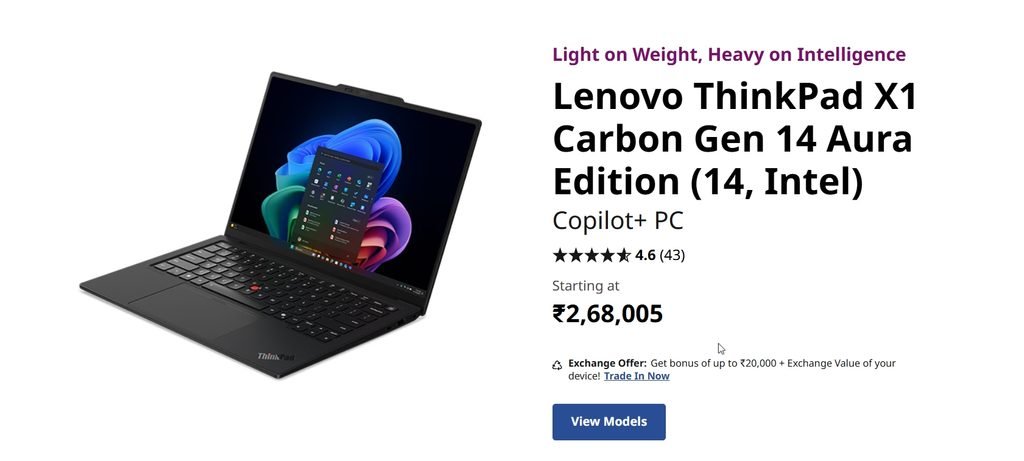
The X1 Carbon Gen 14 is the business laptop I recommend first. Notebookcheck measured almost 24 hours in its Wi-Fi test with the low-power IPS screen, and still 14 hours at full brightness.
It weighs about 0.98 kg in the lightest build and passes MIL-STD 810H testing. Lenovo also restored the right Ctrl key and redesigned the chassis for easier repairs. Memory now goes up to 64 GB, and a 5G modem is optional.
Best for: frequent travellers and executives. Watch out for: the OLED option, which cuts battery nearly in half (see the IPS vs OLED section).
Dell Pro 7 14 (Intel) – longest-lasting mainstream business laptop
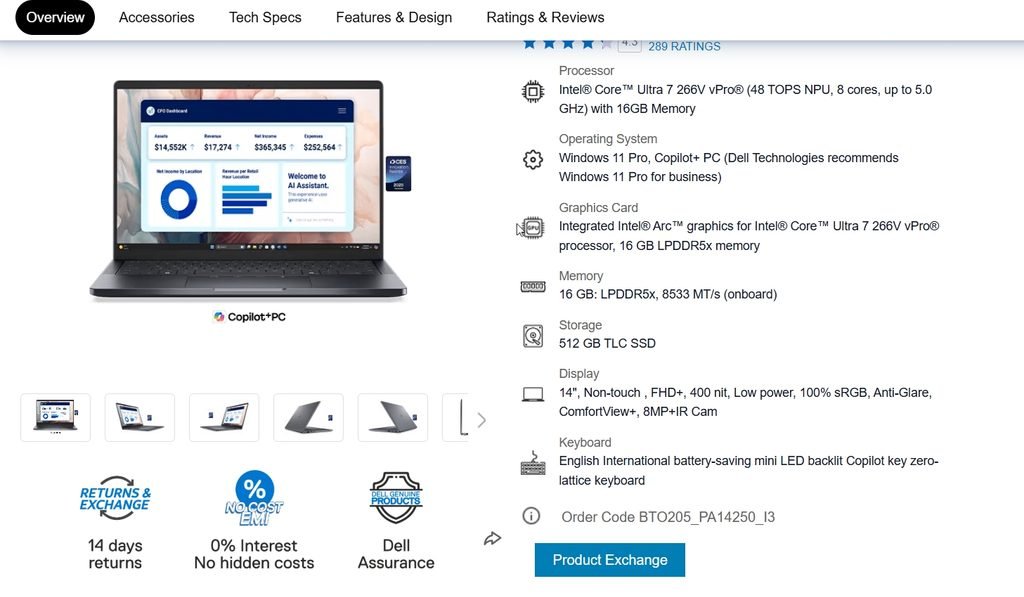
Dell’s renamed Latitude line is the battery champion of 2026. StorageReview recorded 26 hours 18 minutes in PCMark 10 Modern Office on the Pro 7 14 Intel, and 26 hours 48 minutes on the sibling Pro 5 14 Intel, the longest runtime it has ever measured.
The Pro 7 14 runs a Core Ultra 7 366H with Intel vPro Enterprise. That gives IT teams out-of-band management through Intel AMT, even when Windows will not boot. Dell pairs it with SafeBIOS and ProSupport options.
Best for: companies deploying fleets. Watch out for: list prices climb quickly with options; fleet buyers usually negotiate down.
HP EliteBook X G2i – best for hybrid meetings
The EliteBook X G2i is HP’s lead business design. Notebookcheck’s 1920 x 1200 IPS unit lasted about 18 hours in Wi-Fi browsing, matching the older Lunar Lake model while running about 32% faster.
With the 3K OLED screen, StorageReview measured 17 hours 13 minutes. HP adds a Battery Extender mode that lowers refresh rate, brightness and conferencing effects for what HP says is up to two extra hours. Poly Studio audio with AI noise suppression helps on calls.
Best for: hybrid workers who live on Teams. Watch out for: the Sure View privacy screen option hurts viewing angles.
HP EliteBook X G2q – best Snapdragon X2 Elite business laptop
The G2q runs Qualcomm’s 18-core Snapdragon X2 Elite with an 85 TOPS NPU. HP claims up to 29 hours of video playback, and it has built-in 5G, a smart card slot and Wi-Fi 7 at about 1.1 kg.
HotHardware found Snapdragon X2 systems lose far less performance on battery than Intel and AMD systems. In India it sells for over ₹2.5 lakh.
Best for: mobile sales teams who need 5G and multi-day battery. Watch out for: Windows on Arm quirks with VPN clients, printer drivers and older line-of-business apps. Test your software first.
Asus ExpertBook Ultra – lightest powerhouse for executives
The ExpertBook Ultra packs a Core Ultra X7 358H with Arc B390 graphics and a 70 Wh battery into about 0.99 kg. TweakTown’s OLED model lasted 18 hours 35 minutes in UL Procyon Office Productivity and 23 hours 46 minutes in video playback.
Its matte tandem OLED reaches very high brightness, which helps on flights and in sunny cafes. In India, it ranges from ₹2,39,990 to ₹3,49,990.
Best for: executives who also edit photos or video. Watch out for: full performance is not available on battery, and the price is steep.
Microsoft Surface Laptop for Business – best for Microsoft 365 shops
Microsoft refreshed Surface for Business on 19 May 2026 with Intel Core Ultra Series 3 chips, Wi-Fi 7 and an optional integrated privacy screen on the 13.8-inch model. Pricing for the business lineup starts at $1,499; in the UK, the 13.8-inch Surface Laptop for Business starts at £1,829.
Snapdragon X2 business models are due later this year. Microsoft rates the consumer Snapdragon X2 Surface Laptop at up to 20 hours (13.8-inch) and 19 hours (15-inch).
Best for: organisations standardised on Intune, Entra ID and Microsoft 365. Watch out for: price, and no independent battery data yet for the Intel business models.
Dell XPS 14 (2026) – best for freelancers and small offices
Not every business needs vPro. The 2026 XPS 14 with Panther Lake lasted 21 hours 20 minutes in Tom’s Guide’s web test with its 1920 x 1200 screen. 91mobiles named it the best business laptop overall in India.
Order it with Windows 11 Pro in Dell’s configurator, or upgrade later from Settings.
Best for: consultants, freelancers and small offices. Watch out for: fewer enterprise management features than Dell Pro.
Why Windows 11 Pro matters on a business laptop
Most “best business laptop” lists never explain the operating system. Here is what Windows 11 Pro adds over Home:
| Feature | Windows 11 Home | Windows 11 Pro |
|---|---|---|
| BitLocker drive encryption (full management) | No (device encryption only on some PCs) | Yes |
| Join Active Directory / Microsoft Entra ID | No | Yes |
| Group Policy | No | Yes |
| Hyper-V and Windows Sandbox | No | Yes |
| Remote Desktop host | No (client only) | Yes |
| Max RAM | 128 GB | 2 TB |
| US retail price | $139 | $199.99 (upgrade from Home $99.99) |
In my experience, BitLocker alone justifies Pro for anyone carrying client data. If a laptop is lost at an airport, an encrypted drive turns a data breach into a hardware claim.
To check what you have, press Win + R, type winver and press Enter. To check encryption, open an admin Command Prompt and run:
manage-bde -status C:If Protection Status shows Protection Off, turn on BitLocker in Settings > Privacy & security > Device encryption (or Control Panel > BitLocker Drive Encryption). Save the recovery key to your Microsoft or Entra account first.
Intel Panther Lake vs Snapdragon X2: which suits your office?
| Factor | Intel Panther Lake (Core Ultra Series 3) | Snapdragon X2 Elite |
|---|---|---|
| Battery life | 18–26 hours in 2026 lab tests | Excellent, especially video playback |
| App and driver compatibility | Everything runs natively | Most apps; some VPNs, printer drivers, old LOB apps fail |
| Remote management | Intel vPro / AMT on vPro models | No vPro; managed through Intune |
| Performance on battery | Much improved, still drops somewhat | Very small drop on battery |
| 5G options | Optional on some models | Common, built into modem |
I recommend Panther Lake for most offices because it removes compatibility risk. Choose Snapdragon X2 only after you test your VPN, printers, security agent and any in-house apps on a demo unit.
IPS vs OLED: the setting that decides your battery
This is the biggest battery decision most buyers make without knowing it. Notebookcheck tested the same ThinkPad X1 Carbon Gen 14 with both panels: the IPS model ran more than 23 hours at 150 nits, while the OLED model managed only 13.5 hours. At full brightness, it was 14.2 hours vs 7.6 hours.
StorageReview saw the same pattern with Dell. The Pro 14 Premium with a 2880 x 1800 screen lasted 16 hours 30 minutes, while the Pro 7 14 with a lower-resolution LCD and the same chip lasted 26 hours 18 minutes.
My rule: if battery is the priority, order the 1920 x 1200 IPS or low-power LCD panel. Choose OLED only if you work on colour-critical content.
Stop the “hot bag” battery drain on Windows 11
The most common complaint I see from office users is not daytime battery. It is opening the laptop after a commute to find it hot and drained. This is usually Modern Standby, where the laptop never fully sleeps.
Check your sleep state with powercfg
Open Command Prompt and run:
powercfg /aIf you see Standby (S0 Low Power Idle), your laptop uses Modern Standby. Almost every 2026 business laptop does.
Read the sleep study report
Run this as administrator after a night of unexpected drain:
powercfg /sleepstudyOpen the HTML report. Look for sessions with high drain and the “top offenders” list. Common culprits are Teams, OneDrive, security agents, and USB devices left plugged in.
Make the laptop hibernate automatically
Hibernate saves your session to the SSD and turns the laptop fully off. Set Windows to move from sleep to hibernate after 30 minutes on battery:
powercfg /hibernate on
powercfg /change hibernate-timeout-dc 30
Then go to Control Panel > Power Options > Choose what the power buttons do and set When I close the lid to Hibernate on battery if you often close it and walk out.
Use the maker’s battery tools
- Lenovo: Lenovo Commercial Vantage – battery charge threshold and smart standby.
- Dell: Dell Optimizer / Dell Power Manager – adaptive charging.
- HP: HP Battery Extender on Intel EliteBook X models, plus BIOS charge limits.
- Surface: Smart Charging in the Surface app.
For IT admins, these power policies can also be pushed through Intune or Group Policy, which is another reason to run Windows 11 Pro.
Still running Windows 10 in the office?
Windows 10 reached end of support on 14 October 2025. Personal PCs enrolled in the consumer ESU program now get free security updates until 12 October 2027. Businesses must buy commercial ESU, which costs more each year.
ESU only delivers security fixes. Battery and AI features in Copilot+ PCs work only on Windows 11. If your office fleet still runs Windows 10 laptops with 4–6 hour batteries, a 2026 Windows 11 Pro business laptop is a productivity upgrade as well as a security one.
What IT admins and users report in the real world
These are paraphrased from public forum threads and comments. Open each link to read the full discussion.
- Hibernate for the bag (Reddit r/YouShouldKnow): A user warned that laptops entering sleep while plugged in can keep running in a bag, and another replied they solved it years ago by choosing hibernate before packing. Fix: hibernate, not sleep, for transport. Source
- “Hibernate is the answer” (Reddit r/windows): In a long thread about Windows PCs not sleeping properly, several users landed on the same fix: use hibernate. Source
- 3% per hour overnight (Dell Community): A Dell owner reported losing about 3% per hour in Modern Standby even with network-connected standby off. A later reply used the BIOS to disable sleep and rely only on hibernate. Source
- ZBook waking in the bag (HP Community, Business Notebooks): A ZBook G10 user described fans running and unexpected wake-ups in sleep; replies explained Intel removed S3 sleep from 11th-gen chips onward. Fix: use hibernate and check wake sources with sleepstudy. Source
- Power plan tweaks (HP Community): A Spectre owner listed changes that reduced sleep drain, including turning off USB charging in BIOS and adjusting advanced sleep settings. Source
Buying checklist for businesses in the US, Europe and India
- Screen: choose IPS or low-power LCD for maximum battery; OLED costs roughly 40–50% of runtime.
- Battery: 56 Wh minimum; 68–70 Wh for 20+ hour runtimes.
- RAM: 32 GB is the new business standard; it is soldered on most premium models.
- Management: vPro if your IT team uses Intel AMT; otherwise Intune works on all chips.
- Security: fingerprint and IR camera for Windows Hello, TPM 2.0, BitLocker on Windows 11 Pro.
- Warranty: three-year next-business-day onsite support for staff who travel.
- US buyers: check business stores (Dell, Lenovo Pro, HP Business) for volume and small-business discounts.
- Europe/UK buyers: VAT-registered businesses should buy from business channels to reclaim VAT; Surface for Business starts at £1,829 in the UK.
- India buyers: compare brand business stores, Amazon Business and Flipkart; GST invoices let registered firms claim input tax credit.
Frequently asked questions
Q: Which Windows 11 Pro business laptop has the longest battery life in 2026? A: The Dell Pro 5 14 and Pro 7 14 (Intel) lead StorageReview’s tests at 26 hours 48 minutes and 26 hours 18 minutes in PCMark 10 Modern Office. The Lenovo ThinkPad X1 Carbon Gen 14 with the IPS screen follows closely with almost 24 hours in Notebookcheck’s Wi-Fi test.
Q: Is Windows 11 Pro worth it for a business laptop? A: Yes, for most businesses. Windows 11 Pro adds BitLocker encryption management, Entra ID and domain join, Group Policy, Hyper-V, Windows Sandbox and Remote Desktop hosting. Encryption alone protects client data if a laptop is lost. Pro costs $199.99 retail, or $99.99 to upgrade from Home.
Q: What counts as all-day battery life on a business laptop? A: A business laptop with all-day battery life should last at least 15 hours in a lab office test such as PCMark 10 Modern Office. That usually means 8–12 real hours with video calls and brightness above 200 nits. The top 2026 models exceed 24 hours, enough for two working days.
Q: Are Snapdragon X2 Elite business laptops safe for office use? A: They are reliable and very efficient, but check compatibility first. Some VPN clients, printer and scanner drivers, security agents and older in-house apps may not run on Windows on Arm. Test a demo unit with your full software stack before rolling out Snapdragon X2 Elite business laptops.
Q: Why does my business laptop battery drain in my bag? A: Most 2026 laptops use Modern Standby, which can keep Windows partly active while the lid is closed. Background sync, updates or a plugged-in device can wake it. Run powercfg /sleepstudy to find the cause, and set the laptop to hibernate after 30 minutes on battery.
Q: What is the best business laptop in India in 2026? A: For battery and management, the Lenovo ThinkPad X1 Carbon Gen 14 and Dell Pro 7 14 are strong picks. 91mobiles named the Dell XPS 14 (2026) its best business laptop overall in India at Rs 2,57,890. The Asus ExpertBook Ultra starts at Rs 2,39,990 and suits executives who need extra performance.
Q: Does an OLED screen reduce business laptop battery life? A: Yes, often a lot. Notebookcheck found the ThinkPad X1 Carbon Gen 14 lasted over 23 hours with IPS but only 13.5 hours with OLED at the same brightness. If battery life matters most, choose the 1920 x 1200 IPS or low-power LCD option.
Q: Can I keep using Windows 10 business laptops after 2025? A: Windows 10 support ended in October 2025. Personal devices can get free consumer ESU updates until 12 October 2027, but businesses must pay for commercial ESU. ESU gives only security patches, so moving to Windows 11 Pro business laptops is the better long-term plan.
Conclusion
The best Windows 11 Pro business laptops of 2026 finally deliver battery life that matches a real workday and then some. The ThinkPad X1 Carbon Gen 14 is my overall pick, the Dell Pro 7 14 is the stamina king, and the HP EliteBook X G2q shows how far Snapdragon has come for mobile teams.
Remember three rules. Choose IPS over OLED if battery comes first. Test your software before buying Snapdragon. And set hibernate on battery so your laptop never cooks in your bag again.
Bookmark this guide, as I update the battery table when new test results arrive. Which business laptop does your office use? Share your real battery hours in the comments, and send this guide to your IT team before your next refresh.
Related reading: working on a tighter budget? See my guide to the best budget refurbished Windows laptops.
Prefer WindowsTechIT in Google?
Add us as a preferred source so our Windows fixes show up more often in your Top Stories.