
Looking for the best Copilot+ laptops and PC under $1000? You have more choice now than at launch. In the US, UK and India, several real Copilot+ models drop below the $1,000 mark during sales.
But there is a catch. Many laptops carry an “AI PC” sticker and still fail Microsoft’s rules. A Copilot+ PC needs an NPU rated at 40 TOPS or more, 16 GB of RAM and 256 GB of storage. Anything less does not get Recall, Click to Do or Live Captions with translation.
I checked Microsoft’s own requirement pages, retailer prices from July to October 2026, and owner feedback from Reddit and Microsoft Q&A. This guide shows which laptops qualify, what they cost and which problems to expect. It also explains the 2026 memory shortage that is pushing prices up. If you are leaving Windows 10, you will get a clear answer on whether you need Copilot+ at all.
Prices change fast. Treat every price below as a snapshot and check the retailer before you buy.
Best Copilot+ laptops and PC under $1000 at a glance
Here is the short list. Each laptop is listed as a Copilot+ PC by the retailer or the guide I used. The price is the lowest recent price I found, not the list price.
| Laptop | Chip | RAM / Storage | Recent price | Best for |
|---|---|---|---|---|
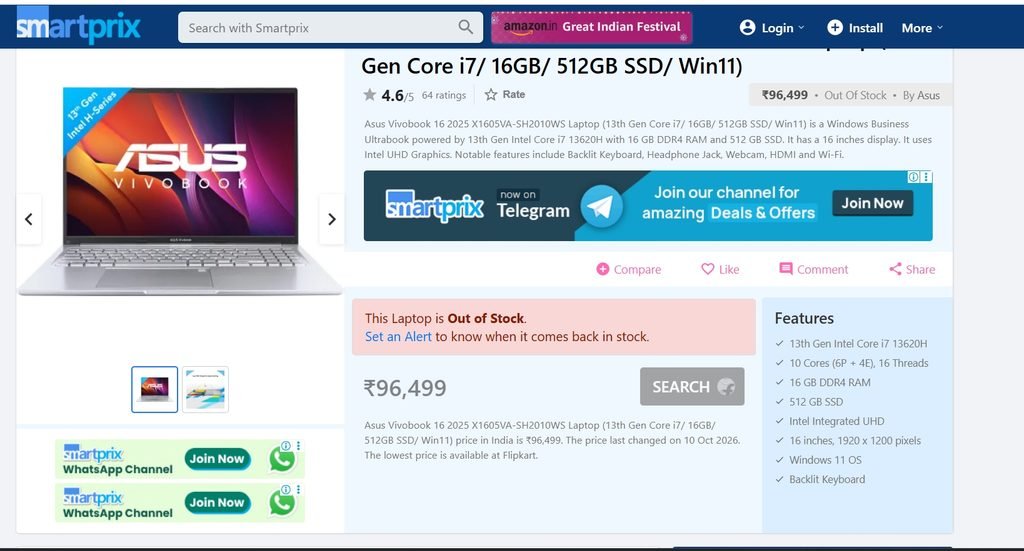
| ASUS Vivobook 16 Copilot+ | Ryzen AI 7 350 (50 TOPS) | 16 GB / 512 GB | $829.99 | Best overall value |
| Acer Swift Go 16 AI | Core Ultra 7 355 | 32 GB / 1 TB | $899.99 (sale) | Heavy multitasking |
| Lenovo Yoga Slim 7x 14″ | Snapdragon X2 Elite | 16 GB / 1 TB | $949.99 (sale) | OLED screen |
| Dell 14S 14″ | Ryzen AI 7 445 | 16 GB / 512 GB | $900 (sale) | OLED touchscreen |
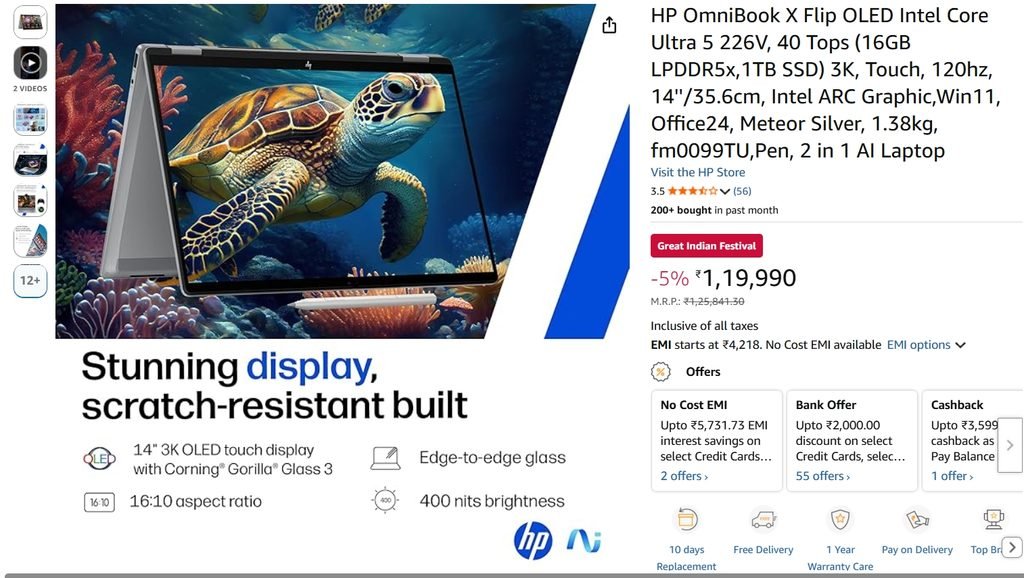
| HP OmniBook X Flip 14″ | Ryzen AI 5 430 | 16 GB / 512 GB | $700 (sale) | 2-in-1 value |
| Samsung Galaxy Book6 | Core Ultra 7 | 16 GB / 512 GB | $900 (sale) | Touchscreen laptop |
| Samsung Galaxy Book 4 Edge 15.6″ | Snapdragon X | 16 GB / 512 GB | $600 (sale) | Big screen on a budget |
| HP OmniBook 5 14″ OLED | Snapdragon X series | 16 GB / 1 TB | $579.99 | Cheap OLED |
| Lenovo IdeaPad Slim 3X | Snapdragon X | 16 GB / 512 GB | $499.99 | Lowest price |
Sources for prices: Newegg’s 2026 AI laptop guide, Of Zen and Computing’s November 2026 roundup, and 9to5Toys deal posts from July and October 2026. Sale prices end quickly.
What makes a laptop a real Copilot+ PC
A Copilot+ PC is a Windows 11 laptop that meets a fixed hardware bar. The NPU is the key part. It is a chip built for AI work, and it must reach 40 TOPS.
Microsoft lists these minimums on its Learn pages for Click to Do and Recall. Here they are in one table.
| Requirement | Minimum |
|---|---|
| NPU | 40 TOPS or higher |
| RAM | 16 GB |
| Storage | 256 GB |
| Logical processors | 8 |
| Recall only | Secured-core PC, BitLocker or Device Encryption, Windows Hello Enhanced Sign-in Security, 50 GB free space |
Microsoft says Recall pauses saving snapshots once free space falls below 25 GB. So a 256 GB laptop fills up fast if you turn Recall on.
How to spot a fake Copilot+ label
Three labels cause the most confusion:
- AI PC. This is a marketing term. It can mean any chip with an NPU, even a weak one.
- Copilot key. A keyboard key does not make a laptop Copilot+. Many cheap laptops have the key and no 40 TOPS NPU.
- Copilot+ PC. This is the Microsoft badge. It needs the full hardware bar.
Older Intel Meteor Lake chips are the usual trap. One Microsoft Q&A buyer asked why a laptop with a Core Ultra 7 155H had no Copilot+ features. A support volunteer answered that the chip does not reach 40 TOPS. I also saw one retailer guide label a 155H laptop as Copilot+. Check the spec sheet, not the label.
How I picked these laptops
I kept the rules simple:
- It must meet Microsoft’s Copilot+ minimums.
- The price must be under $1,000, at list price or on a sale.
- It needs at least 16 GB of RAM.
- It must come from a brand you can buy and service in the US, UK or India.
- Owner reports must not show a deal-breaking problem.
I did not run lab tests. These picks come from spec sheets, retailer prices and published reviews. If you want battery numbers, read a full review of the exact model before you pay.
The best Copilot+ PC laptops under $1000
ASUS Vivobook 16 Copilot+: best overall value
Newegg’s 2026 guide lists it at $829.99 with a Ryzen AI 7 350 and a 50 TOPS NPU. It also has 16 GB of DDR5 and a 512 GB SSD. That clears every Microsoft minimum with room to spare.
It uses an x86 chip, so old apps, printers and VPN tools behave normally. The 16-inch screen suits spreadsheets.
Acer Swift Go 16 AI: best for heavy multitasking
9to5Toys tracked the Swift Go 16 AI at $899.99 in July, down from $1,550. That model has a Core Ultra 7 355, 32 GB of RAM, a 1 TB SSD and a 16-inch 2K OLED touchscreen.
Newegg lists the same family at $1,149.99, so the sale price matters. Wait for a deal. At list price it is above the limit.
Lenovo Yoga Slim 7x: best OLED screen near $1,000
Best Buy’s early Black Friday sale put a 14-inch Yoga Slim 7x with Snapdragon X2 Elite, 16 GB and 1 TB at $949.99, about $700 below its usual price. In July, a Snapdragon X2 Plus version with 512 GB hit $999.99.
The X2 chips are the new generation. Qualcomm’s X2 Elite, X2 Elite Extreme and X2 Plus chips all carry an 80 TOPS NPU. Emulation is also better than on the first Snapdragon X laptops.
HP OmniBook X Flip 14: best 2-in-1 value
In October, Best Buy listed the 14-inch model at $700, down from $1,250. It has a 2K touchscreen, a Ryzen AI 5 430, 16 GB of RAM and 512 GB of storage. It flips into tablet mode for notes and reading.
This is the cheapest 2-in-1 here. Check the sale is still live before you plan around the price.
Dell 14S: OLED touchscreen at $900
The Dell 14S had a 14-inch 2K OLED touchscreen, Ryzen AI 7 445, 16 GB and 512 GB at $900 in the same sale. The regular price was $1,450.
Pick it if screen quality matters more than storage.
Samsung Galaxy Book6 and Galaxy Book 4 Edge
The Galaxy Book6 with Core Ultra 7, 16 GB and 512 GB sold for $900 in July. The older Galaxy Book 4 Edge 15.6-inch with Snapdragon X dropped to $600 in October.
The Book 4 Edge is last-generation. It still meets the Copilot+ minimums. It suits anyone who wants a big screen at the lowest cost.
Lenovo IdeaPad Slim 3X and HP OmniBook 5: cheapest options
Of Zen and Computing lists the IdeaPad Slim 3X at $499.99 and the HP OmniBook 5 OLED at $579.99. Both use Snapdragon X-series chips with 16 GB of RAM.
These suit browsing, email and Office. Check them for Snapdragon app problems first (see the chip section below).
Other models worth watching
- Microsoft Surface Laptop 7. Of Zen lists a Snapdragon X Plus model at $849. Microsoft raised Surface prices in April 2026, so these deals are older stock.
- Dell Plus 14 2-in-1 and LG gram Book 16. Both sold for $850 to $900 in July with 16 GB of RAM and 1 TB of storage.
Which Copilot+ laptop should you buy?
| If you are a… | Pick | Why |
|---|---|---|
| Student on a tight budget | IdeaPad Slim 3X or HP OmniBook 5 | Lowest prices, 16 GB RAM |
| Office user | ASUS Vivobook 16 | x86 chip, no app issues |
| Heavy multitasker | Acer Swift Go 16 AI | 32 GB RAM, 1 TB SSD |
| Home user who wants a big screen | Galaxy Book 4 Edge 15.6″ | Large display, low price |
| Tablet and pen user | HP OmniBook X Flip 14 | 2-in-1 design |
| Photo and video hobbyist | Yoga Slim 7x or Dell 14S | OLED screens |
Snapdragon, AMD or Intel: which chip is safer?
This choice matters more than the brand.
Snapdragon X and X2. These give the lowest prices and strong battery life. The catch is Arm compatibility. Windows runs x86 apps through emulation, and some tools never got Arm drivers.
One Reddit owner list names the common failures: backup tools that cannot see drives, professional printers and scanners without Arm64 drivers, some anti-cheat games, and a few work VPNs. A TWiT review says the second-generation chips improved x64 emulation, but you should still check your own apps.
AMD Ryzen AI. These are x86 chips. Everything runs natively. The Vivobook 16 shows the NPU can reach 50 TOPS.
Intel Core Ultra. Lunar Lake chips meet the bar. Microsoft’s Surface specs show 40 TOPS on the Core Ultra 5 236V and 48 TOPS on the Core Ultra 7 266V. Older Meteor Lake chips do not qualify.
My rule is simple. If you use an old printer, a work VPN, a backup tool or a game with anti-cheat, buy AMD or Intel. If you mostly use a browser, Office and Teams, Snapdragon is a good fit.
Copilot+ features that matter on a budget laptop
Not every feature is worth the price. Here is what each one does.
- Live Captions with translation. It translates speech on the device. It helps on calls and videos.
- Windows Studio Effects. It blurs your background and keeps you centred on video calls.
- Click to Do. It lets you act on text or images on screen, such as copy, search or summarise.
- Recall. It saves snapshots of your screen so you can search past activity. It is opt-in. It needs Windows Hello and drive encryption.
An honest note. One Digital Trends writer who owns a Copilot+ PC says he rarely uses these tools. A Gartner analyst quoted by Computerworld expects Copilot+ to become a broader Windows experience, not just a hardware label.
So buy for RAM, battery and screen first. Treat the AI features as a bonus.
Why laptop prices are rising in 2026
The cause is memory. AI data centres are buying huge amounts of DRAM and NAND, and consumer laptops are getting less supply.
- IDC warned the shortage could last well into 2027.
- TrendForce estimated that DRAM contract prices rose about 90 to 95 percent in the first quarter of 2026.
- Microsoft raised Surface prices by up to $500 in April 2026.
- In India, analysts said laptop prices could rise up to 35 percent during 2026.
Copilot+ PCs are hit harder because they need 16 GB of RAM. That is why most sub-$1,000 models are sale prices, not list prices.
If you need a laptop this year, early Black Friday deals are a good moment. I cannot promise prices will fall again in January.
Do Windows 10 users need a Copilot+ PC?
No. Windows 10 reached end of support on October 14, 2025. It no longer gets free security updates. But you do not need a Copilot+ PC to fix that.
Here are your options:
- Check whether your current PC can run Windows 11. If it can, upgrade for free.
- If it cannot, buy any Windows 11 laptop. A normal one works fine.
- Buy Copilot+ only if you want the on-device AI features.
The cloud-based Copilot chat runs on any Windows 11 PC. Recall, Live Captions with translation and Click to Do need the 40 TOPS NPU. You cannot add one to an old laptop.
Buying notes for the US, Europe and India
United States. Best Buy started early Black Friday deals on October 30, 2026. Amazon also lists Surface Laptop models at up to 41 percent off. Check the return window before you buy.
Europe and the UK. Prices include VAT, so the sub-€1,000 list is short. UK retailer listings show the Lenovo IdeaPad Slim 3 (Snapdragon X, 16 GB, 256 GB) from £770 and the Galaxy Book4 Edge 15.6-inch from £900. A German price site lists the Surface Pro 11 at €1,379. Watch for 256 GB base storage.
India. Indian guides list the HP OmniBook 5 OLED at ₹61,990 and the Galaxy Book4 Edge at ₹67,990. An ASUS Vivobook 16 with Ryzen AI 7 350 was listed at ₹69,990 in 2025. HP says an ideal AI PC in India starts around ₹70,000 to ₹75,000. I suggest ₹80,000 as a practical ceiling. Always confirm the 40 TOPS rating on the spec sheet.
Common Copilot+ laptop problems and fixes
| Problem | Likely cause | Fix |
|---|---|---|
| Copilot+ features missing | NPU below 40 TOPS | Check the chip on the maker’s spec page. A Core Ultra 7 155H will not qualify |
| Recall will not turn on | Missing requirement | Enable BitLocker or Device Encryption, enroll Windows Hello with a biometric, free 50 GB |
| High memory use on 16 GB | AI features running in the background | One owner cut idle use from about 12 GB to 7 GB by turning Copilot+ features off |
| Backup tool cannot see the drive | No Arm64 driver | Use Windows reset or a recovery drive |
| Printer or scanner will not install | No Arm64 driver | Try a universal driver or the Windows Scan app |
| Work VPN or game fails | Arm or anti-cheat limits | Check vendor support first. Native WireGuard or OpenVPN works for some users |
| Old app looks blurry | High-DPI scaling | Update graphics drivers, then change high DPI settings in the app’s Properties |
What Copilot+ laptop owners report
Here are five owner reports from Reddit and Microsoft Q&A. Votes show how much the community agreed.
- Reddit thread on “hidden” Snapdragon X issues (37 points). The original poster listed five unfixed problems: backup tools, pro printers, anti-cheat and VPNs, screen flashing, and battery drain from emulated apps. Each came with a workaround.
- Reddit reply (39 votes). One user pointed out that emulation drains battery on every platform. It is not unique to Snapdragon.
- Reddit reply (4 votes). An owner of a 16 GB model said AI features pushed memory into the page file. Turning Copilot+ features off dropped idle memory from about 12 GB to 7 GB.
- Reddit reply (2 votes). A university student has used a Snapdragon laptop since July 2025. Most work runs natively in a browser or VS Code, and emulation is good. They call it a strong second computer.
- Microsoft Q&A, accepted answer. A buyer with a Core Ultra 7 155H laptop asked why Copilot+ was missing. The answer said the chip does not reach 40 TOPS, and only newer Intel chips qualify.
The pattern is clear. Snapdragon laptops work well for browser-based work. They cause trouble for people with old peripherals and specialist tools.
Frequently asked questions
What is a Copilot+ PC?
A Copilot+ PC is a Windows 11 laptop with an NPU rated at 40 TOPS or more, plus 16 GB of RAM and 256 GB of storage. It unlocks on-device features such as Recall, Click to Do and Live Captions with translation. Regular Windows 11 laptops do not get these features.
What is the cheapest Copilot+ PC?
Of Zen and Computing lists the Lenovo IdeaPad Slim 3X at $499.99, the lowest regular price I found. A Windows Central Black Friday post flagged one Copilot+ laptop as low as $349. Sale prices change daily, so compare retailers before you buy.
Are Copilot+ PC laptops worth it under $1000?
Yes, if you want the battery life, 16 GB of RAM and a modern NPU. No, if you only want the AI tools, because many people rarely use them. Buy a Copilot+ laptop for the hardware first. Treat Recall and Click to Do as extras.
Can I get Copilot+ features on my current laptop?
No. The features need an NPU with at least 40 TOPS, and you cannot add one to an older Windows 10 or Windows 11 laptop. You can still use the cloud Copilot chat on any Windows 11 PC, but Recall and Live Captions translation stay locked to Copilot+ hardware.
Does a Copilot key make a laptop a Copilot+ PC?
No. The Copilot key is only a keyboard shortcut to the Copilot assistant. A Copilot+ PC must have a 40 TOPS NPU, 16 GB of RAM and 256 GB of storage. Many cheaper laptops have the key and no qualifying NPU, so check the chip on the spec sheet.
Can Snapdragon Copilot+ laptops run regular Windows apps?
Mostly yes. Windows runs x86 apps through emulation, and the newer Snapdragon X2 chips improved it. Problems remain with some backup tools, professional printers, anti-cheat games and work VPNs. Check that your key apps have Arm64 versions or drivers before you buy.
Is Recall turned on by default?
No. Recall is opt-in. You must choose to save snapshots during setup or in settings. It needs Windows Hello with a biometric, BitLocker or Device Encryption, and 50 GB of free space. You can pause it, filter apps and websites, or delete snapshots at any time.
How much RAM do I need in a Copilot+ laptop?
16 GB is the Microsoft minimum, and it is enough for browsing, Office and calls. Choose 32 GB if you edit video, run virtual machines or keep dozens of tabs open. RAM is often soldered in thin laptops, so you may not be able to upgrade it later.
What are the best Copilot+ PC laptops in India under ₹80,000?
Indian listings show the HP OmniBook 5 OLED at ₹61,990, the Galaxy Book4 Edge at ₹67,990 and the ASUS Vivobook 16 with Ryzen AI 7 350 at ₹69,990. Under ₹70,000, many laptops are only AI-ready, so confirm the 40 TOPS NPU first.
Conclusion
The best Copilot+ PC laptops under $1000 are the ones that meet Microsoft’s real hardware bar and cost less than they did a year ago. For most buyers, the ASUS Vivobook 16 is the safe pick. The Acer Swift Go 16 AI suits heavy users, and the Snapdragon models win on price.
Check three things before you buy: the 40 TOPS NPU, 16 GB of RAM and your own apps. Do not trust the “AI PC” sticker. Do not assume a sale price will last.
If you are leaving Windows 10, any Windows 11 laptop is a valid choice. Copilot+ is optional.
Which laptop are you considering? Tell me in the comments and I will help you check the specs. Share this guide with a friend who is shopping for a new Windows laptop, and browse our Windows 11 guides for fixes after you buy.
