Affiliate Disclosure: As an Amazon Associate, WindowsTechIt earns from qualifying purchases. When you click our laptop recommendations and buy through our links, we may earn a small commission at zero absolute cost to you.
Your laptop dies at 2 PM, the lecture runs till 4, and every outlet in the hall is taken. I have fixed Windows battery complaints since 2010, and in 2026 the longest battery life Windows laptops finally solve this problem. Some now run 20 to 30+ hours in independent lab tests.
The change comes from two chips. Qualcomm’s Snapdragon X series and Intel’s new Core Ultra Series 3 (Panther Lake) both sip power. A Windows laptop no longer has to be the one that needs a charger.
In this guide, I compare seven laptops for college students using real test hours from Tom’s Guide, Mashable, PCWorld and others. You will see prices for students in the US, Europe and India. I also show the Windows 11 settings that add hours to any laptop, and the one compatibility check you must run before you buy a Snapdragon machine.
Quick answer: the longest battery life Windows laptops right now
If you want the short version, here it is:
- Longest overall: HP OmniBook 5 14 (Snapdragon X Plus) – 32 hours 31 minutes in Mashable’s test.
- Best premium Intel: Dell XPS 14 (2026) – 21 hours 20 minutes in Tom’s Guide’s web test, the best Windows result that site has recorded.
- Best budget: Lenovo IdeaPad Slim 3x – 16 hours 29 minutes in Tom’s Guide’s test, often near $500 on sale.
- Best for India under ₹1 lakh: Asus Zenbook A14 (Snapdragon X) – around ₹90,000 and under 1 kg.
Comparison table: tested battery hours and prices
| Laptop | Chip | Best lab result | Who tested | Weight class | Price guide |
|---|---|---|---|---|---|
| HP OmniBook 5 14 | Snapdragon X Plus | 32h 31m (browse/mixed); 34h 48m video | Mashable; PCMag | 14-inch, light | From $799 (seen ~$680 on sale) |
| Lenovo IdeaPad Pro 5i Gen 11 | Intel Panther Lake | 30h 34m web browsing | Hardware Canucks | 14-inch, large battery | Mid-range |
| Lenovo Yoga 9i 2-in-1 Aura | Intel Core Ultra 7 258V | 25h 45m | CNET | 14-inch 2-in-1 | ~$1,699 |
| Asus Zenbook A14 | Snapdragon X | ~24h; 19h 54m PCMark 10 | PCWorld; 91mobiles | 14-inch, ~980 g | ₹89,990–92,990 (India) |
| Dell XPS 14 (2026) | Core Ultra 7 (Panther Lake) | 21h 20m (FHD model) | Tom’s Guide | 14-inch | ~$1,700 |
| MSI Prestige 14 Flip AI+ | Intel Panther Lake | ~20h Wi-Fi test | Notebookcheck | 14-inch 2-in-1 | Premium |
| Lenovo IdeaPad Slim 3x | Snapdragon X | 16h 29m | Tom’s Guide | 15.3-inch | ~$500 US sale; ~£626 UK |
Different sites use different tests, so compare hours within the same column of a review, not across sites. More on that below.
Best battery life laptops for college students in 2027
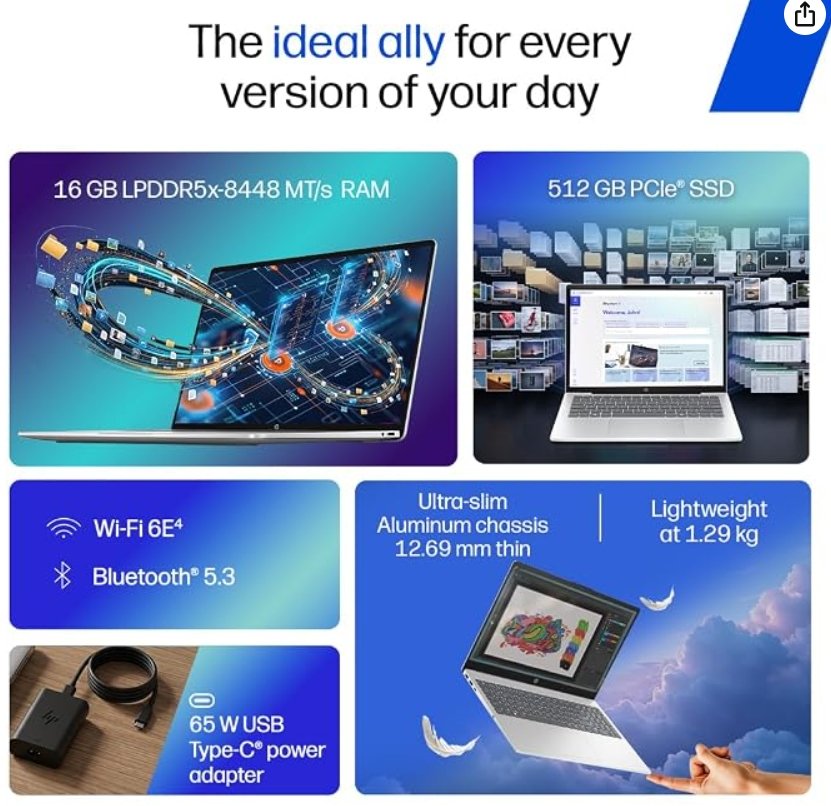
HP OmniBook 5 14 – the overall battery champion
The OmniBook 5 14 is the laptop every battery list now puts first. Mashable recorded 32 hours 31 minutes, PCMag measured 34 hours 48 minutes in video playback, and CNET logged 28 hours 19 minutes. Even PCWorld’s tougher offline test gave it 25 hours.
It uses the Snapdragon X Plus chip with an OLED screen, and it is almost as slim as a MacBook Air. HP also supports fast charging, going from 0 to 50% in about 30 minutes.
Best for: students who want the longest battery life Windows laptop at a mid-range price. Watch out for: Windows on Arm app limits (see the software check below).
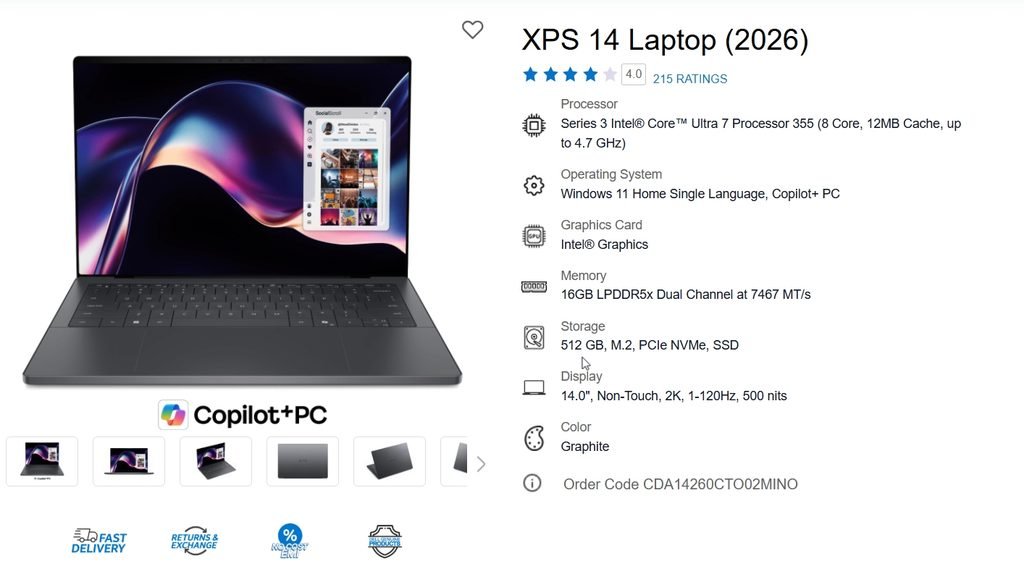
Dell XPS 14 (2026) – best premium Intel pick
Dell’s 2026 XPS 14 with Intel Panther Lake is the strongest x86 battery laptop yet. Tom’s Guide’s 1920 x 1200 non-touch model with a Core Ultra 7 325 lasted 21 hours 20 minutes, beating every Windows laptop it had tested before.
Hardware Canucks pushed a Core Ultra 7 355 model past 43 hours with variable refresh rate on. Notebookcheck got 16 hours 45 minutes with the screen fixed at 120 Hz. That spread tells you how much display settings matter.
Best for: engineering and design students who need full x86 app compatibility. Watch out for: price around $1,700.
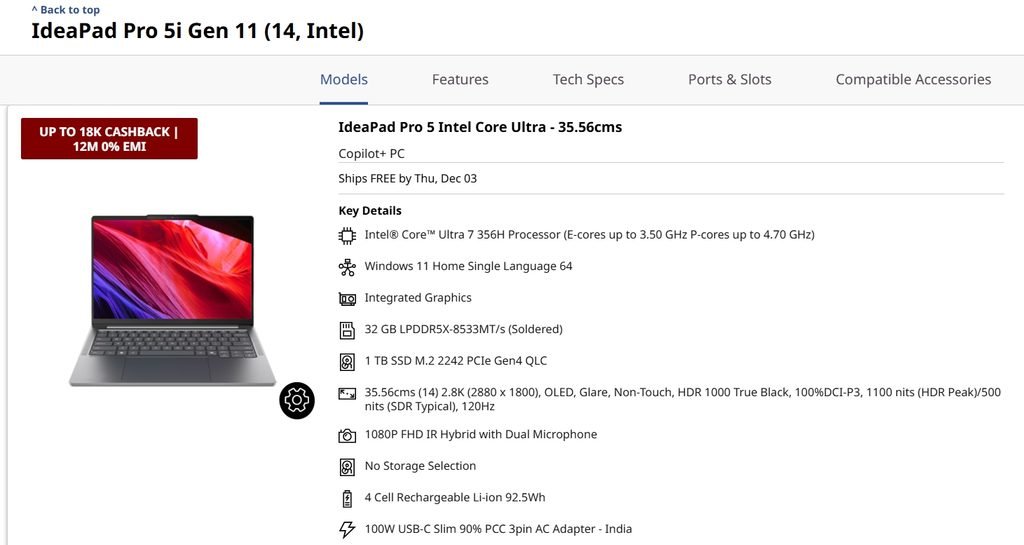
Lenovo IdeaPad Pro 5i Gen 11 – the Panther Lake marathon runner
This 14-inch Lenovo lasted 30 hours 34 minutes in Hardware Canucks’ web browsing loop at 150 nits and 60 Hz. The previous generation managed only about 10.5 hours in Notebookcheck’s test.
Part of the gain is a very large battery. Part is Intel’s efficient 18A process. Configurations go up to a Core Ultra X9 388H with an optional RTX 5060, so it also suits students who game or edit video.
Best for: students who want power and stamina in one machine. Watch out for: it is heavier than the Snapdragon ultralights.
Lenovo Yoga 9i 2-in-1 Aura Edition – best 2-in-1 for note-taking
The Yoga 9i lasted 25 hours 45 minutes in CNET’s test and 23 hours 34 minutes for Mashable. Its OLED touchscreen folds into tablet mode, which works well for handwritten notes in OneNote.
It runs an Intel Core Ultra 7 258V (Lunar Lake), so every Windows app works natively.
Best for: students who take notes with a pen. Watch out for: a premium price near $1,699.
Asus Zenbook A14 – lightest pick, strong value in India
The Zenbook A14 weighs about 980 grams and packs a 70 Wh battery. PCWorld measured around 24 hours, and 91mobiles recorded 19 hours 54 minutes in PCMark 10’s battery test.
In India, the Snapdragon X model now sells around ₹89,990–92,990, down from its ₹99,990 launch price. It is MIL-STD 810H tested, a plus for a bag that gets thrown around campus. The newer Snapdragon X2 Elite version costs far more (about ₹1.66 lakh), so the base model is the value buy.
Best for: Indian students wanting the best battery under ₹1 lakh.
Lenovo IdeaPad Slim 3x – best budget laptop for college students
The IdeaPad Slim 3x lasted 16 hours 29 minutes in Tom’s Guide’s test, outlasting the pricier Yoga Slim 7x. It has a 15.3-inch 1920 x 1200 display, Snapdragon X and 16 GB RAM.
Be realistic, though. ITPro saw only 6–7 hours of mixed real-world use from its 60 Wh battery. Lab loops are light; your day may not be.
Best for: first-year students on a tight budget. Watch out for: a dimmer screen than premium models.
Microsoft Surface Laptop – cleanest Windows experience
The Snapdragon Surface Laptop gives you Windows with no bloatware. Laptop Mag measured the 13.8-inch Surface Laptop 7 at 15 hours 44 minutes. Microsoft rates the 2026 Snapdragon X2 Surface Laptop at up to 20 hours (13.8-inch) and 19 hours (15-inch).
Best for: students who want Microsoft’s own hardware and long-term driver support.
Snapdragon X vs Intel Panther Lake: which chip lasts longer?
For two years, Snapdragon X laptops owned this category. In 2026, Intel’s Panther Lake closed the gap and in some tests pulled ahead.
Here is how I explain the difference to readers:
| Factor | Snapdragon X / X2 | Intel Panther Lake |
|---|---|---|
| Video playback stamina | Usually better | Good |
| Web browsing stamina | Excellent | Excellent (best results in 2026) |
| Performance on battery | Barely drops when unplugged | Much improved over older Intel |
| App compatibility | Most apps; some games, drivers, VPNs fail | Everything runs natively |
| Gaming | Limited | Strong integrated graphics |
Hardware Canucks noted that Apple M5 and Snapdragon X Elite still beat Panther Lake when playing locally stored video. For a student who mostly browses, writes and streams lectures, either chip will last a full day.
Check your college software before buying a Snapdragon laptop
This is the step most “best laptop” lists skip, and it matters more than two extra hours of battery.
Snapdragon laptops run Windows on Arm. Microsoft’s Prism emulator runs most x86 apps, but not all. Kernel-level drivers, some anti-cheat games, older VPN clients, certain exam proctoring tools and specialist engineering software can fail.
Before you buy:
- Ask your department for its required software list.
- Search each app name plus “Windows on Arm” or “ARM64”.
- Check the free community list at worksonwoa.com.
- If even one must-have app fails, buy an Intel Panther Lake or Lunar Lake laptop instead.
Engineering students using AutoCAD, SolidWorks or MATLAB toolboxes should lean towards the Dell XPS 14 or IdeaPad Pro 5i.
Why lab battery hours never match your real day
Every review site tests differently. Tom’s Guide loops websites over Wi-Fi at 150 nits. PCWorld plays an offline video at 250–260 nits with Wi-Fi off. Hardware Canucks browses at 150 nits with a fixed or variable refresh rate.
Your real day includes 300+ nit brightness, Teams calls, Chrome with 30 tabs and background OneDrive sync. In my experience, expect roughly 40–60% of the headline lab number in heavy mixed use. A 30-hour laptop then gives you 12–18 real hours, which is still a full college day.
Two display traps cut battery hard:
- HDR: Creative Strategies found enabling HDR dropped a Surface Laptop from about 16 hours of light work to 9 hours.
- High refresh rate: The XPS 14 swung from 43+ hours with VRR to under 17 hours locked at 120 Hz.
Windows 11 settings that add hours to any laptop
These tips work on any laptop, including the one you already own.
Generate a battery report with powercfg
Open Command Prompt as administrator and run:
powercfg /batteryreport /output "C:\battery-report.html"Open the HTML file. Compare Design Capacity with Full Charge Capacity. If full charge is below 80% of design, your battery is worn and no setting will fix it.
Turn on Energy Saver and the right power mode
Go to Settings > System > Power & battery. Set Power mode to Best power efficiency on battery. Under Energy saver, set it to turn on automatically at 30% or higher. On Windows 11 24H2 and later, Energy Saver also trims background activity and display brightness.
Lower refresh rate and turn off HDR
Go to Settings > System > Display > Advanced display. Choose Dynamic refresh rate if offered, or drop to 60 Hz on battery. Under Display > HDR, turn off HDR video streaming on battery.
Find the app draining your battery
In Settings > System > Power & battery > Battery usage, switch the view to Last 7 days. Sort by background use. Set heavy apps to Never run in background via Settings > Apps > Installed apps > (app) > Advanced options.
Protect long-term battery health
Most HP, Lenovo, Dell and Asus laptops include a charge limit (often 80%) in their own apps: HP Smart / BIOS, Lenovo Vantage, Dell Optimizer / Power Manager and MyASUS. If you sit near a desk outlet most days, turn it on. Your battery will hold its capacity through a four-year degree.
Still on Windows 10? Read this first
Windows 10 reached end of support on 14 October 2025. Microsoft has since extended free consumer Extended Security Updates (ESU) to 12 October 2027. In the European Economic Area, the free option depends on signing in with a Microsoft account.
ESU only delivers security fixes. Battery features such as Energy Saver and Copilot+ PC efficiency work only on Windows 11. If your old Windows 10 laptop lasts under four hours, a 2026 Snapdragon or Panther Lake laptop will feel like a new category of device.
What students and users report in the real world
These are paraphrased from public user comments and reviews. Read the full threads at the links.
- First days don’t count (Reddit r/thinkpad): A Surface Laptop owner told a worried ThinkPad T14s buyer that battery drains fast during initial updates, and settles to about 15 hours after a day or two. Fix: let Windows Update and indexing finish before judging battery. Source
- Software first (Reddit r/computer): A user advised a student to pick an Intel Lunar Lake laptop because battery is similar and some required software may not run on Snapdragon. Fix: check your course software list before buying. Source
- Intel throttling complaint (Tom’s Hardware forum): A reader noted older Intel laptops cut CPU speed sharply on battery to reach long runtimes. Panther Lake reviews, including The Verge’s, show far smaller drops. Source
- College buyer review (Best Buy): A Surface Laptop 13 buyer rated it 5 stars as a college laptop, praising battery, display and speed. Source
- HDR drain (Creative Strategies test): Testers found HDR nearly halved light-work battery on a Surface Laptop. Fix: turn HDR off on battery. Source
Buying checklist for students in the US, Europe and India
- Battery size: look for 60 Wh or more; 70 Wh+ for 20-hour class.
- Display: IPS lasts longer than OLED at the same brightness; 60 Hz or dynamic refresh saves power.
- RAM: 16 GB minimum for a four-year degree.
- Charging: USB-C Power Delivery, so one phone-style charger works for both devices.
- Weight: under 1.4 kg if you walk across campus daily.
- US students: watch Back to School and Black Friday deals; the OmniBook 5 and Slim 3x regularly drop below $700.
- Europe/UK students: check UNiDAYS and Microsoft Store education pricing; the Slim 3x sells around £626.
- India students: compare Amazon, Flipkart and brand e-shops; the Zenbook A14 Snapdragon X is the strongest battery laptop under ₹1 lakh.
Frequently asked questions
Q: Which Windows laptop has the longest battery life in 2026? A: The HP OmniBook 5 14 with Snapdragon X Plus leads most tests, with 32 hours 31 minutes at Mashable and 34 hours 48 minutes in PCMag’s video test. Among Intel models, the Lenovo IdeaPad Pro 5i Gen 11 reached 30 hours 34 minutes in Hardware Canucks’ browsing test, and the Dell XPS 14 hit 21 hours 20 minutes for Tom’s Guide.
Q: Are Snapdragon laptops good for college students? A: Yes, for most courses. Snapdragon X laptops offer excellent battery life, stay cool and run Microsoft 365, browsers and Zoom natively. However, some engineering software, VPN clients, exam proctoring tools and anti-cheat games may not work on Windows on Arm. Check your course software list before you buy.
Q: Is Intel Panther Lake better than Snapdragon for battery life? A: They are now close. Panther Lake laptops such as the Dell XPS 14 and IdeaPad Pro 5i set the best web-browsing results of 2026. Snapdragon still tends to win at local video playback. Intel’s big advantage is full app compatibility, which matters for engineering students.
Q: How many hours of battery life does a college student need? A: Aim for at least 12 hours of real-world use, which means a laptop rated 18 hours or more in independent lab tests. That covers back-to-back lectures, library sessions and evening study without hunting for an outlet. All seven laptops in this guide meet that target.
Q: What is the best battery life laptop for students in India under 1 lakh? A: The Asus Zenbook A14 with Snapdragon X sells for around ₹89,990–92,990 in India. It weighs about 980 grams, has a 70 Wh battery and recorded nearly 20 hours in 91mobiles’ PCMark 10 battery test. It is the best battery life laptop for students in India in that budget.
Q: How do I check my laptop battery health in Windows 11? A: Open Command Prompt as administrator and run powercfg /batteryreport. Open the battery-report.html file it creates and compare Design Capacity with Full Charge Capacity. If full charge has fallen below about 80% of design, the battery is worn and should be replaced.
Q: Why is my new laptop battery draining faster than the reviews say? A: Reviews test at low brightness (150–260 nits) with light workloads. High brightness, HDR, 120 Hz refresh, video calls and the first few days of Windows updates all drain faster. Turn on Energy Saver, set Best power efficiency mode and use dynamic refresh rate to get closer to lab numbers.
Q: Can I still use Windows 10 on a student laptop in 2026? A: Windows 10 support ended in October 2025, but enrolled personal PCs get free security updates until 12 October 2027 through the consumer ESU program. Battery-saving features like Energy Saver need Windows 11, so a new laptop on Windows 11 is the better long-term choice.
Conclusion
The longest battery life Windows laptops of 2026 have finally ended the charger hunt for college students. The HP OmniBook 5 14 is the stamina king, the Dell XPS 14 and IdeaPad Pro 5i prove Intel is back, and the IdeaPad Slim 3x and Zenbook A14 bring 16–20 hour laptops to student budgets in the US, Europe and India.
Remember the three rules. Check your software before buying Snapdragon. Expect about half the lab hours in heavy use. And use Energy Saver, dynamic refresh and a charge limit to add hours on any laptop.
Bookmark this guide, as I update the battery table whenever new test results arrive. Which laptop are you using for college? Share your real battery hours in the comments, and pass this guide to a classmate who is still carrying a charger.
Related reading: if your budget is tight, see my guide to the best budget refurbished Windows laptops.
Prefer WindowsTechIT in Google?
Add us as a preferred source so our Windows fixes show up more often in your Top Stories.