
Sound is a major feature to Windows 11 pcs, laptops, tablets and notebooks. You need audio while gaming, reading books, watching videos, playing songs etc. Bluetooth headsets, speakers, USB headphones, earphones are some of the sound output hardware.
If the Windows 11 audio is not working, then the money spent on the above devices is useless. Are you hearing a hissing or stuttering sound or unbearable audio from your Windows 11 audio devices, then wrong audio drivers could be the problem.
Solutions to Windows 11 Audio Problems
What audio problems do you experience after upgrading to Windows 11? The new operating system introduced some issues that need to be fixed. This post explains the solutions to those problems.
Total Time: 5 minutes
Multiple Audio HD Codec Drivers might have been installed.
Windows 11 has been released. What does this mean for you? Are you excited or worried? Well, if you have multiple audio drivers installed, then you should be concerned because they could conflict with each other and cause problems.
Incompatible Audio Driver.
However, some third party applications or software cannot access these audio drivers because they are incompatible. For instance, a certain application might not recognize the sound card due to incompatibility issues.
Selecting the wrong playback device.
How does Windows play audio files to speakers? What type of speaker should I choose?
If you want to watch movies or listen to music on your computer, then you need a good sound card. While some computers come with a built-in sound card, you can always add another one. Just make sure that you get a compatible card that won’t conflict with your motherboard.
The Audio Driver might have been corrupted.
Microsoft has officially announced Windows 11, but some users are already reporting issues related to audio driver corruption. What should you do? Update the right VIA, Realtek, NVIDIA, Conexant audio drivers that suits your sound card.
Plugging to the wrong port.
In many cases, computers have audio ports in the front and back. Sometimes, these ports may not work and sound device is working properly. In such case, Windows 11 audio will not work obviously.
Bluetooth or Wireless or Wired speakers or headset?
In 2022, bluetooth headsets are common which can be connected to mobile and pc. To make it work with Windows 11, make sure the bluetooth adapter is enabled and also on the speakers.
Check if the Windows 11 Audio Services are running?
To not to have windows 11 audio not working problem, make sure the core audio services are running and without problems. There are 3 main services which can be seen in the Services window.
Disable Audio Enhancements and check!
For sound enhancement and quality sound many Windows 11 users enable different options that are available in Settings. But are you sure your hardware supports them? 3D Stereo and Dolby is not supported by all headsets. So make sure you disable them if they are not working.
Uninstall Audio driver and Restart PC.
The most common troubleshooting step to fix windows 11 audio issues. Once the driver gets corrupted, decoding to fix it is a headache. Its better to uninstall it and reinstall it again.
Update Windows 11, Audio Drivers.
New versions of Windows 11 drivers will have the latest updates that will fix bugs in the sound issue. Once you update Windows 11 and sound drivers, they can go away. Otherwise, roll back to previous updates.
Estimated Cost: -1 USD
Supply:
- Solve your Windows 11 audio crackling sound. Services not responding. headphones not working.
Tools:
- Computer, Windows 11, Settings
Materials: Hardware, Software, Tools
I’m hearing cracking sound while playing games in Windows 11
The fault could be in the wrong sound drivers installed for your audio hardware. For example, if your computer motherboard supports VIA HD codec and you installed RealTek audio codec. Then this type of static noise can be heard.
The best solution is to install the default HD driver that comes with Windows 11. Most problems will be gone. RealTek audio drivers play well only if they are supported otherwise, they give much trouble. Check your computer motherboard or Audio card manual, before installing any new drivers.
Some kind of dolby apps installed from the Microsoft Store can also cause issues. Though audio enhancement has been disabled they could still corrupt the system files. This inturn makes the audio Endpoint services not work well.
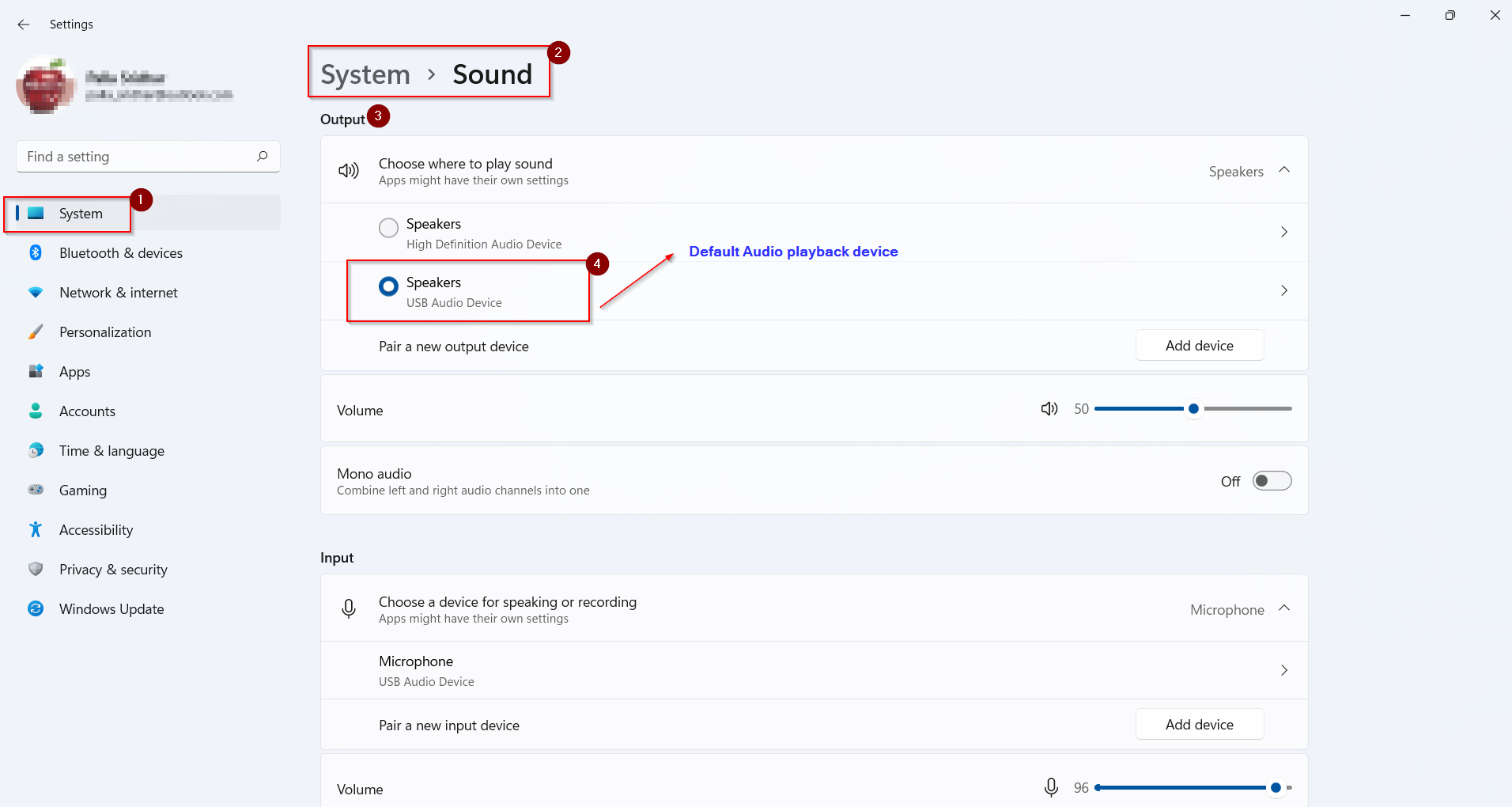
Solution #1 – Make your Audio device as default playback
- Press Win + I keys together to open Settings app in Windows 11.
- (Or) Right-click the speaker icon and Sound Settings.
- Go To System > Sound in Settings.
- Under Output, select the right sound playback device.
- Check the speakers or sound hardware with another system to make sure it is working properly.
Solution #2 – Make Sure Audio Volume is not Muted
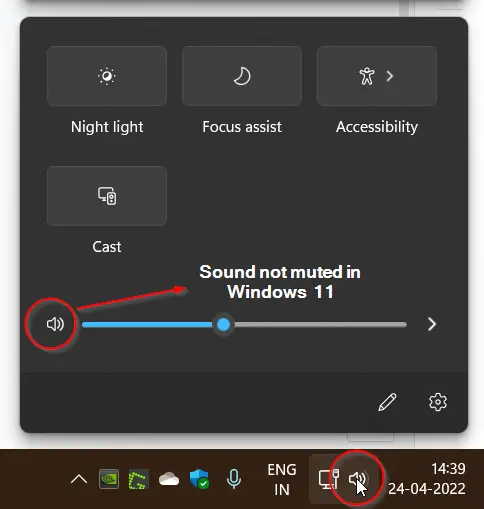
Check there is no cross symbol on the speaker icon. If it is then the sound is muted or not working in Windows 11.
Even if it is low, you cannot hear the sound. Click the speaker icon and drag the slider to increase it to 30 to 50. It is based on your sound hardware configuration and what volume you want to listen to.
You can do the same in Sound Settings also.
Solution #3 – Pair a new Output Sound Device
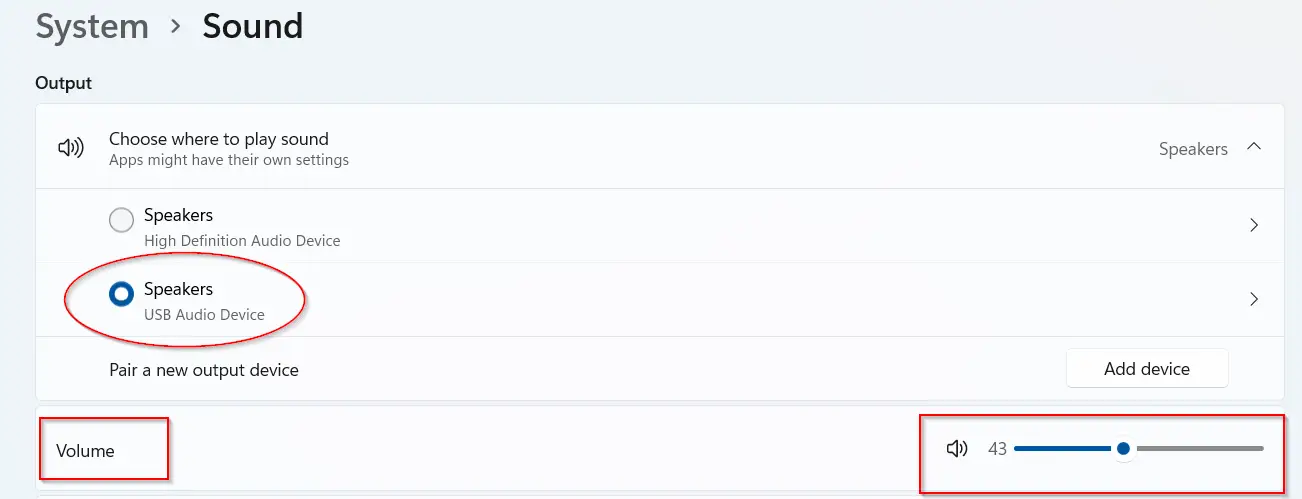
If no sound device is connected to the Windows 11 computer or not working, then add a new device. If it’s a bluetooth hardware, you need to pair it to connect and listen to the audio from Windows 11.
Click on Add device to add a new sound speaker and proceed with further steps.
Solution #4 – Troubleshoot Common Output Sound Problems
On the same Sound Settings page, under Advanced you can see Troubleshoot common sound problems. Click on Output devices. It will check for audio services, ask a few options about sound devices. Then it will process the errors and fix it automatically.
It works many times when your audio drivers or sound system files are corrupted.
Solution #5 – Adjust Sound Properties of Output Playback device
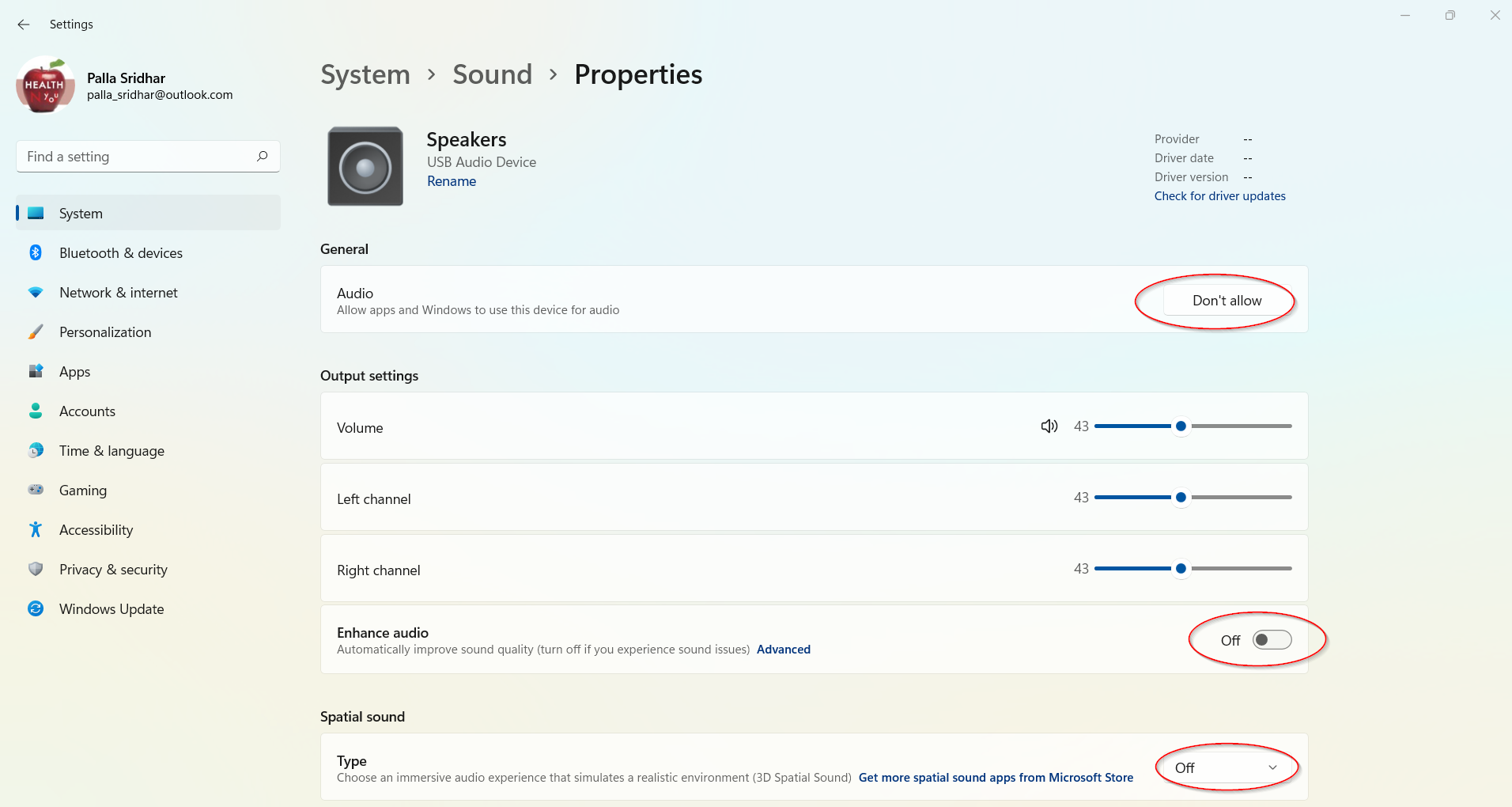
Click the sound playback device in Sound settings in Windows 11.
Properties screen will open. The following options are available.
- General – Audio – Allow apps and Windows to use this device for audio. Make sure it is enabled.
- Enhanced Audio – Automatically improve sound quality (turn off if you experience sound issues). – If a cracking or unbearable sound comes out of your speakers, turn it off.
- Spatial Sound – This is useful for sound devices which support 3D spatial sound. – Turn it off, if your audio speakers are legacy devices.
- Left Channel, Right Channel – To listen to the sound at the center, make sure both are at same levels. Otherwise, you may listen to different volume levels for left and right speakers.
Solution #6 – Set the right Default Sample Rate and Bit Depth
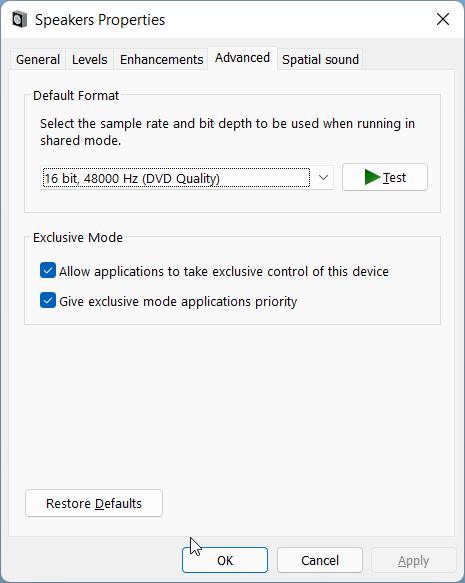
Click on Advanced below Enhanced Audio setting for your sound device. Speaker Properties pop-up will open. Click on Advanced. Here, you can set the default bit rate and sample rate. Based upon your sound device hardware, these are automatically configured.
Some Windows 11 users want to tinker with these settings and change them to a different value expecting better sound. If it works then it is fine. Otherwise, stick to the default format. Generally, 16bit, 48000Hz, DVD Quality rate works for many legacy devices.
Solution #7 – Restart Windows 11 Audio Services
Search for services in Windows 11 search box. Find the following services.
- Windows Audio
- Windows Audio Endpoint Builder
- Remote Procedure Call (RPC)
Restart each service. If any service is not started then try the audio troubleshooter mentioned earlier.
Solution #8 – Uninstall, Restart and Update Audio Driver
In most cases, when Windows 11 audio is not working it works as a simple solution. Search for Device Manager in the search box and open it. Under Audio input and outputs, you should see your sound devices.
Right-click the device you want to play and uninstall it. Restart the PC. Next time when the computer reboots it should install the right audio codec drivers. You can also right click the playback sound device and update driver.
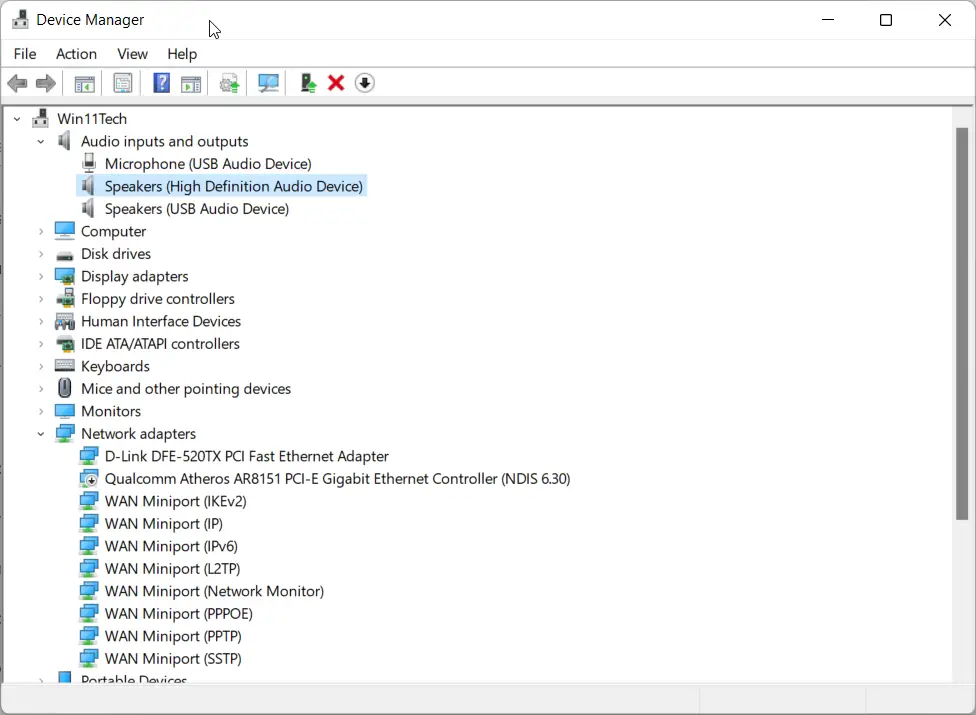
You can browser for default sound drivers if the right ones are not available. For example, the RealTek website does not have Windows 11 audio hd drivers yet on its website. In that case, you can use the default drivers.
Lenovo, Intel support certain chipsets and motherboards with Realtek audio drivers and provide them on their website. You can install them and check if the crackling or hissing sound is gone while playing or hearing music.
