In the 2020 PC world, there are only 2 OS competing for the top spot. Windows 10 and Windows 7. But which gives better benchmarks in terms of performance like ram, memory and gaming?
During the initial release of Windows 10 of 2015, it was lagging in many of the speed aspects as compared to Windows 7.
But in 2020, there has been tremendous improvement in terms of Windows updates, Microsoft Defender, security, operations, support for Unix kernel, less virus.
Unless you are in the Insider Preview, where you may get unstable builds. Windows 10 is fast enough in doing normal functions like opening files, opening of different apps, moving from one window to another etc.
More of this – FIX: Best solution for Xbox Error code 0x803f900a
Since Windows 7 is no more supported now, you have only one OS that gets the real updates – Windows 10. Though Windows 8.1 is still supported, it doesn’t occupy much of PC market.
For example, HTC One for Windows is faring better than Android, not only in battery life, but also is faster. Also the IE10 and IE11 are having better JavaScript experience in Windows 10.
Windows 7 vs 8.1 vs 10 – Resource Usage and Performance in 2015
PCWizKids did some performance tests to compare Windows 7 vs Windows 8.1 vs Windows 10 Technical Preview in memory usage, gaming and fps. He used a dual-boot scenario of Windows 8.1 and 10 Technical Preivew, but later added Windows 7 also to test their comparison.
You will like – [Solved] Fix Error Code 80246005 in Windows 10/8.1/7 – 5 Solutions
The system configuration was something like this :
- Processor – AMD A10-6700 (Richland)
- Motherboard – ASUSTek Model F285- V PRO
- Memory : 4 GB.
- Graphics Card – NVidia GeForce GT 740
- Hard Disk – Minimal
Windows 7 vs 8.1 vs 10 RAM Usage
Windows 7 was using around 800 MB of memory, which is about 20% of the total memory for the normal processes.
10 and 8.1 used about 17% of the memory, which comes to around 700 MB.
Though, it’s very early to compare the 10 Technical Preview memory usage, but 17% is better than 20%.
So with less resources it can run the processes, while the remaining can be used for gaming and other memory intensive programs.
The idle usage of RAM on a Asus T100 machine for Windows 10 was less compared to Windows 8.1 (Mar, 2015).
Though it depends on various factors like the size of RAM, it also depends on the beta build version. For example v10041 had problems with RAM usage compared to v10130.
[Source : http://www.tenforums.com/general-discussion/5007-windows-10-memory-usage-asus-t100.html]
But there are contrary reports on RAM usage on the same forum. In another forum post (recently in May, 2015), it was found that Win 10 was using 90% RAM.
But in another post, a user posted a comparison ram usage for Windows 10 vs Windows 8.1.
He didn’t find much difference. (Feb, 2015). But the noticeable difference is that Windows 10 has more free memory, instead of standby memory.

[Image Source : tenforums.com]
Windows 7 vs 8.1 vs 10 BenchMark Tests




The AIDA64 Cache & Memory Benchmark tests produced the following results.
Windows 10 copy memory bandwidth usage was little higher than the others.
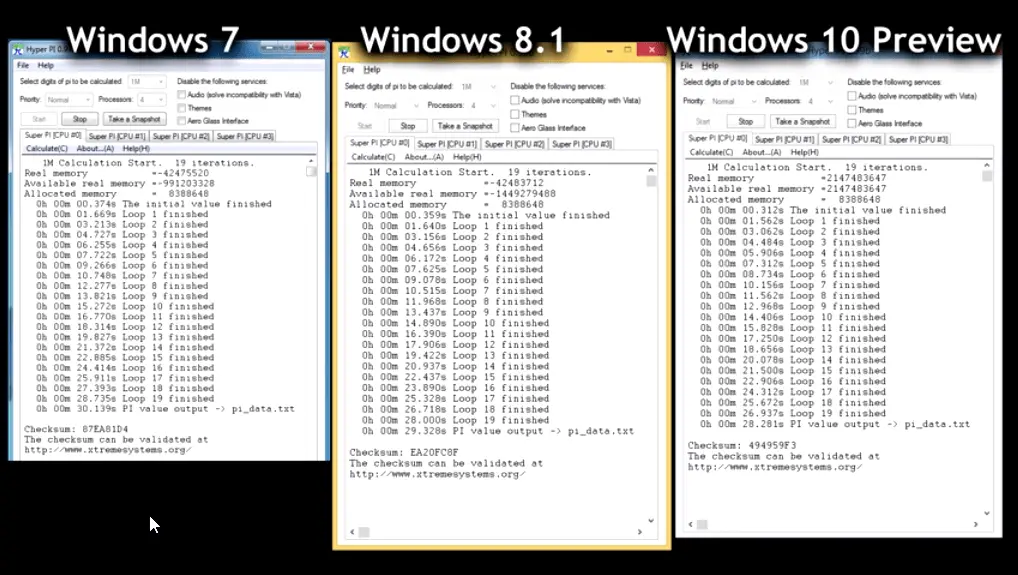
With driver improvements we can see better benefits. Also calculating Pi to 1 million decimal places, Windows 10 was the winner.
It calculated in 28 secs, while Windows 8.1 did it in 29 secs and Windows 7 in 30 secs.
On the CPU Queen Scores, Windows 10 scored a higher score of 21203.
The other two OS, scored 21168 and 21079 respectively.
The overall system performance test on PCMark 8 Home tests showed that Windows 7 and 8 scored 2743 points.
But Windows 10 made a better score of 2768.
3DMark doing the SkyDiver test, Windows 7 scored 6544 while Windows 8.1 scored a bit less (because of the physics score probably) 6483.
But Windows 10 made improvement than 8.x with 6510.
Though 7 outscored all the three, it can be seen that 10 had improvements and we can see better scores in the final versions.
The drivers are all identical in all the 3 scenarios.
In the Unigine Heaven Benchmark 4.0 tests, there was not much difference in the average FPS score.
The FPS speed was 20 in Windows 7, while in Windows 8.1 and 10, there was only half-frame second difference.
The FPS scores were also almost identical at around 503. With better driver improvements, we can see more benefits.
Windows 10 vs 8.1 vs 7 Gaming Performance
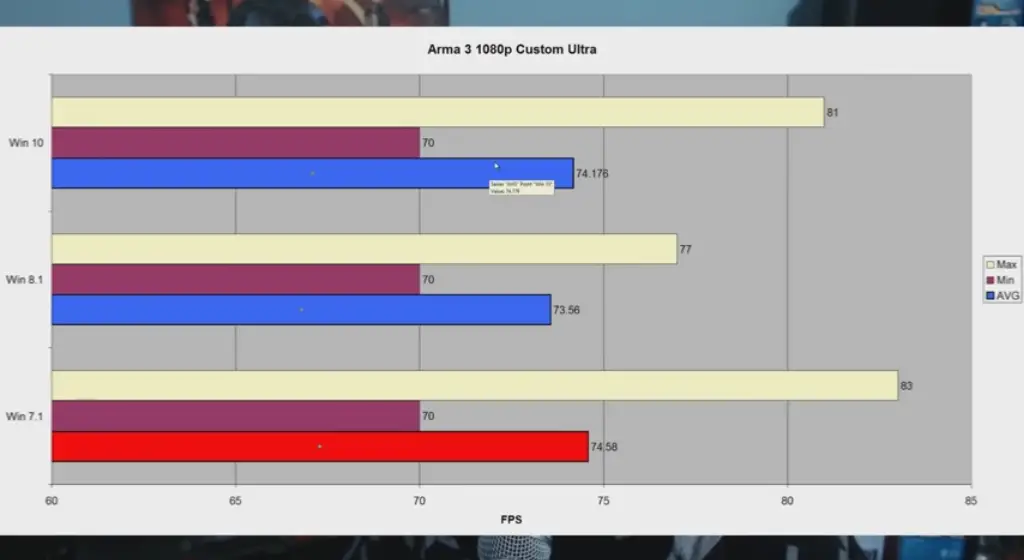
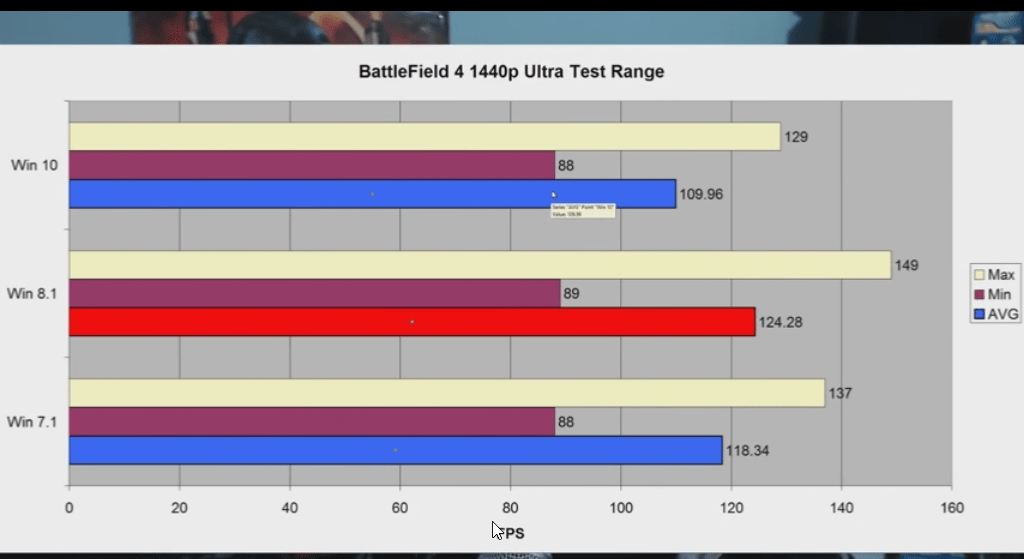
Tech YES City, did some benchmark comparison of 3 commonly used games on Windows 7 and Windows 8.1 and Windows 10 Technical Preview.
Specs:
- 5820k @ 4.2ghz / 3.3ghz cache ratio.
- DDR4 Memory at 2133 default speeds.
- GTX 970 at default speeds.
- X99S SLI Plus MSI Motherboard
The following games and softwaer were tested. (Battlefield 4 / Skyrim / Arma 3) / Adobe CS6 Premiere pro benchmark (rendering times) and a start up (boot) times test.
The final conclusion was that all the 3 games fared well the same in all the 3 OSes.
But there was minor advantages with two of the games in Windows 8.1.
But with Directx 12 round the corner, Windows 10 may show some drastic improvements. Crysis 3 didn’t work out in Windows 10, but the performance score was the same in 7 and 8.1.
“Ocaholic” also did a vast comparison of some other games.
Test Setup
| Motherboard |
|
| CPU |
|
| Memory |
|
| Graphics Cards |
|
| Drivers |
|
| Games and OS |
|
| System Drive |
|
| PSU |
|
In the Unigine Heaven 4.0 Extreme Present benchmark test, Windows 7 scored a higher FPS rate with different resolutions.
For a 1080p mode, the average FPS was 66.7 in Windows 7, while it was 66.0 and 65.2 in Windows 10 and 8.1 respectively.
The BattleField 4 performance tests showed neck and neck comparison within all the three OS.
One did well with one resolution and also the average FPS rates were also not much different. Windows 10 scored an average FPS rate of 88.72 with 1080p mode.
In the Watch Dogs benchmark comparison, Windows 8.1 was almost the clear winner with different resolution modes of 1080p, 1440p, 2160p.
It gave around 2 to 6% improvement scores in the average FPS rates.

The Tomb Raider also showed that Windows 8.1 is better at FPS rates.
Though the difference is only marginal, it can be seen that games go well with 8.1 OS.
The average FPS rates for Windows 10 were 53.10, 33.00, 14.20 in different resolution modes.
The website also conducted Power Consumption tests.
With Idle mode as the parameter, Windows 10 was using less power compared to 8.1 and 7.
It used only 68 watts power, a 5% less compared to Windows 7.
The FurMark benchmark tests showed that, Windows 10 used 221 watts, only a 2% decrease compared to Windows 7.
Anyhow, it can be seen that, if you want normal performance of games with little power usage, than Windows 10 is the winner.
Many-a-times, Windows 7 and 8.1 showed a minor performance increase in the game average FPS rates, but they can be out-scored.

Update : 18/8/2020


Leave a Reply to Davey Cancel reply