
Last Updated:
Microsoft continuously develops Outlook, a popular mail client, in both interface and functionality.
Furthermore, in the latest versions of Outlook, there are performance problems too.
As a result, one problem you may encounter in Outlook 2013 or 2010 is that it takes too much time to load and hangs while loading the profile.
Different versions of Windows show this issue. You may try to rename the .pst file, as it may be corrupted. But Outlook will not grant permission to do so even if you kill it using the Task Manager.

This scenario is a familiar picture you see for some time until your head goes dizzy and you want to restart your computer or close Outlook.
The Solution
I too experienced the same problem while adding an email account created with HostGator. I had to research forums and many other blogs to find the solution. But the ultimate answer lies in deleting the default profile and re-creating one.
How do you do it in Windows 8.1 and 10?
The fix for this kind of problem is the same for both 32-bit and 64-bit systems. I was searching through the Microsoft community for deleting profiles in Outlook when a solution appeared for “Outlook stuck during loading profile”-kind of problems.
Close Outlook.
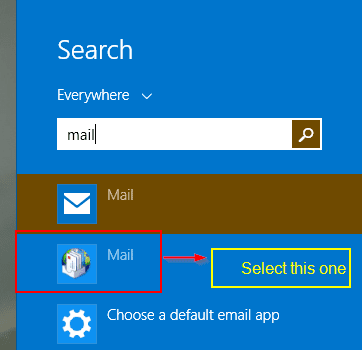
Press the Windows key and type mail. This step is for Windows 8 or 8.1. If it’s Windows 7 or Vista, you can find it in the Control Panel. Another way is to open the Charms bar and use search and type mail.
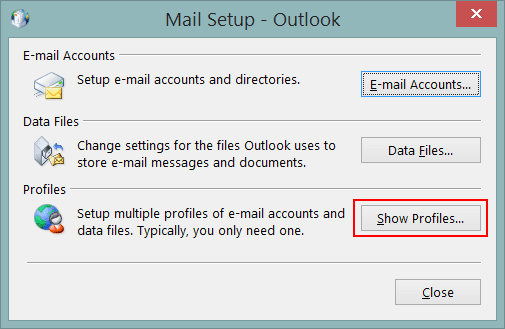
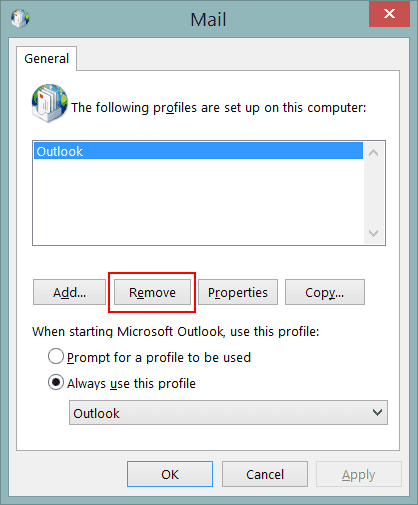
Please remove the existing profile, typically named “Outlook,” and start with a new profile. The downside is that if you have any email accounts added to this profile, they will also be deleted. (I’m assuming).
Please let me know your experience in the comments section.
Please restart Outlook, and the “loading profile hanging problem” will be resolved.
The Other Solutions
There are typically other solutions, which I found out while researching this topic.
Fix It – #1
You can try to uninstall Office 2013 completely and reinstall it. But the process will take some time. You can also perform a repair install from the Programs and Features section in the Control Panel.
Fix It – #2
You can also repair the .pst or .ost file using the Outlook repair tool. ScanPST is a tool to scan and repair corrupted PST files. This file is located in different locations for different versions of Microsoft Outlook.
SCANPST IN OUTLOOK 2010 32-Bit
Windows 32-Bit C:\Program Files\Microsoft Office\Office14
Windows 64-Bit C:\Program Files (x86)\Microsoft Office\Office14
SCANPST IN OUTLOOK 2010 64-Bit
Windows 64-Bit C:\Program Files\Microsoft Office\Office14
SCANPST IN OUTLOOK 2013 32-Bit
Windows 32-Bit C:\Program Files\Microsoft Office\Office15
Windows 64-Bit C:\Program Files (x86)\Microsoft Office\Office15
SCANPST IN OUTLOOK 2013 64-Bit
Windows 64-Bit C:\Program Files\Microsoft Office\Office15
Windows 32-Bit C:\Program Files\Microsoft Office\Office15
Windows 64-Bit C:\Program Files (x86)\Microsoft Office\Office15
Run that file with elevated privileges and find the location of the .pst or .ost file. These files are nothing but related to your email account in Outlook 2013. The most noteworthy location will be like this—
C:\Users\palla\AppData\Local\MicrosoftOutlook
Click on the Start button. The tool will check the .ost file in Outlook 2013 for consistency and any repairs. Once the repair complete dialog box is displayed, you can click on OK and try reopening Outlook again.
This sometimes mostly solves the problem.
Fix It – #3
Another solution is to disable hardware acceleration.
Fix:
Run regedit
Browse to HKEY_CURRENT_USER\Software\Microsoft\Office\15.0\Common
Create a new key and name it “Graphics.”
Select Graphics, right-click on the right panel and create a New DWORD (32-bit). Value and name it DisableHardwareAcceleration.
Enter Value data as 1
Fix It – #4
Another simple solution is to verify the system drive for errors using the following command.
Method: – Simple solution on Windows 8: Win+X -> Command Prompt (Admin) -> chkdsk c: /f -> Answer (Y) -> Restart Windows.
Fix It – #5
Another simple method is to open Outlook in safe mode and disable the add-ins.
Method:
Let us open Outlook in safe mode and check. Follow the steps:
1. Press the Windows + R keys on the keyboard.
2. Type “Outlook /safe” (leave a space after “Outlook”). -> Click OK.
If you are able to open Outlook 2013 or 2016, then disable the add-ins and verify if it helps. Follow the steps to disable the add-ins:
1. Click on File -> Go to Options.
2. Click on Add-ins -> select COM Add-ins under Manage -> Click Go
3. Select the add-ins you want to disable, then click OK.
Fix It – #6
Sometimes a third-party VPN like “Express VPN” can interfere with the normal startup of Outlook. So either uninstalling the VPN or disabling it from running at start-up can solve the issue.
Fix It – #7
In a corporate environment, you will not be provided access to uninstall VPN software. In such cases, if you can open Outlook in safe mode and disable the add-ins for your VPN software, this can solve the issue. You can run the following two commands in the Run box.
outlook.exe /resetnavpaneoroutlook.exe /resetfolders
If everything works fine after the first command, then you can proceed. Otherwise, try the second command. But Outlook may take a bit of time after executing the 2nd command.
Fix It – #8
In Windows 8 and 7, there are some services that can interfere with the proper functioning of Outlook 2013 and 2016. One such service is the “Desktop Window Manager Session Manager.” You can stop this service and set the status to “disabled.” Now restart, and Outlook should open fine.
Fix It – #9
Lync is one Office product that can have compatibility problems with Outlook. So if you have it running parallel, then it’s best to kill the task using the Task Manager. Now Outlook 2013 should open without problems.
Fix It – #10
The common cause for an Outlook profile not loading is that other applications access its data files. If the data file is being locked or accessed by third-party applications like Google Calendar, Microsoft Communicator, etc., such issues can happen. There are a few solutions in this case.
- You can stop the sync process of other applications that are trying to access these data files.
- You can temporarily disable your anti-virus and check if you have resolved the problem.
- You can stop the Windows search indexing service and see if Outlook loads fine.
- You can kill the outlook.exe process and then restart Outlook.
Fix It – #11
Another common problem with Outlook taking forever to load in the 2016 version could be due to compatibility problems. For example, if you are using Windows 7 SP1, then you can examine the properties of the Outlook 2016 shortcut. Now, under the “Compatibility” tab, uncheck the box next to ‘Run this program in compatibility mode for: Windows 7 Service Pack 1‘.
If it is Windows 10, the shortcut would be available in the following path.
C:\ProgramData\Microsoft\Windows\Start Menu\Programs
You can then run the “Troubleshoot Compatibility” tool, which can resolve this issue.
Fix It – #12
In Windows 10 and Outlook 2016, there can be problems related to networking things. So, while loading Outlook, if you can cut off your Wi-Fi and other network interfaces, Outlook should load fine. The general problem may be due to telemetry and TCP-related stuff.
These are some of the solutions I have tried to fix my Outlook 2013 loading profile problem. You can disable the add-ins, which will reduce the delay in opening Outlook.
Were you able to solve your slow loading issues with the Outlook profile using these tips? Which fix did you apply? Did it work out for Outlook 2010 and 2007 in the same way I told you? Please comment and share about this post.

I had one email account (of 5) that turned out to be the trouble. Using the same steps you used to get to the profile and selecting “email accounts”, I deleted that one. Outlook then started with no problems. Maybe a good idea not to remove the whole profile, but delete mail accounts that were recently modified.
Nothing worked, I thought I would have to delete the profile. However, Tony’s solution from Nov 25 2014 worked as a charm! I was able to remove the e-mail account that I recently added and now it starts as always again.
Thanks!
I tried all and it did not work. Still stuck in “loading profile” everytime I tried to open it. I have outlook installed in a different computer using the same email, could this be part of the problem?
Thanks
Beautiful! The first suggestion (deleting the default Outlook mail profile) fixed the issue in my particular case. It bears mention that the “broken” profile in question was tied to an Exchange Server, so it was trivial to reconfigure the profile (the server handles the process transparently) after removing the presumably-corrupted profile. I mention this mostly to underscore Tony’s comment that deleting the entire profile may not be desirable when the user has several accounts that would have to be reconfigured subsequently. Also, in Windows 7, one accesses that “Mail Setup” dialog by navigating to “Control Panel” -> “Mail”. On 64-bit systems, the control panel item is named “Mail (32-bit)”. Thanks for pointing me in the correct direction, Palla!
Thanks This did the Trick
Thank you!
I removed the “Outlook profile” but kept my other profile with my name and Outlook did not freeze on startup!
Thanks so much!!!
you are awesome. It’s the profile that hangs during new account creation. Had to force shutdown it and then profile doesn’t finish loading anymore. Used your method to “repair” the account by re verifying all the settings of the account that failed. Then now, it loads 🙂
Great help! was so stressed
Thanks
Thank u so much. It worked for me.. : ) : )
Thanks dear, its working perfectly fine now, just had to recofigure my email again.
Brilliant
Deleting the profile and starting again worked like a dream. Thanks so much, as it was so frustrating!!
Worked like a charm. Thanks!
Thanks man..
It worked for me….
I have the same issue, but the manual method doesn’t give any advantage to me. However, I have got the useful result with the free demo of Stellar Phoenix Outlook PST repair software, but it is a paid software.
Can you suggest any freeware?
@Kevin Mitchell: Did you try the SCANPST tool provided by Microsoft itself. Also you can post your problem in this Google+ community. You can also try the free tool from Easeus.
.
Thank you so much for posting this.
I removed my .ost file, did various repair install, removed Office and installed it again with no luck. Outlook picked up my faulty profile and did nothing again.
Your fix #0 did the trick. Perfect.
have tried deleting profile, also uninstalled several times and still no go….only can open in safe mode. I am using outlook 2010 on windows 10. when I first installed 2010 on windows 10 it was fine for one day and then issue started. only email account configured is gmail as imap. I noticed there were lots of pst files so I deleted all and started fresh ,.,still no luck. have spent numerous hours and is driving me nuts….
@Rosy: Disable all Outlook add-ins. Also uninstall any old programs interacting with Outlook like PGP etc. Did you try the POP3 option? Also check if there any other profiles. Delete them also and try. Try repairing Outlook 2010. Let me know.
Thanks by removing the profile and creating a new one problem solved.
Hi Palla,
Great writeup! Thanks for sharing.
Here’s how I solved this issue and it took 5 seconds and only a couple of clicks!
My hdd was failing so I cloned it to a SSD and installed the SSD.
All Office programs started real quick except Outlook. Outlook got stuck on “Loading Profiles…” . I waited for about 2 hours but no luck.
I closed Outlook
I then disconnected from the internet ie switched off wireless, disconnected wired connection and for safe measure switched to airplane mode (my Acer has this option).
Restarted Outlook
And voila! It started instantly – no issues.
Hope others find it useful too.
@Manoj. Thanks for the comment. Its nice to see you solved your Outlook Loading profile problem in a unique way. Sometimes the Office apps, keep trying to connect to the Internet and they can cause issues. Happy that its solved.
This has been happening to me on-and-off for some time. Today’s fix was: use the RUN window to start “OUTLOOK.exe /safe” , choose FILE/ADVANCED, scroll to the bottom and uncheck “Allow analysis of sent emails….”, close the window and exit Outlook. After that Outlook starts rapidly. Beware that the slowdown may come back. Interestingly if you look at the “Allow analysis…” option in normal mode it is unchecked, while in safe mode it shows checked.
I opted to ‘open as administrator’ since when no delays. (fingers crossed)
Remove the profile that is existing, typically “Outlook“. Start with a new profile. The downside is that if you have any email accounts added to this profile they will also be deleted. (I’m assuming).
Let me know your experience in the comments section.
Just start Outlook again and your “Loading profile hanging problem” is gone.
Hi, my problem solved with this solution. thankyou very much
Hello, yeah this article is truly good and I have learned lot of things
from it on the topic of blogging. thanks.