

Recently Microsoft released the Service Pack 2 update for Office 2010. I earlier wrote an article giving manual links to download this update. Most of the times running Windows update is sufficient enough to renew your 32-bit or 64-bit version of Office 2010 with this KB2687455 update. But sometimes you may face problems in installing this update and I’m here to help in such a scenario.
Read More : Fix BOOTMGR is Missing Error During or After Windows 7 Install – Causes and Solutions
If you are on Windows XP and failed to do this update, you can do a few things before doing the last solution. You can apply the Microsoft Automatic Fix (Mr.Fix) for Office products upgrade. One user found 4 registry commands to implement in fixing this problem in the concerned knowledge article. Suppose the KB2687455 update fails then you can follow this process.
- Download the Office 2010 SP2 update manually from the Microsoft page. Links are already given in my earlier post.
- Check whether you are running 32-bit or 64-bit version of Office 2010. Here is the link to check.
- Try updating in a clean boot state. What is “clean boot”? In order to troubleshoot error messages and other issues you can start your Windows OS (Vista/7/8) by using minimal set of drivers and startup programs. This type of startup is known as “clean boot”. Here is a link on how to do it.
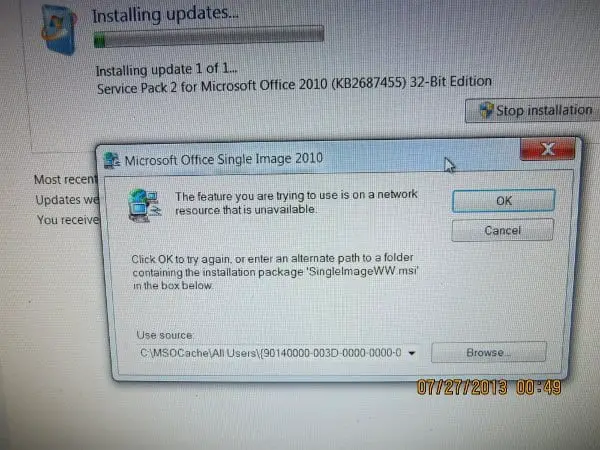
- Office updates sometimes can fail if the update files are looking for the original installation source files of the Office Product. Downloading the full installation file and the updates can solve some problems. You can also put the installation source files on the installation drive or network source where the update tries to search.
Ultimate Solution to all Problems of Office 2010 SP2 UPDATE Installation:
If everything else fails it is better to perform a repair install. After researching several problems on the forums, blogs and microsoft support groups, I find this solution clearing most of the Office 2010 SP2 installation problems.
Sometimes Intel Express chipset drive updates can interfere with Office 2010 SP2 update. Better install your Office update without the Intel chipset update.
Sometimes you may have problems with Language settings. You administrative account language settings may be in other language then English. Changing temporarily to English and then updating may solve the problem.
Sometimes deleting your MSOCache can cause these problems. Using the installation media in this case to find the MSOCache files may sometimes not work with Office 2010 SP2. So its better to retain the MSOCache after installing MS Office. This is generally advised in many threads and forums.
How to Perform a Repair Install ?
This is very easy.
- Goto Control Panel > Programs and Features. (View by small icons)
- Find and Select your Office 2010 product.
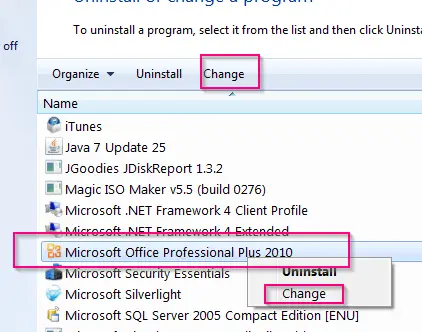
- Right-click and from the context menu select “Change”. You can also click the same label at the top. This will pop-up the following window.
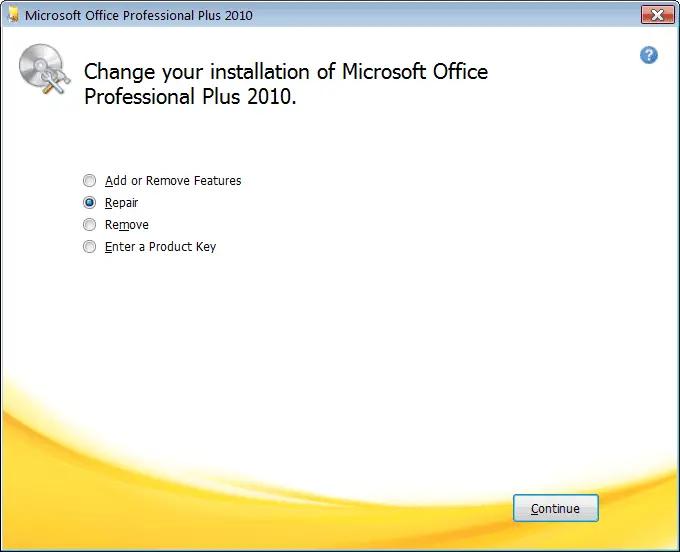
- Select “Repair” and click the Continue button.
- During the process it may ask the location of some source files present on Office 2010 installation media.
- When finished, reboot your machine.
That should complete the repair process. You are done!
There are also some known issues detailed by Microsoft when you install Office 2010 SP2 and Sharepoint 2010 SP2. The solutions to these issues are detailed in this article.
Some Other Office 2010 SP2 Update Problems (KB2687455) are listed below from Microsoft forums, blogs and communities.
Service Pack 2 KB2687455 due to failure code 80070643. Automatic Trouble Shooter unable to fix problem. Suggestions?
Microsoft Windows Update failed Error Code: 0xB56 for Office 2010 Service Pack 2 for
Microsoft Officei already downloaded the update, but it does not want to complete the installation, keep on getting error 8024002D please help!
I can’t download the update either, I keep getting error code 80070652. I have tried over 20 times to download this update. PLEASE HELP !!!
I also have a Windows 7, 64 bit machine. My original installation was without SP1 which had been added by Windows Update. I used a 2010 plus SP1 version and ran the .exe when it came to the question of what was needed I selected Repair. After this was complete I then retried the Windows Update to update to SP2. This worked.
When I try to activate the suite using any of the installed applications (word, excel, outlook or powepoint) I get the error “An unspecified error has occurred. Your request cannot be processed at this time. Please try again later. (0x80070190)”. If I repair the install then try the activation again it works right away.
When I went and ran the install, I got the dialog box as shown in Picture #2. For reference, the full path to where the file “ProPlusWW.msi” is suppose to be is
I have no idea what “SingleImageWW.msi” is..
Sources : answers.microsoft.com, social.technet.windows.microsoft.com, dslreports.com
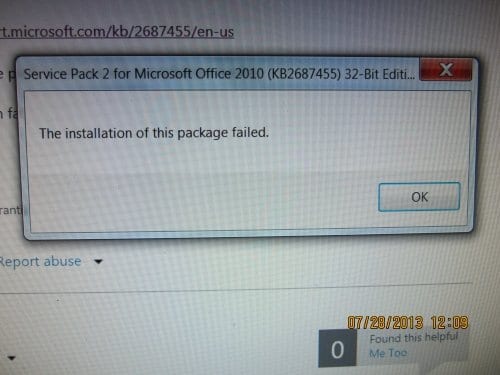
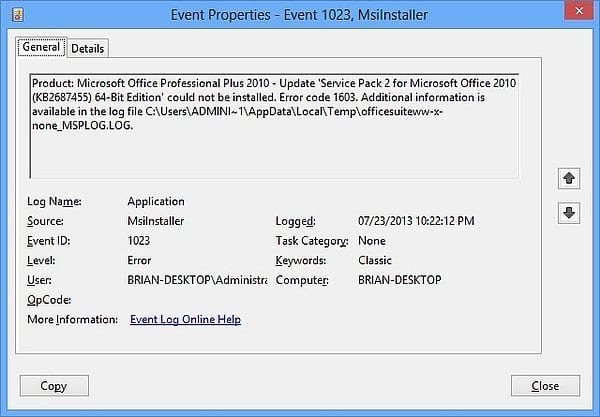
In conclusion, I’d like to deduce from reading all the above forums and threads that “repair install of Office 2010” will maximum solve your SP2 update problems. Sometimes you need to have your source for the Office 2010 installation media.
If you still face any problem relating to Office 2010 SP2 update (KB2687455 failing), please let me know in the comments. I spent almost half-a-day researching this topic, so sharing this post and images on your social network would be useful. You can also subscribe to my Feedburner Feed or Mailchimp Weekly Newsletter.

I have repaired the office 2010, rebooted the server 2003 and then performed the installation, but still getting the error “The installation of this package failed”
Upgrade from Office 2007 to 2010 SP2 has gone smoothly except for Access.
We have a Production Planning Access app that does ODBC to an MS SQL Server.
Users (Win7 32bit) experience, when they de-focus the app and re-focus it, it hangs.
Remote users to our RDP serKB2687455er W2K8S have a bug, Access can’d the first time
use setup. We locin as Admin, run Access, it does the First Time setup (again) and it is OK for
the users again. (It’s a pain)
Thank you !!
I had deleted the MSOCache folder; eventually ended up recreating that folder and placing the specific missing files in it, and the install went very well.
I am having a problem installing KB2687455.
I have read your documentation but have this question:
“During the process it may ask the location of some source files present on Office 2010 installation media”
What is the location of these source files?
Please help. I am getting frustrated.
Thanks.
T.
@Tom O’Malley – Basically you should have the Office 2010 installation media like DVD, CD. Then when it asks any particular file, you can do a search in the installation media. Then you should get the location of that particular source file. Like this, you can do for any set of source files. Generally, the required source files will be in a particular folder. Otherwise, you can just do the search as I said above.
I am unable to find the location as you suggested in the above advice. I don’t have DVD or CD as it was put on through using a keycode. Please advise.
@Deb: You could download the installation file from Microsoft or somewhere else. After that if you can “unzip”, you should be able to find the location of that file. Just do a trial and error. Let me know if this solves the problem.
Hi,
Same problem in downloading update. I have Microsoft Office Home and Student 2010. I started with Change Your Installation, selected Repair, and the box Configuation Progress came up, and then a smaller box(named Browse for Folder) also popped up stating Setup cannot find Office.en-us\ShellUI.MST. Browse to a valid installation source, and then click ok. I went to my start and clicked on All Programs, right clicked on Properties of Microsoft Office and the Properties box came up, and under Security, it gave me the Object Name and Path, I followed it in the Browse for Folder, selected the OS C:, clicked, Selected and clicked on Program Files (x86), selected and clicked on Microsoft Office, clicked and selected MSECache. In MSECache there is PPTViewer and MSXML 4.0. Under the PPTViewer there is a file called Catalog. I select it and hit OK, it gives me back a box stating Invalid location. Ok, so I go back and select the file called Catalog, and it gives me the same little box stating invalid location. So I start going thru the different locations, and it is mostly my stuff, not Microsoft related.
I would greatly appreciate anything you are willing to suggest.
Sincerely
Carolyn, sorry this is a bit long.
@Carolyn: You should try to find the file on the installation media of Office 2010, not on your computer, if I’m correct.
What a disaster.
I had the drive with my programs and data die so I ran out, got a replacement and restored from an image just one week old. The first time I tried to run an office program I got this same error about “cannot find file in MSOCache” etc…
I had installed from a downloaded office package. I unzipped that into a folder and right mouse clicked on every MSI file and selected repair. I still got the “cannot find file in MSOCache” error, but I pointed the installer to the folder into which I had unzipped the install executable.
I left the singleImageww.msi for last because it asks you to reboot your machine.
Now everything works except, if you go into control panel and try to select Microsoft Office and then click the change button, NOTHING HAPPENS.
I’m content with all my MS Office apps running though.
I Just Removed Microsoft Office 2010 all together…. now when I go into the update it says I am all up to date… but this 1703 update is not good for my gpu for some reason… and people are telling me to update this junk.. is there an update past 1703 .. if so.. is there a web link because as I stated.. my check for updates.. says everything is up to date!
@Cory. My assumption is that, since you uninstalled Office 2010 completely, Windows 10 thinks there is no Office at all. So it just checks for Windows 10 updates and thats why that message. For the solution to your problem, try to use CCleaner and remove all junk files. Also do a registry clean, (that option also is available in it). Now use AdwCleaner and Malwarebytes to remove any adware etc. Now reinstall and let me know if the updates work. Also let me know the error code you get.
downloaded the Office 2010 SP2 manually.
tried to install, failed, showed SP2 already installed. Windows update continued to suggest it.
attempted uninstall of update. failed.
did windows control panel change repair. rebooted. retried SP2 .
Seems to have worked.
I’m having a problem with MS Office 2010 Service pack 2 on Windows 10. It throws Error 0x8024002d every time it runs. It tries to install every time the machine starts. The problem is that I don’t have Office 2010! I uninstalled it and replaced it with Office 2016 about 3 months ago.
Obviously Windows 10 still thinks there is an Office 2010 present and is trying to update it but it can’t.
What can I do?
@Ulric: Using CCleaner free version, you try to do a registry clean. Take a backup of the registry. Now Fix all the issues, that come-up. Also clean your temp files etc. Now re-boot. Check if this works out and Office 2010 error is gone or not. Otherwise, you uninstall Office 2016, and repeat the above steps and then re-install Office 2016. Let me know if it works. 🙂
at first, I had issues with installation but then after reading all of these tips all over again, i finally got it. thanks for your priceless tutorials.
Hi Admin,
Thanks for this explanatory post! I have been trying to install office 2010 SP2 update, sometimes, it would hang on preparing to install, installing or checking for updates. Atlast, i had it installed successfully following your solutions and Its perfect now. Will surely come back to read more posts!
Thanks Ops! I really enjoy reading your articles being well-explained with images and taking your time to show everything deeply. Unfortunately, I never had issues like this but i will share to those that might need it and i will also save this page in case i have this kind of issue in the future.
Regards,
Jean.
I wasted a good bit of time trying to repair it. I ended up using Magical Jelly Bean Keyfinder to get my CD Key, uninstalled my current version and reinstalled a fresh version from Micrsoft’s website:
https://www.microsoft.com/en-us/software-download/office
Thanks anyway!
how to find the right storage location, I can not find it?
The installer is asking for the Location\parent folder for the Folder “ProPlus.WW” and NOT for the location\parent folder to the file “propsww2.cab” – source : technet.