

A Solid State Drive (SSD) is a new type of storage device for computers and laptops.
The advantage of SSD over HDD is that it has no moving parts. No electricity is required to store information.
SSD laptops typically consume less energy. Solid State Drives (SSDs) also improve boot times in Windows 10.
With excellent hardware configuration, you can boot up your laptop or PC in less than 10 seconds. SSDs also have an advantage in gaming.
Graphics cards play a major role in single-player games.
The speed of data transfer plays a key role in a smooth gaming experience.
SSDs make this type of performance happen.
Less sound is another beautiful feature of SSDs. HDDs can make sound due to their moving parts.
But because of SSDs’ built-up mechanism, they are less noisy.
In this post we are going to see the list of best ssd of 2020 based on user reviews, performance, benchmarks, warranty period, price, etc.
What is an SSD? – Introduction
An SSD does the same operations as an HDD.
But data is stored on interlinked flash memory chips.
This technology keeps the data without power being present.
But typical HDD data can be read only if a power source is attached.
The SSD chips can either be permanently installed on a PC motherboard (desktops and small laptops), on a PCIe (external card like a network card), or in a box that’s soldered to a slot in a laptop or PC.
HP S700 vs Kingston A400
The HP SSD S700 is new compared to the Kingston A400. Both were released in 2017. The avg. sequential read speed and write speeds in the HP S700 were about 40 MB/s more than the Kingston SSD. The peak 4K random mixed I/O speed is the only metric that Kingston scores best.
[table id=2 /]
In all the average and peak metrics, the HP S700 has a better edge.
Out of 1018 SSDs tested for benchmarks, the HP S700 scores 480th rank, and the Kingston A400 scores 722nd rank. The HP S700 achieves a 25% faster effective speed. But Kingston’s market share is largely higher than that of the HP S700.
Cons of HP S700
- The system won’t boot from the primary drive.
- Sometimes hardware failure occurs.
- No improvement in boot times with i5 and i7 configurations.
- Read/Write speeds were around 200 to 300 MB/s.
Pros of HP S700
- Ease of mounting in a PC.
- High data speed.
- Suits ASRock B450M mini-ATX motherboards.
- The Windows 10 installation took approximately 8 minutes.
- Works with Mac Mini.
Another feature to compare is the price difference.
Kingston is 23% cheaper than HP. The Kingston 240GB A400 SATA 3 2.5″ Internal SSD is priced at $39.40.
The HP SSD S700 2.5″ 250GB SATA III 3D NAND Internal Solid State Drive (SSD) is currently unavailable on Amazon.com.
For the Kingston A400, there are 85% of the best 5-star ratings out of 37,643 customer ratings. On the same scale, the HP S700 receives a 5-star rating from 75% of 140 customer ratings. HP S700 is suitable for PCs, while Kingston is better for laptops.
Pros of Kingston A400
- Stable SSDs add performance.
- It’s inexpensive.
- Better performance than HDD.
- With a SATA 2 interface, you get speeds around 250 to 275 MB/s.
- Disable different services like pagefile.sys, defragment, indexing, etc., if low on resources.
Cons of Kingston A400
- Cannot be configured as a boot drive
- It is not the fastest SSD as of 2020.
- Most basic TLC memories.
The following is a list of the top 5 best SSDs of 2020, based on no special order of ranking.
#1 Best SSD of 2026 – Samsung 860 EVO
- The model is available in different storage capacities like 250GB/500GB/1TB/2TB/4TB.
- It is powered by Samsung V-NAND Technology.
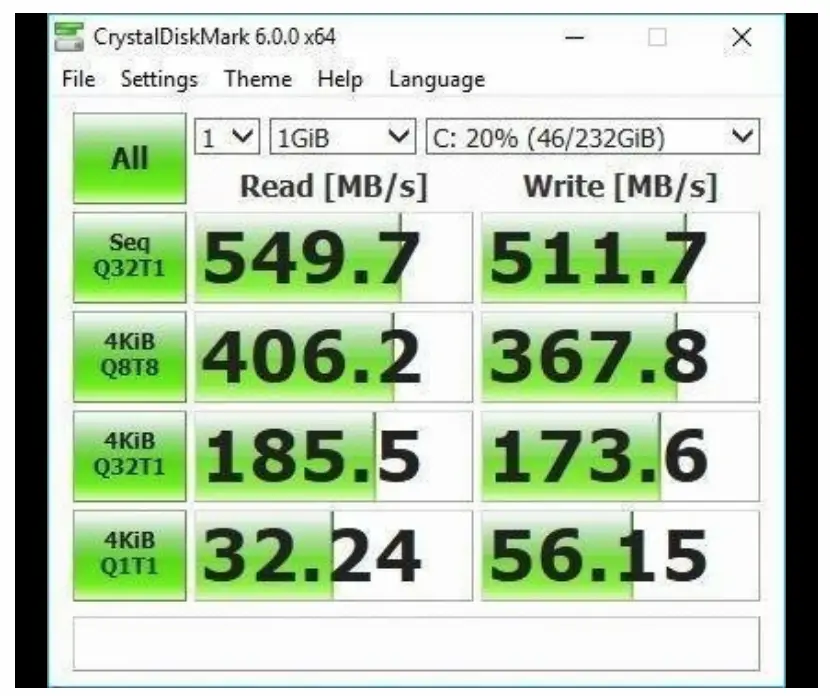
- Sequential read/write speeds up to 550MB/s and 520MB/s, respectively.
- It supports PCs and laptops for personal, gaming, and business use.
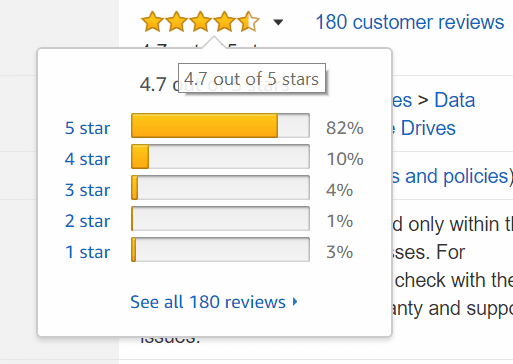 Customer reviews of Samsung 860 EVO on Amazon.com
- Supports Windows 8/Windows 7/Windows Server 2003 (32-bit and 64-bit); Vista (SP1 and above); XP (SP2 and above); Mac OS; X; and Linux.
- 5-Year Warranty.
- The interface is a SATA III (6Gb/s) SSD.
- It also supports Windows 10.
- It also has utilities to clone the HDD and move the whole OS image, data, and applications to the SSD.
- You can also use it along with HDD as a secondary storage device for photos, videos, etc.
- It also works with PS4 Pro.
- For example, if you are using Star Wars Battlefront 1, you can arrive at the next board within 72 seconds.
Typical CrystalDiskMark 6.0.0 x64 benchmark tests for Samsung 860 EVO 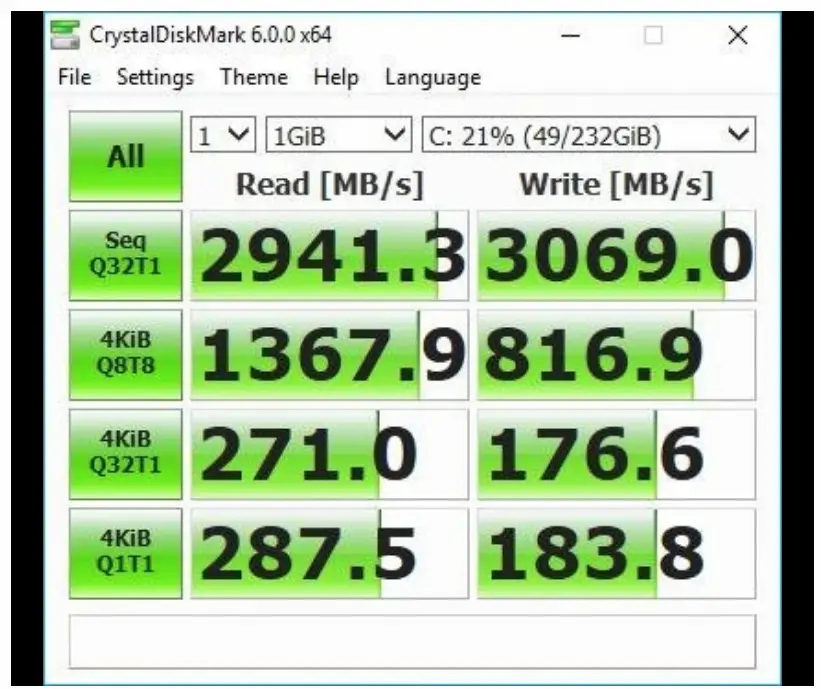
 One can also get the Corsair Dual SSD Mounting Bracket for another $6.
You can use the Samsung Data Migration software and Samsung Magician software for installing the SSD and replacing the C: drive.
After formatting the SSD in NTFS format, you can clone 232GB to the SSD in around 30 minutes with a SATA 3.0 to SATA 3.0 connection.
If your PC motherboard supports SATA 6.0, it would be much faster.
Users reported that there were no issues after cloning when the same port was used as the C drive HDD was connected.
#2 Best SSD of 2026 – SanDisk SSD PLUS
- There are different storage capacities on Amazon like 120GB/240GB/480GB/960GB.
- You will get 20X faster speeds than your old HDD. Read/write speeds of up to 530MB/s/440MB/s.
- One can also monitor the status of your applications using the SanDisk SSD
- Dashboard, which provides tools for monitoring and optimizing system performance.
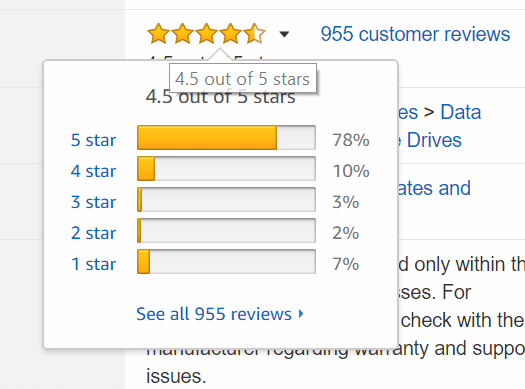 Customer reviews of SanDisk SSD PLUS on Amazon.com
- Cloning software is available with the purchase and easily helps you set up the drive.
- It is ideal for PC workloads as it offers SLC caching to improve burst write performance.
- It improves speed in web browsing, emailing, casual gaming, office productivity, and audio/video entertainment. The device is shock-resistant (up to 1500 G), vibration-resistant (5 g RMS, 10-2000 Hz/4.9 g RMS, 7-800 Hz), and temperature-resistant (from 0°C to 700°C). 3-year limited warranty.
- It uses SanDisk’s second-generation 19 nm MLC NAND instead of TLC NAND.
- One user used it to upgrade his Dell E6410 laptop, and his boot times went up from 1 minute to about 20 seconds.
- The apps and boot-up time are very fast, like less than a minute, in both Windows 10 and Lubuntu 16.04.
- For the Windows 10 system, the major bottlenecks seem to be the hard drives.
- With this SSD, your PC boots in a fraction of a minute compared to the old HDDs.
#3 Best SSD of 2026 – Crucial MX500
It comes in different varieties, like 250GB/500GB/1TB/2TB.
The device supports sequential reads and writes of up to 560 MB/s and 510 MB/s, respectively, as well as random reads and writes of up to 95,000 and 90,000 IOPS on all file types.
A crucial limited 5-year warranty is given.
As with any SSD, the life span depends upon the SSD storage available, like Single-Level Cell (SLC), Multi-Level Cell (MLC), and Triple-Level Cell (TLC).
So generally, an SSD is likely to last longer than the time you will use it and the warranty it provides. Customer reviews of Crucial MX500 on Amazon.com
It uses a minimal amount of power as it uses next-gen Micron 3D NAND technology.
Every purchase of the MX500 comes with a 7mm to 9.5mm spacer or adapter. The advantage with this type of SSD are
- Easy to clone old hard drive (needed some extra devices / products to help with this)
- Lightning-fast boot-up
- Bios instantly recognized the SSD as the boot drive.
But the cloning process may require extra equipment like a SATA to USB for one time.
You need a converter kit to clone data from a 2.5-inch drive to a 3.5-inch bay.
For 250 GB of data on an HDD, the cloning time is about 20 to 30 minutes.
For 2 TB data, it takes around 90 minutes. The Dell 15 (5579) 2-in-1 i7 Gen 8 16GB DDR4 RAM Win10 64-bit boots up very quickly, and applications run very fast.
#4 Best SSD of 2026 – WD Blue 3D NAND
- The storage capacities are 250GB/500GB/1TB/2TB.
- 3D NAND SATA SSD technology is available for storage up to 2TB.
- The power utilized is also little compared to earlier WD SDDs. Sequential read speeds up to 560MB/s and sequential write speeds up to 530MB/s.
- It won the Tom’s Hardware Editor’s Choice Award in 2017. You got a 5-year limited warranty.
- It should work on any PC or laptop, even with XP if your motherboard supports SATA 3.0.
- You can also replace your laptop HDD by cloning it.
- You can use different cloning software like EaseUS, Acronis True Image, etc. to do your job.
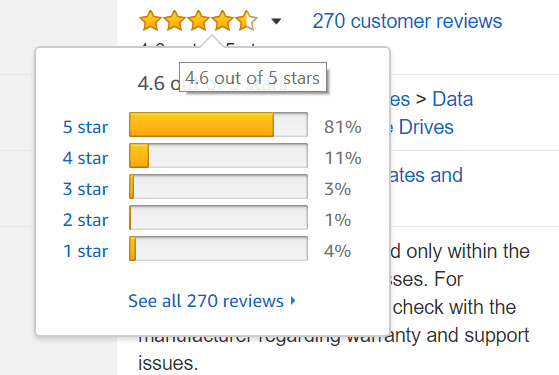 Customer reviews of WD Blue 3D NAND on Amazon.com
If you have BitLocker enabled on your files, it is better to disable it, as Acronis doesn’t support cloning those files.
Since that tool is to encrypt files, you may have problems later with not accessing them.
So before you clone, it is better to decrypt and then copy it. The CrystalDiskMark test pegs the sequential reads at 568.8 and writes at 557.3.
You may also require an SATA III cable and a 2.5” to 3.5” adapter bracket to fit in the desktop bay since they are not provided with the purchase.
You can install Windows 10 and should work without problems.
One user had a 5+ year old desktop with Win 10 booting up in 3 minutes.
After running this SSD, it took only 15 seconds to start.
Also the programs run faster.
With the Windows Experience Index on Win 7, the score came out to be 7.5 for a particular configuration.
The temperature also does not exceed 42c at maximum load and does not make much noise.
You can transfer a 100GB Steam library to an SSD in under 10 minutes.
#5 Best SSD of 2026 – Kingston A400 SSD
It has different versions like 120GB/240GB/480GB/960GB.
It supports SATA Rev. 3.0 (6Gb/s) with backwards compatibility to SATA Rev. 2.0. 120GB — 500MB/s read and 320MB/s write.
Games run faster and even better.
This will work with any desktop or laptop having a SATA drive port.
It is one of the cheapest 120GB-brand SSDs you can buy in 2020.
In case the SSD is not recognized after hooking it up and rebooting, the solution is to run the Windows Memory Diagnostic tool.
Within 5 to 10 minutes your drive will be found again.
If your PC does not boot up on removing the old HDD, then you need to change from legacy to UEFI boot mode if you have partitioned them using GPT. Customer reviews of Kingston A400 on Amazon.com
It works with Windows 10 64 OS and boots very quickly.
You can also rapidly load games and programs.
For example, huge Excel sheets can load quickly.
You can use a 1 TB or 2 TB HDD for secondary storage.
Even if you have SATA 2.0, this upgrade will have a huge performance difference in load time and quality of gaming.
One can use the MiniTool Partition Wizard free version to migrate the OS to an SSD. Typical CrystalDiskMark 5.2.1 x64 benchmark tests of Kingston A400 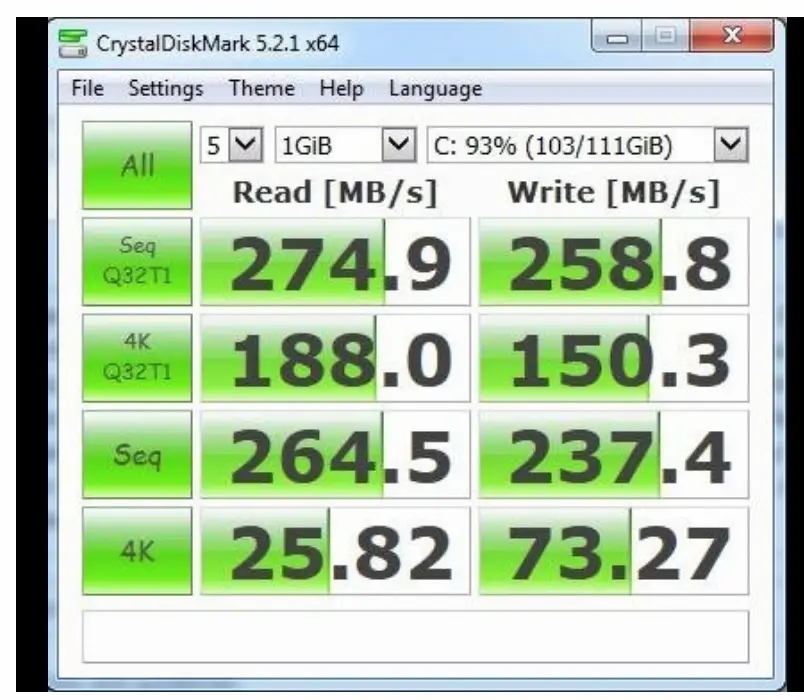 Your data is much safer compared to the mechanical drive.
Also, if you are using old Intel processors with SATA 2.0, you may not find the practical speed that can be found with high-end machines.
But at least if you are using an i3, i5, or i7 of the 3rd to 7th generation, you can definitely see 10 times faster performance according to the WD benchmarks.
Top 5 Best SSDs in UK
The following is the list of top SSDs in the UK.
These are mentioned by popular tech sites.
As you can see, the Samsung 860 Evo, 850 Evo, 850 Pro, 960 Pro, and 960 Evo also lead the best SSD models in the UK. 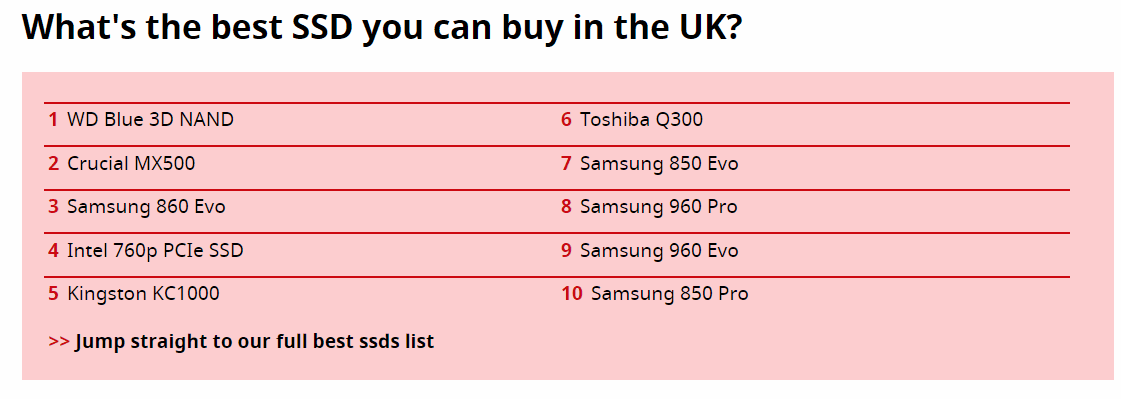
Best SSD from Popular PC Sites
- Best SSD: Samsung 960 Evo
- Gaming SSD: Kingston HyperX Predator
- NVMe SSD: Samsung 960 Pro
- PCIe SSD: Toshiba OCZ RD400
- M.2 SSD: WD Black PCIe SSD
- SATA 3 SSD: Samsung 860 Pro
- U.2 SSD: Intel 750 Series
- Budget SSD: Samsung 860 Evo
- endurance SSD: HP S700 Pro
- SSD boot drive: Intel 760p Series SSD
- External SSD: Samsung Portable SSD T5
Source: https://www.techradar.com/news/best-solid-state-drives-ssds
- Samsung 860 EVO
- Crucial BX300
- Samsung 960 Pro
- Intel 760P SSD
- Intel’s Optane SSD 900P
Source: https://www.pcworld.com/article/3234838/storage/best-ssds.html?page=2
- WD Blue 3D NAND
- Crucial MX500
- Samsung 860 Evo
- Intel 760p PCIe SSD
- Kingston KC1000
- Toshiba Q300
- Samsung 850 Evo, 960 Pro, 960 Evo, 850 Pro
Source: https://www.techadvisor.co.uk/test-centre/storage/best-ssd-2018-3235200/
SSD Gaming Performance in 2026
The following is a graphic of SSDs’ performance in different benchmark tests.
The score given is the overall performance score calculated over an aggregate of ten benchmark tests. Image Credit: PCGamer (reference given at the end).
As you can see above, the Adata SX7000NP with a storage capacity of 512GB is the best top-tier SSD in performance.
Samsung has a decent score for different models of SSDs. The 860 Evo, 860 Pro, and 850 Pro are giving good scores in SSD benchmark tests.
Pros and Cons of SSD
- HDD is affected by magnets.
- SSD data is not erased even by magnets.
- General read/write speed of HDDs is between 50 and 120 MB/s, but SSDs are 10 times faster.
- File opening speed is also 30% faster.
- The drawback with SSD is that it is more costly than HDD per GB.
- Configuration of having both SSD and HDD on the same motherboard is a little difficult. Predicting the performance of this kind of setup is not that easy.
- SSDs don’t have any moving parts.
- They are shock-proof and don’t get damaged in vibration environments.
- SSDs can work in high temperatures between 0°C and +70°C, which allows them to work in any country.
- The risk of mechanical failures is less in SSD.
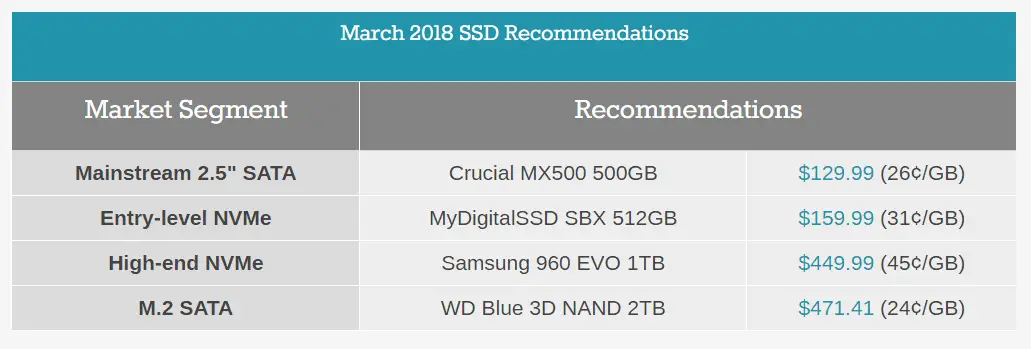
Recommendations of SSD in 2026 by popular tech sites
 There are also some disadvantages with SSDs.
- NAND flash memory used in SSDs can be used only for a few writes.
But in recent SSDs, this amount has increased vastly. So the lifespan is sufficient before we discard them.
- NAND can be used only for a limited number of writes and an unlimited number of reads.
This is due to the mechanism of how SSD works.
Each time NAND writes a single byte of information, it has to erase a large block of data.
For some SSDs, charge is left in the floating-gate transistor, which changes its resistance.
So finally, after some time, the gate or block where information is stored becomes useless to write and changes into a “read-only” state.
Also, the capacity of SSD drives is commonly around 500 GB to 1 TB, while that of HDDs is between 2 TB and 10 TB for the same price.
Warranty period of popular SSDs
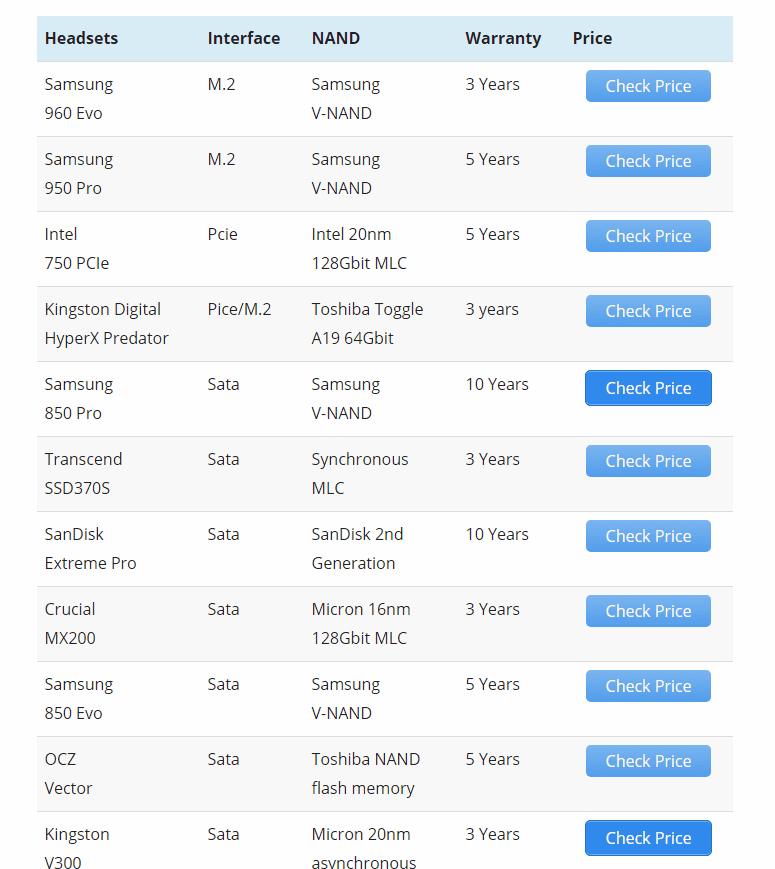
- The boot time of SSD-based computers is faster compared to HDD, which can be seen as the positive side.
- Also, multimedia applications require more processing power and data speed, which SSDs can easily provide.
- Since SSDs run apps and transfer files faster, they are useful in education and offices where time-critical tasks are more important.
Connect SSD to Motherboard—Different Interfaces
SATA:
- These are the minimal form and cheapest type of connection for your SSD to your PC.
- Generally, motherboards have SATA ports, and these types use them. Though it is 5 to 8x faster than HDD, it’s the slowest form of SSD.
- The sequential read/write speeds hover around 500–600 MB/s. The normal version used in this type is SATA III.
PCIe:
- In this type, NVMe memory is used.
- It represents Non-Volatile Memory Express.
- It is technically Peripheral Component Interconnect Express, but in short form it is called PCIe or PCI-E.
- This is a standard type of connection for internal devices on your motherboard.
- If we connect a high-speed SSD drive, it allows for faster reading and writing to the drive.
M.2 –
- This is for the sole purpose of SSD.
- Since the form factors for this type of slot are very few, it can be used in very thin laptops, tablets, and ultrabooks.
- The M.2 specification supports applications such as Wi-Fi, USB, PCIe, and SATA.
- The read/write speeds can reach about 3000 to 5000MB/s.
- They are more costly than SATA and PCIe-type SSDs but give high performance.
- They are generally rectangular and are generally 22mm and usually 60mm or 80mm long.
- The card size is represented by a four- or five-digit number.
- The first two are for the width and the remaining for length. For example, a 2260 card means 22mm wide and 60mm long.
mSATA –
- These are being replaced by M.2 and are of the older format.
- The mSATA SSDs still exist and probably continue for some more time.
- Since M.2 and mSATA cards are of different form factors and connectors, they cannot be used in tandem.
- M.2 SSDs are faster and store more data than mSATA cards.

The type of SSD plays a major role in performance.
I have been using them from 2016 and have seen tremendous improvement in speed.
Thanks for letting know about such products.