

In the latest year, many AV (Audio/Video) devices like Blu-Ray Player, DVD Player, Gaming Console (PS3, Xbox 360), Smart TV, Projector, PC, laptop, Plasma TV etc are using HDMI connection.
The problem using High-Definition Multimedia Interface (HDMI) technology is that you need to look for coaxial cables, CAT6 cables, wireless extenders for connection lengths greater than 50 feet.
To resolve hdmi over ethernet problems, one has to look at the different types of cables available and their issues.
From this image below, we can observe that, the cheapest way to extend HDMI cable for lengths between 50 to 300 feet, is to use HDMI over Ethernet. Rightly speaking this is a loose term, and the right word is to use CAT 5e, 6, 7 cables or HDMI over IP.
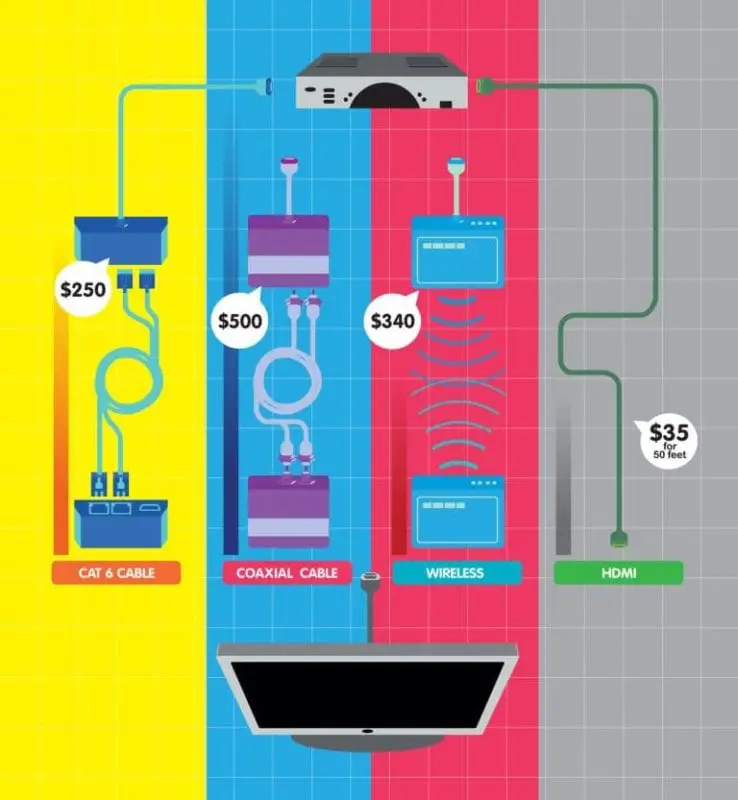
[Image Source : http://www.popularmechanics.com/]
The common problems you face with HDMI interface/connectors which are used to connect source to display to give high resolution of like 2560×1600, 75hz/1600 p etc are as follows .
- No picture even with extension like CAT 6 balun
- Low Resolution error than specified
- Complex cables running through house for an HDMI home theater system
- No video on your HDMI TV
- Seeing flashes, dots, blank screen on your Display device like Smart TV, Plasma TV, Projector
- Getting Picture but no HDMI audio
- Multiple Display devices, with one device not working
- Using in-line HDMI booster, but still no picture
- Lack of hi-speed HDMI 1.4 rated cables that can handle 3D, faster speeds and Ethernet
- Connecting HDMI to analog TV with DVI etc
- No Audio, No Video when connecting through HDMI to DVI cable.
How to Extend HDMI over 150 feet without losing signal, audio and video?
For example, you have a standard PC. You want to connect to two TVs, Smart TV, projector using an HDMI splitter.
But you don’t want to get bad signal or pixel problems. Since the distance is well over the 50 feet mark, you can consider the option of using HDMI and CAT cables.
You can use one-direct 150 feet HDMI cord, but it is very expensive. The best next cheapest alternative is to use a CAT5E or CAT6 cable. But for 150 feet and above it’s better to use the last one.
Possible Solution
You may be tempted use an HDMI Extension cable over Cat 5/6 RJ45 Extender adapter (generally working for 200 feet) with power adapter (HDMI-EXTC).
It consists of two small DVI-HDMI adapters. One is the Sender HDMI IN and other is HDMI OUT. Both have VIDEO and DDC slots for connecting to CAT 5 or CAT 6 cables.

The display data channel (DDC) is useful to communicate your display modes to your graphics adapter. But the problems using this type of arrangement is like this –
- For lengths, greater than 90 feet you should be needing shielded Ethernet cable.
- It will not work through an Ethernet switch or router.
- Sometimes with particular brands, you may not get a picture.
- It may not work the distance.
- Initially they may work, but later they may fail
- The specifications mentioned with the product may not be proper
Best Solution
The next best alternative is to use HDMI Extender over Single CAT 6 Ethernet cable. Cable Matters is a reputed brand suggested by one of the readers on Reddit.
The following units are present in such an arrangement
- -1x HDMI Transmitter
- -1x HDMI Receiver
- -2x 5V DC Power Adapters
- -4x L Mounting Brackets
- -16x Mounting Screws
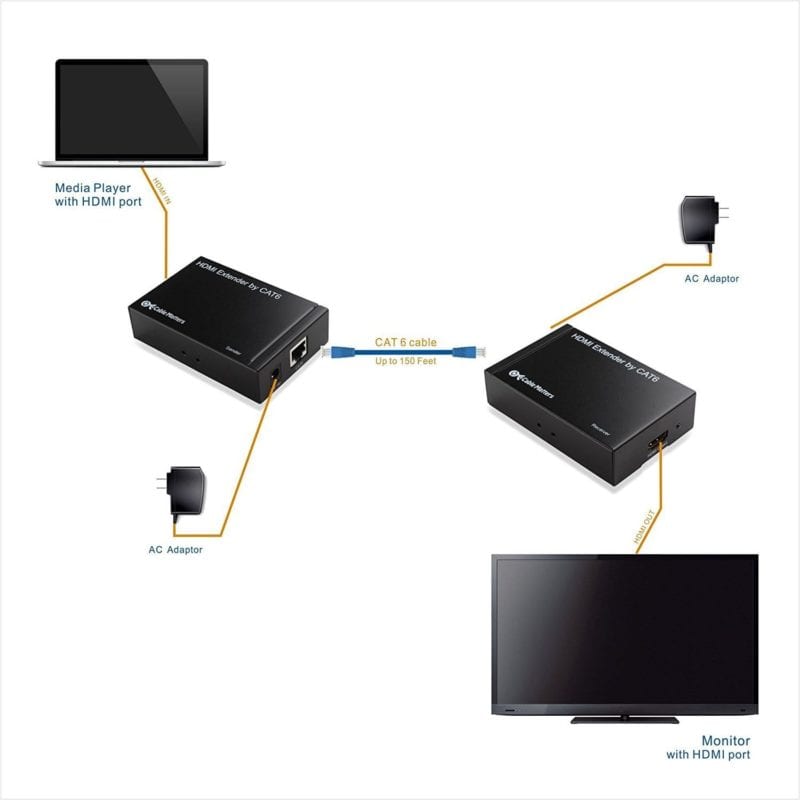
You can use a Media source with HDMI port which is connected to the HDMI transmitter. This is powered using the AC power adapter provided by the company.
Then this can be connected to an HDMI receiver using CAT 6 cable of length around 150 feet to the HDMI Receiver. This can be again powered up using AC power adapter again.
Then it can be connected to the HDMI display device with HDMI port.
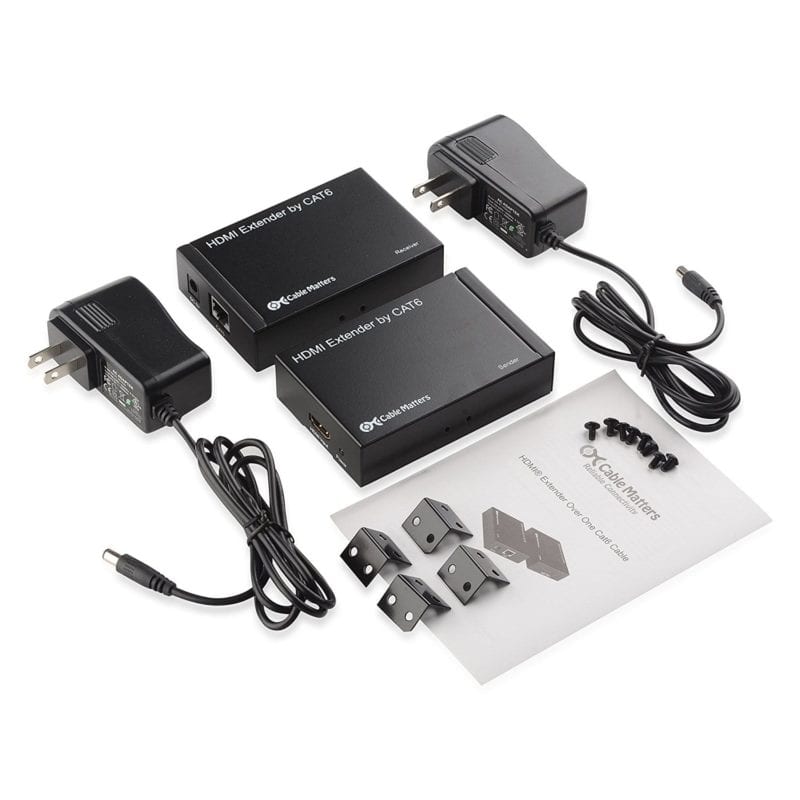
It supports resolutions up to 1080p, 24-bit color, uncompressed 2 channel audio such as LPCM.
The above video shows a typical setup on how to extend HDMI over Ethernet using CAT cables. In this informational video, we get to know the common problems and a practical look-up after connecting the CAT cables to the extenders or connectors or adapters.
The problems with such arrangement are like this –
- You may face latency in video signal over long distances with high resolution. Generally, its good for 720 or 640 resolution when exceeding distance limitation.
- It does not pass CEC signals to use TV remote for both sender and receiver sides.
- It does not have IR capabilities.
- When used with CAT 5e it may not match the highest resolution provided by your flat TV.
- It may work only intermittently with screen going out and in randomly.
How to Connect HDMI over Ethernet when the length is less than 30 feet?
In this case, it is better to use a lengthy HDMI cable. Though you cannot shorten to the exact length, you can find the right size.
Generally, using an High Speed Ethernet cable will be useful to transmitting 1080p and 1080p 3D for 30 feet. The pricing is also cheap – around $30 to $35.
The CAT balun system is more expensive. You may get problems due to patch cables, if not configured correctly.
They only work point to point. It’s a bad idea to stringing together a load of short CAT 6 with couplers or trying to pass the balun-ised signal through a router and IP network. It isn’t IP.
Problem with OpenELECT Media Center over an HDMI to CAT 5 converter
When you connect it through this set-up you may get a blank screen. You can get a signal by directly connecting it to the TV.
You then disconnect and reconnect it to the HDMI to CAT5 converters that works. The HDMI over Ethernet problem in this case could be the handshake issue.
What is an HDMI handshake?
This process is nothing but the exchange of encrypted keys between the source device and HDMI display/ distribution equipment.
The HDMI converter or extender features a unique set of keys which need to be accepted by the display and source before the AV signals are displayed.
When you have problems with no video or no audio through HDMI it can be mainly caused by an encryption named High-bandwidth Digital Content Protection (HDCP).
These handshake issues rarely occur when all devices are powered on 24×7.
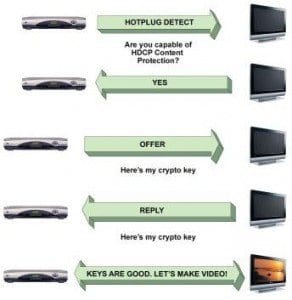
But we sometimes switch off the devices to save power like in the night. But for such kind of issues, you can follow a power-on sequence.
You can simply get a handshake issue due to a poor connection. Avoid sharp bends of the cable or if it is causing the HDMI port to bend. Ensure HDMI/DVI cables and equipment are HDMI v1.3 and HDCP 1.2 compatible.
If power cycle does not resolve the HDMI handshake problems, then you can power cycle all HDMI equipment which includes HDMI Distribution equipment, receivers, amplifiers and displays.
Source : http://forum.kodi.tv/showthread.php?tid=182057
What problems Ethernet CAT cables can solve over HDMI?
It is always recommended to use high quality HDMI cable for extensions or installation of HDMI equipment wherever possible.
But in some situations, it becomes cheap and easy to use Ethernet cables. The following are some of the scenarios.
- Homes pre-wired with existing CAT cables.
- Easy termination of CAT Ethernet cables:
- HDMI Extenders over Ethernet can support long link distances
- Installation requiring HDMI, Infrared control and Toslink audio.
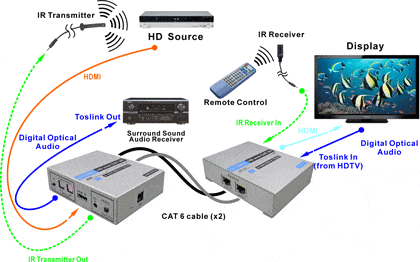
It’s always better to use CAT 6 shielded and CAT 7 cables for best and excellent link quality whenever you face HDMI over Ethernet problems.
The above YouTube video shows on how to use HDMI over Ethernet for length greater than 150 feet using single CAT cable and supporting IR.
Source : http://www.octavainc.com/HDMI-Extender-Over-CAT-basics.html
Issue with Apple TV using HDMi over cat 5?
Connecting a new projector to your Apple TV using Ethernet, may face resolution problems and distorted image conditions if you use CAT 5 cable, even if it’s for a short distance of 60 feet.
The main problem in this case is bad link signal. Probably you should be using CAT 5e or CAT 6 or cat 7 wires to solve such issues.
Also the resolution at which the Apple TV runs that makes a difference in the case. The video resolution may not be the culprit in this case. Even if videos with low resolution are played, but if ATV is at high-end resolution, you can face problems.
Issue with PC to Smart TV using Ethernet Cables for Gaming purpose?
The following questions will arise, when you have this particular setup.
- Will the signal be proper?
- Will I have the correct resolution and proper framerate?
- Can I have 3d SIGNAL?
- Will there be lossless compression of signal to the standard HDMI connection?
The solution to all of these problems is to use HDBaseT standard.
This is the global standard for the transmission of ultra-high-definition AV, Ethernet, controls, USB and up to 100W of power over a single cable for up to 330 feet.
It eliminates cable clutter without compromising performance and high quality. This standard is supported by big brands like Samsung, LG, Sony, Valens etc.
Source : http://www.tomshardware.com/answers/id-2014619/hdmi-ethernet.html
How to connect 50-inch Plasma TV to Small Entertainment Center (PS3, Cable Box, Yamaha Receiver) – 12 feet away?
You can directly use the HDMI extension cables, that are available with Monoprice or any other brand.
But the problem with HDMI cables compared to CAT wire, is that they cannot be cut exactly and also bending them is difficult.
For this purpose, you can find some hardware from Monoprice if the HDMI cable is too short and an adapter to fit the 90-degree angles when needed.
Source : https://forums.anandtech.com/threads/updated-and-solved-question-about-running-hdmi-over-cat6.2208032/

This was an excellent article. Very informative!
Thanks
Hello, I have a small issue where a Cat5 wire may be damaged. Which pins are active for the HDMI to Cat5/6 plug in adapters? Orange/white ect.
I purchase a Monoprice HDMI over Ethernet 1×8 for 3 TV’s , and thought this would be a simpler solution than HDMI cables, but I have been plagued with receivers that keep burning out ! I am on my third complete system (13 failed receivers), and they replaced the entire system twice so far. I have a Fluke meter that tests cables and reports lengths, and it doesn’t detect any issues. Cable length’s between 9.7M and 12.1M. Looking for a solution, replaced connectors on cable of the latest receiver that just burned out (9.7M), is it possible the TV could be assisting this, as being the source of this latest issue (Auto sensing HDMI) ?
@John: Thanks for the comment. I may not be an expert at these HDMI over Ethernet problems. But my feeling, is that, you connect a few devices like 2 TVs. and check if the receivers don’t burn out. Also check the voltage/power coming out of the input device, which can be high sometimes. Better contact a network expert who checks this kind of HDMI/Ethernet setup.
I have 2 hdmi extender 300F ..i connected laptop on first one its working normally then i connected PC on second one but it’s not working after that i brought the laptop and connected it to seconded extender so the problem is with PC how can I solve this problem (windows 10 on laptop &PC)