

There are several causes for the Error Code 8024402c. The system may throw a message like “windows could not search for new updates”.
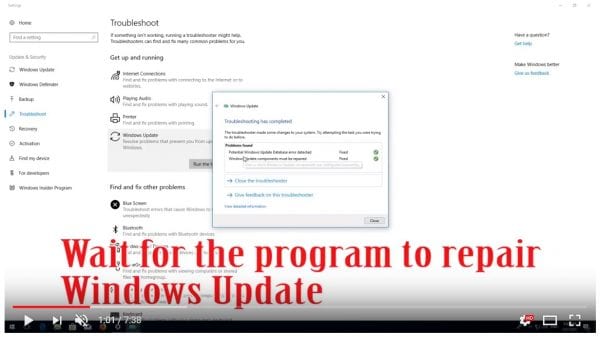
To fix this error you can make use of the Troubleshooting tool in Control Panel. It will try to make amends to the Windows Update Database Corruption and provides a fix it solution. Let the troubleshoot tool run for a few seconds and analyze the problem.
Then finally, it will ask to apply the fix it. You just do it and the problem is resolved.
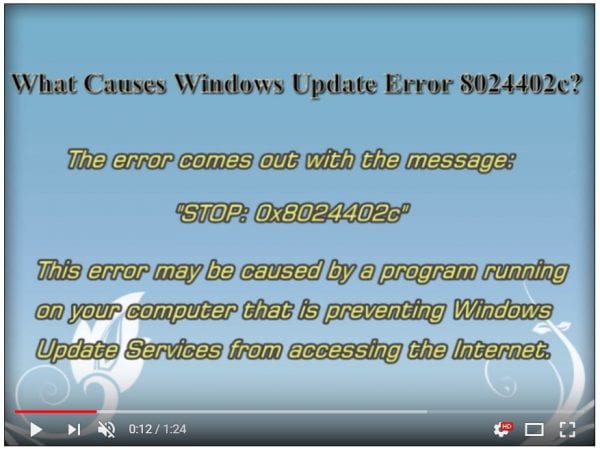
Windows update service not running in windows 7 64 bit is another cause. Then you have to check the relevant update services like BITS, WSUS etc. You must have disabled it or some other software application might have done it.
Windows 8.1 won’t find updates if code 8024402c pops up. The message will show as if this is because of unknown reason. But in many cases, this is because a third-party firewall or app is preventing the Update service from accessing the Internet.
In 2015 also, when you try to update Windows 10 this might cause you to rethink about upgrades.
If you apply the first weapon mentioned above, a progress indicator showing a green tick mark for several issues are shown. It also includes that the Windows update components must be repaired.
To resolve your issue in any Windows OS, you have to find the root cause. Once that is fixed, you can easily download the updates.
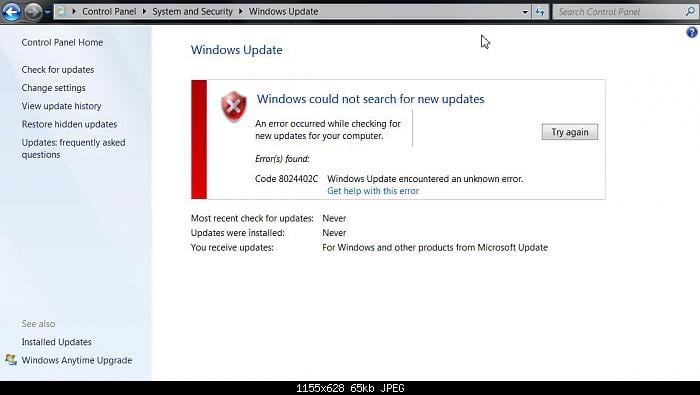
Some of the causes for this error code are –
- You can have an erroneous character in the proxy override settings.
- If you are using a third-party firewall like ZoneAlarm, Sygate, Sunbelt, Comodo, you may have wrongly configured it.
- In Windows 10, if you are using a VPN like HotSpot Shield, Zenmate, Avast Internet Security etc then the above error may occur.
- Workstation in Office that work behind a corporate ISA server can also face this issue.
- For corporate networks like Facebook, Google, Microsoft etc, if autoproxy is not enabled then also you may have this problem.
- Corrupted registry entries. If you have made any changes to the registry or did any tweaks, this can also cause Error Code 8024402c.
- Infection of Virus or Malware. If you plugged in a pen drive from a corrupted system, you can have viruses. Also, if you have downloaded too many adware programs, they can cause malware. These are also some causes for the above error code.
General Fixes
The common solutions in any OS are the following –
Fix #1
First make sure you have the following websites white-listed in your Firewall.
- https://*.windowsupdate.microsoft.com
- http://download.windowsupdate.com
- http://*.windowsupdate.microsoft.com
Fix #2
For erroneous character in proxy override settings, you can do the following.
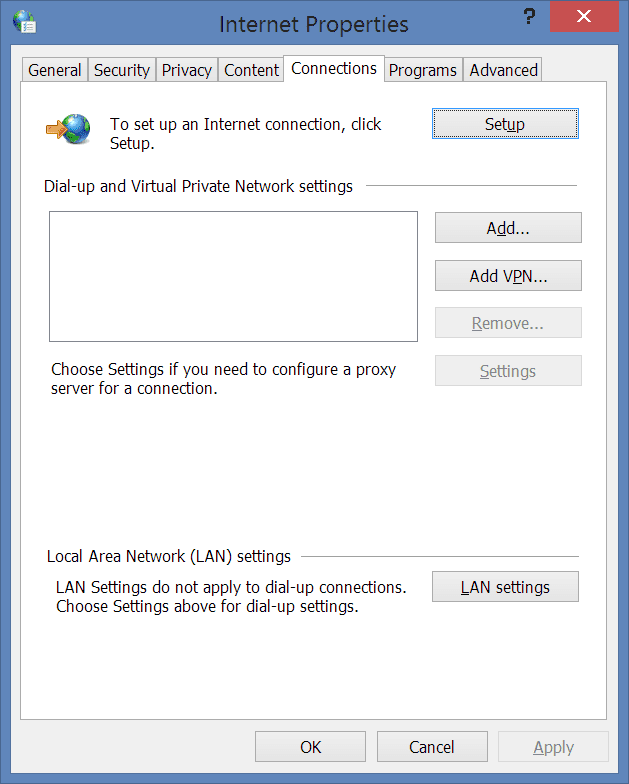
Select the LAN settings option in the “Internet Options” of Control Panel. If “Proxy Server” is enabled, then select the “Advanced” button. Delete everything in the “Exceptions” text box. Now press Win + R and in the Run window, type “proxycfg -d” and press ENTER.
- Type the command “net stop wuauserv” and press ENTER.
- Finally, type “net start wuauserv” and press ENTER.
You have cleared the proxy cache. Now try the Windows Update or Windows 10 download again. You should see success.
Fix #3
If VPN is the source of error, just disable and directly connect to the Internet. Now download Windows 10. After the update is successful, then enable your VPN again.
Fix #4
If you are behind an ISA server, you should configure the Firewall settings. Select the Firewall Client for your third-party software. Select the configure option. Now check the box that says “automatically detect firewall server”. Click on “Update Now” button. Restart your Windows 10 update or other updates.
Fix #5
First do a complete scan and cleaning of your computer using an antivirus like Kaspersky, ESET NOD32, Panda, Avast, AVG etc. You can also use Malwarebytes Anti-Malware to remove the adware.
Fix #6
Since this is an update error, you can download the update troubleshooter fix from Microsoft.
You need to download the fix file from the above link and run it as an “Adminstrator”. Accept the license and then on the next screen click on “Detect problems and apply the fixes (Recommended).”
Let the troubleshooter program complete its execution. Then restart the PC. See if this resolves the Error Code 8024402c in your Windows 7 or 8.1 or 10 computer.
Fix #7
You need to configure your proxy settings properly. Open command prompt with elevated privileges.
- Type the command “netsh winhttp import proxy source=ie” in the prompt before hitting Enter.
- Disable proxy in Network Settings unless you receive a message indicating that there is no proxy server.
Fix #8
You can also reset and re-register the Windows Update components. You can do this by following these tutorials.

- http://www.sevenforums.com/tutorials/91738-windows-update-reset.html
- https://support.microsoft.com/en-us/kb/971058
How to Deal with Error Code 8024402c in Windows Server 2012?
You generally keep the “Automatic Updates” on in your system. This will automatically download the updates whenever there are new updates. This is most likely to happen on every Tuesday. Sometimes, you may face this dreaded Error Code 8024402c.
There is a quick fix for it using registry settings.
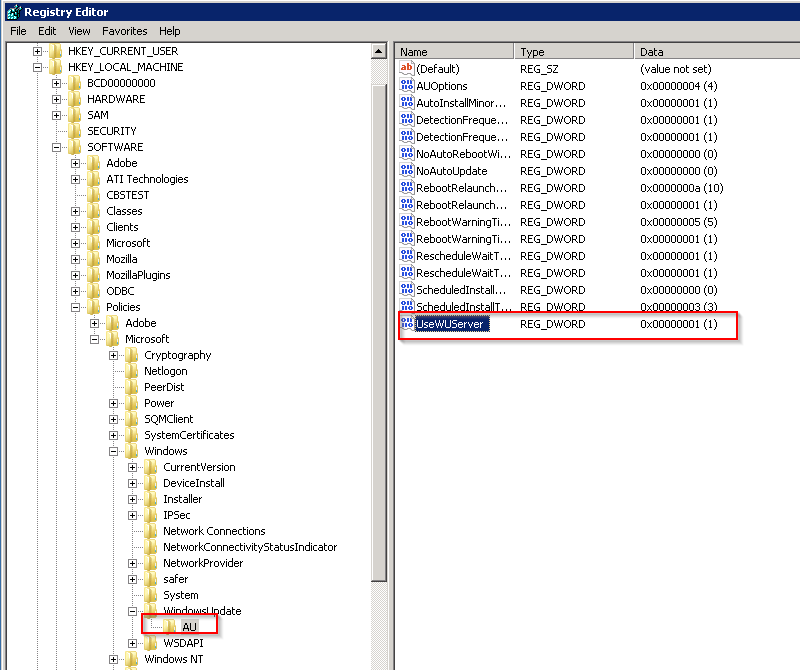
First run “regedit” in the Run box (Win + R). This will open the Registry Editor. Then go to HKEY_LOCAL_MACHINE\Software\Policies\Microsoft\Windows\WindowsUpdate\AU and update the value of UseWUServer from 1 to 0.
In the second step, open “Services” and restart the Windows Update service.
This usually resolves the problem of the current error code. But it also can fix Error Code 80072EE2.
How to Fix Error Code 8024402c in Windows Server 2008?
Source: https://theorypc.ca/2013/05/
You may get this issue while applying Windows Update. The source of this error cannot be easy to diagnose. The updates can be Office updates or any other Microsoft program. Even if you check the Event Viewer – software feature of Windows and look at the BITS-client logs, it is not easy to fix it.
So you need to enable analytics and debug logs. The results are produced in a WinHTTP log file. You need to re-execute the Windows Update and check the log, to find the reason for this error – 8024402c.
The common reason would be the Update going to the wrong server – like wswsus02.YYYY.ab.ca. For example, you might have used this server earlier and later updated with a new IP. So in order that Windows Update picks the right server, you need to apply the following commands.
esentutl /p %windir%securitydatabasesecedit.sdb /o
Gpupdate /force
After this trick is applied, your Windows Update service will use the Microsoft servers instead of the WSUS server. Then reboot the server. You could also run the net stop and net start commands.
Then Windows Update will download the required updates with success.
How to Iron Out Error Code 8024402c in Windows 10?
You may have faced this error, when you try to download the Windows 10 update. It may show up a progress of 50 or 80% and then show this 8024402c error. Otherwise, you may fail in installing updates with this error.
The common reason for Error Code 8024402c is prevention of Windows Updates Services (SVCHOST) accessing the internet properly. Some of the programs that can do this are – firewalls, web accelerators, internet security, antivirus programs, anti-spyware software, proxy servers etc. Generally, Windows 10 is available as an update. So, first check if your firewall or Antivirus software is blocking access. Try to disable your default firewall or anti-spyware or anti-virus for the time-being.
You can do this in Windows 10 as follows.
Control Panel > Windows Firewall Turn Windows Firewall on or off and then select Turn off Windows Firewall:
Then try to run the Windows 10 update again. This time Windows Update will try to connect to Microsoft server. The download of Windows 10 will resume normally again, once this is done.
[alert]
Note: Be careful once you disable firewall and anti-virus or internet security. Generally, this is not recommended, but only when you have compatibility problems, this is required. So it is better you restrict your PC and Internet activities, during this weak period of disabled services.
[/alert]
Turn your security software or Windows firewall, once the Windows 10 Update process is complete.
You can also stop and restart your Windows Update service. This can be done in the following way.
Just open your command prompt with administrator privileges and type the net stop wuauserv command to stop the Windows update service and then net start wuauserv to restart the latter. You can also do using the Services program.
Press Win + R keys and type “services.msc” in the dialog box. There you will find a service called “Windows Update”. You can restart it. Otherwise, you can stop it and start again.
How to Work Out Error Code 8024402c in Windows 8.1?
You can try the above steps first to resolve the error.
But @Shivam15 on Tomshardware found a clean solution for this problem.
You just have to use Google DNS servers 8.8.8.8 and 8.8.4.4 to fix Error Code 8024402c in Windows 8.1. You just have to update the above server list in your ISP settings.
How to do this in Windows 8.1?
You can follow these steps.
- Move the mouse to the bottom right-hand corner. In the Charms bar, go to Settings > Control Panel. You can also press the Win key and type “Control Panel”. It will appear in the Search.
- From it, you can navigate to Network and Internet > Network and Sharing Center > Change adapter settings. You can also right-click the Wi-Fi or Ethernet icon at the bottom right-hand corner and select “Open Network and Sharing Center” and then select the same.
- You can select the Network Adapter. For example, it can be Wi-Fi adapter or Ethernet Adapter.
- To change the settings for an Ethernet connection, right-click Local Area Connection >Properties.
- To change the settings for a wireless connection, right-click Wireless Network Connection> Properties.
- If you are asked for administrator credentials, you need to provide them.
- Choose the “Networking” tab if it’s not selected by default.
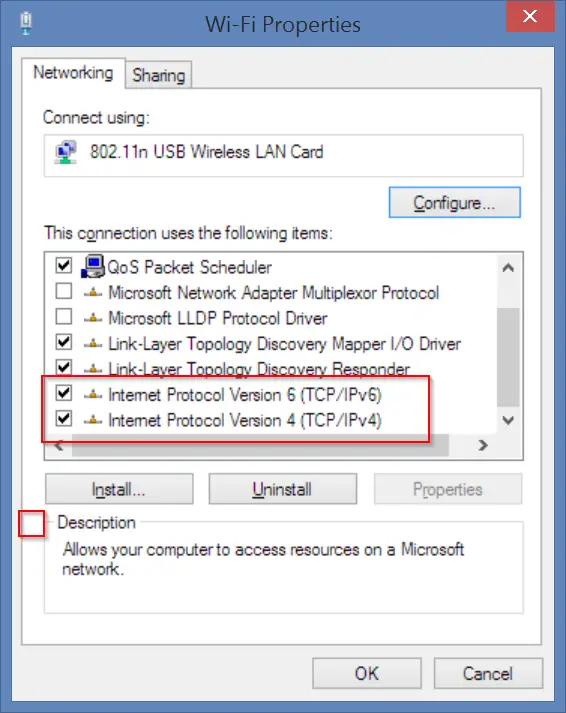
- Under This connection uses the following items, select Internet Protocol Version 4 (TCP/IPv4) or Internet Protocol Version 6 (TCP/IPv6) and then click Properties.
- A pop-up window will open. Click Advanced and select the DNS tab. If there are any DNS server IP addresses listed there, note them for further use.
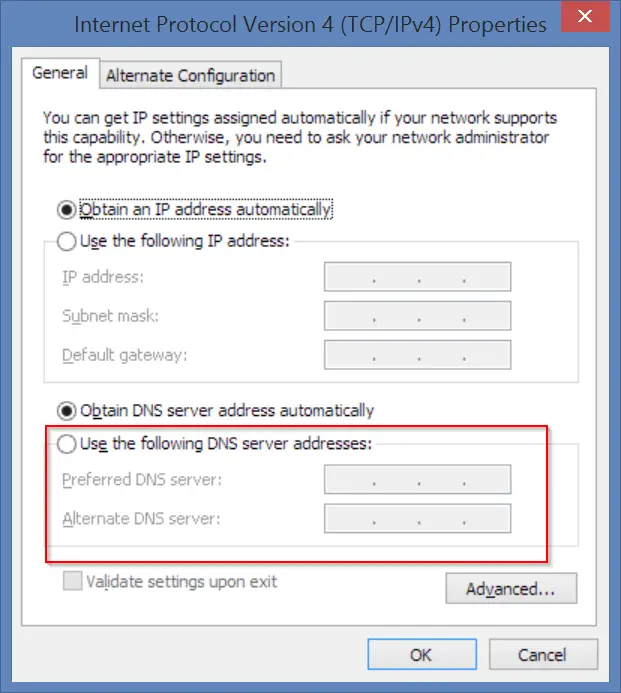
- Now give the IP addresses of the Google DNS servers:
- For IPv4: 8.8.8.8 and/or 8.8.4.4.
- For IPv6: 2001:4860:4860::8888 and/or 2001:4860:4860::8844.
- For IPv6-only: you can use Google Public DNS64 instead of the IPv6 addresses in the previous point.
- Disconnect from Internet and restart again.
- Test whether error code 8024402c is gone and updates are working fine.
How to Figure Out Fix for Error Code 8024402c in Windows 7?
A user on sevenforums @ countkenshin had a similar problem. He tried different solutions like disabling the Windows firewall and Anti-virus. He also uninstalled all the security and windows updates, hoping that Windows will automatically fix it. But there was no success.
Then he did this to fix the problem.
- Type “services.msc” in the Run window (Win + R) and find the Windows Update service. Stop it.
- Go to C:\Windows\ and find the SoftwareDistribution folder. Rename to something like SoftwareDistribution.old
- Restart the Windows Update service.
- Click the “Check for Updates” button on the Windows Update screen.
- Windows will perform the check – it may take some time, so leave it running. Eventually it will successfully complete.
- Once the updates are downloaded, you can delete the SoftwareSistribution.old folder.
Conclusion
Generally the Error Code 8024402c resolves itself when you stop and restart the Windows Update service. If not, you can try any of the solutions mentioned above. Sometimes, just cleaning the junk in your system, can also fix the problem. For this you can do a registry clean using CCleaner and fix any errors that is causing the malfunction of your updates.
You can also try the Microsoft update troubleshooter to fix this error code. You can also reset the Windows Update components as provided by Redmond itself. Other solutions are tailored for specific cases.
If you still not able to solve the problem, please leave a comment in the section below. I’ll try to find a solution, using my expertise.

My computer is Asus 8.1 Model. . I deleted sound system from my pc. How can I re-installation sound system on my PC. Pleas advise me.
@Akbar: You just remove the connection of your sound system to PC. Restart and connect it again. Generally Windows will automatically discover it. Otherwise, you can do automatically search for updates and right drivers will be updated from Internet. Otherwise, you can just disconnect and reconnect and install the sound drivers (if available) from the manufacture website or CD provided. One of these solutions should work.
After reading many tutorials and still having error 8024402 on my window 10. Your tutorial works for me and everything seems perfect now!
Initially, I downloaded WINDOWS UPDATE from the link you provided. Run it one time and download the first batch of updates. I reboot my system, the main windows update from Microsoft start working again very well. Good luck to you guys!
@Allan. Sometimes manually downloading the KB windows update and installing it, could solve errors like 8024402c. But with Windows 10, most of the times, the update works perfectly. This is just my experience.
Windows Update Error 8024402c is just so easy to fix with registry cleaner. If you scan your computer it will detect all the errors in your registry and safely remove them. All thanks to palla for this great article! Will surely come back to read more.
@Eric. Nice to see your update error resolved. Most of the times, its the junk in some temp folder conflicting with the Windows Update process. Registry cleaner does a good job of cleaning it. Thanks.
I agree with you