

To download VIA HD Audio Driver Windows 11 64 bit or 32 bit, you are tempted to use the official manufacturer page for driver downloads. But VIA has not released any sound drivers for this OS.
Also the current homepage does not list any hd audio drivers. The industry also has changed. More likely you will not find any audio codes for Windows 11 or 10. You have to use the old version available on other sites.
In that case, the best bet is to use via hd audio driver windows 10 or 7 32 or 64bit for the same. You can install it in compatibility mode, if required. Along with it, the VIA HD Audio Deck also gets installed in Windows 10 or 8.1 or 7.
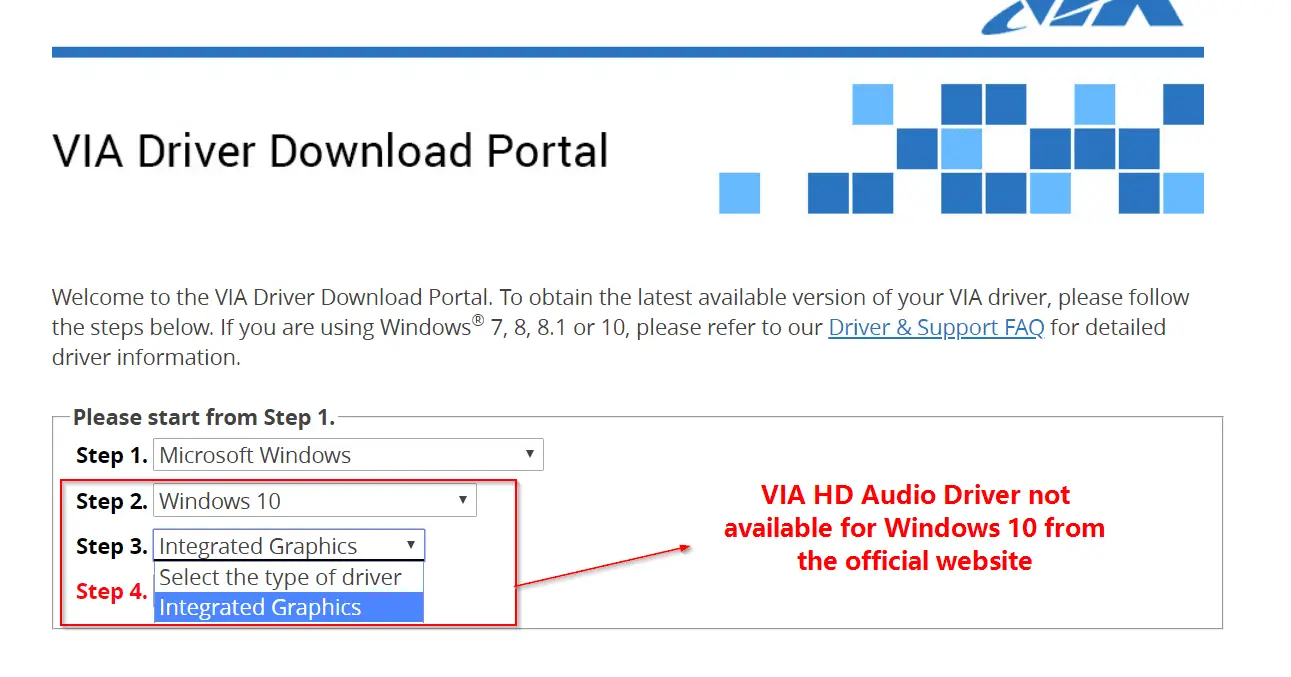
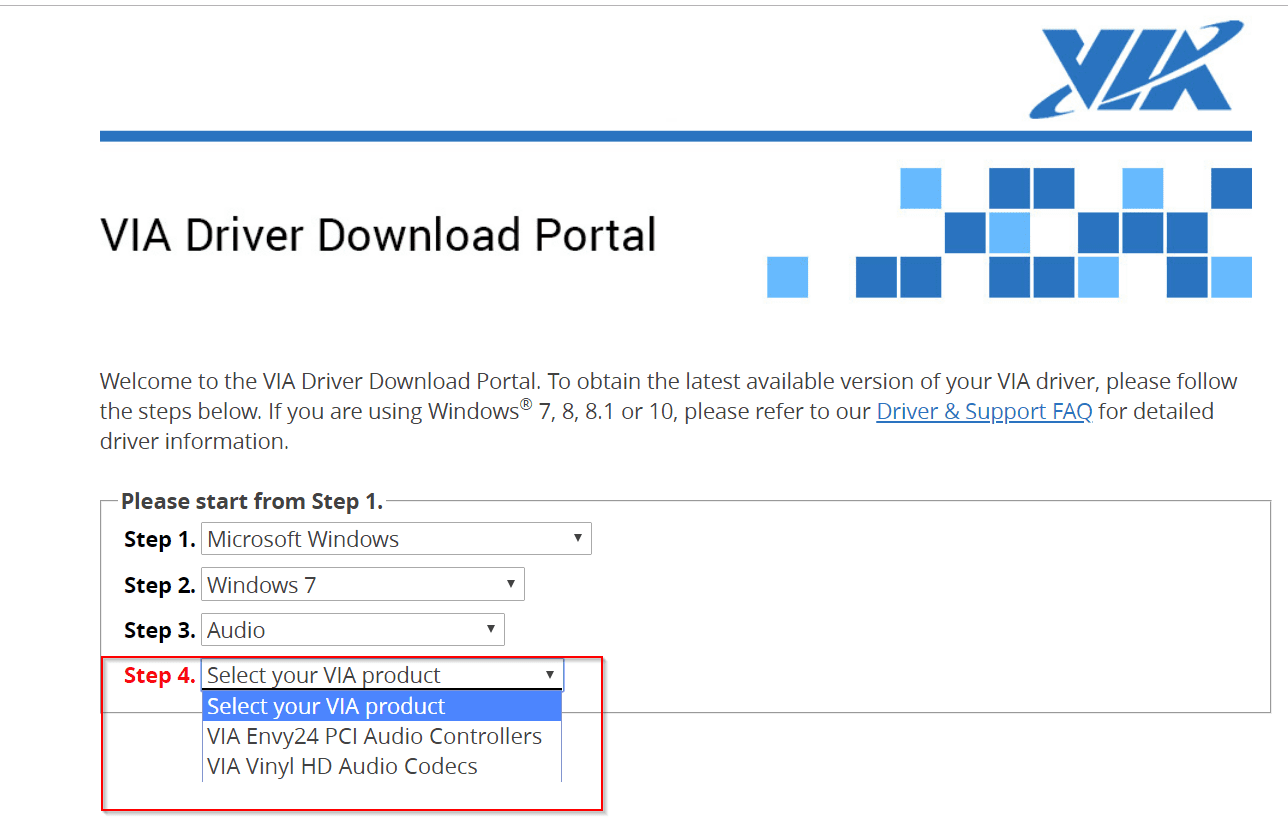
The interface may vary from OS version to version. But for Windows 7, you can get only two types of audio drivers.
1. VIA Envy24 PCI Audio Controllers
2. VIA Vinyl HD Audio Codecs
For old PCs, you can use the second option.
Sometimes, the legacy motherboards and sound cards are compatible with Vista or XP or 98 or 95. For these OS’es also, drivers are provided.
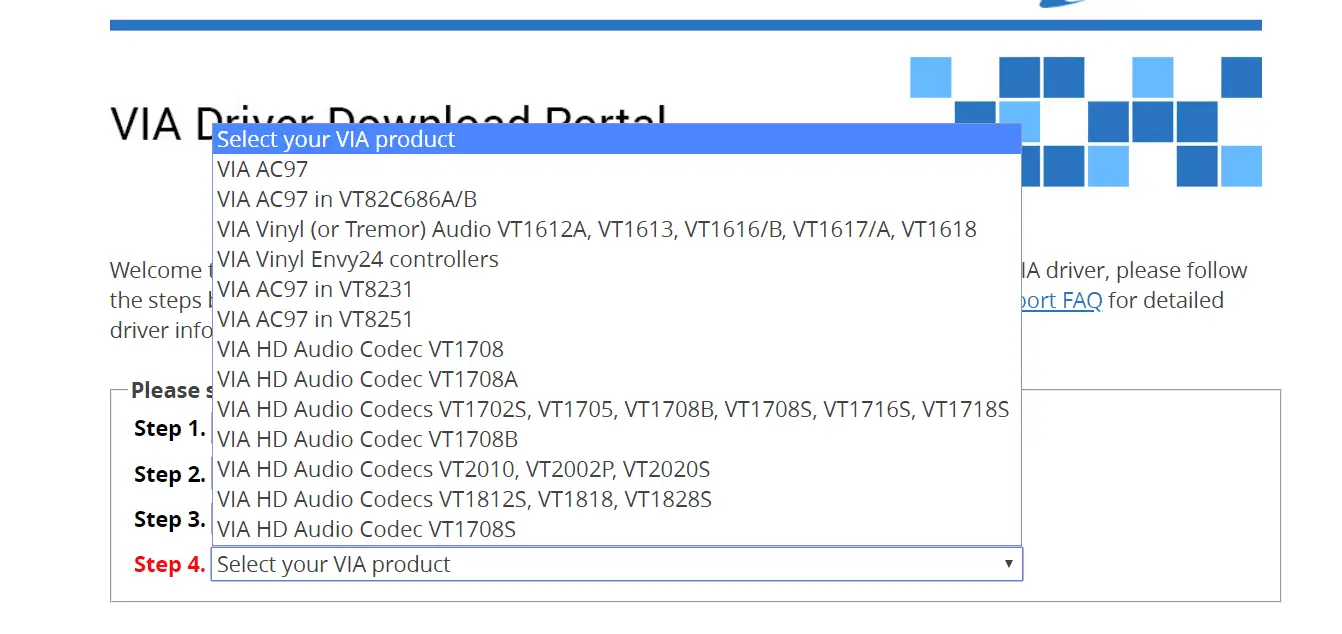
via hd audio codecs
- VIA AC97
- VIA AC97 in VT82C686A/B
- VIA Viny (or Tremor) Audio VT1612A, VT1613, VT1616/B, VT1617/A, VT1618
- VIA Viny Envy24 controllers
- VIA AC97 in VT8231
- VIA AC97 in VT8251
- VIA HD Audio Codec VT1708
- VIA HD Audio Codec VT1708A
- VIA HD Audio Codecs VT 1702S, VT1705, VT1708B, VT1708S, VT1716S, VT1718S
- VIA HD Audio Codec VT1708B
- VIA HD Audio Codecs VT2010, VT2002P, VT2020S
- VIA HD Audio Codecs VT1812S, VT1818, VT1828S
- VIA HD Audio Codec VT1708S
- VIA VX900 HDMI Audio Driver
To download these drivers from VIA product page, you can go here.
http://download.viatech.com/en/support/driversSelect.jsp
Sometimes, the Microsoft HD audio driver is installed automatically in Windows 10. But it may not work with some motherboards and sound cards.
With every computer, you have default audio jack coming from the your CPU cabinet. Otherwise, to be secure, safe you can install a sound card.
These days you get an USB sound card from Creative or Acer. This is gives good surround sound and audio boost.
Sometimes, this default audio driver from Microsoft, may not be compatible with new or old motherboards.
The sound is missing or quality is not good.
In that case, you have to use the VIA HD audio codecs, which are the perfect drivers for your system.
VIA HD audio driver Windows 10 64 bit download
Are you looking to download VIA HD Audio Deck driver for Windows 10 64-bit?
The VIA HD Audio Deck driver is the software that allows your operating system to communicate with your VIA audio device. It is important to keep it up to date to avoid compatibility, performance, or sound quality issues.
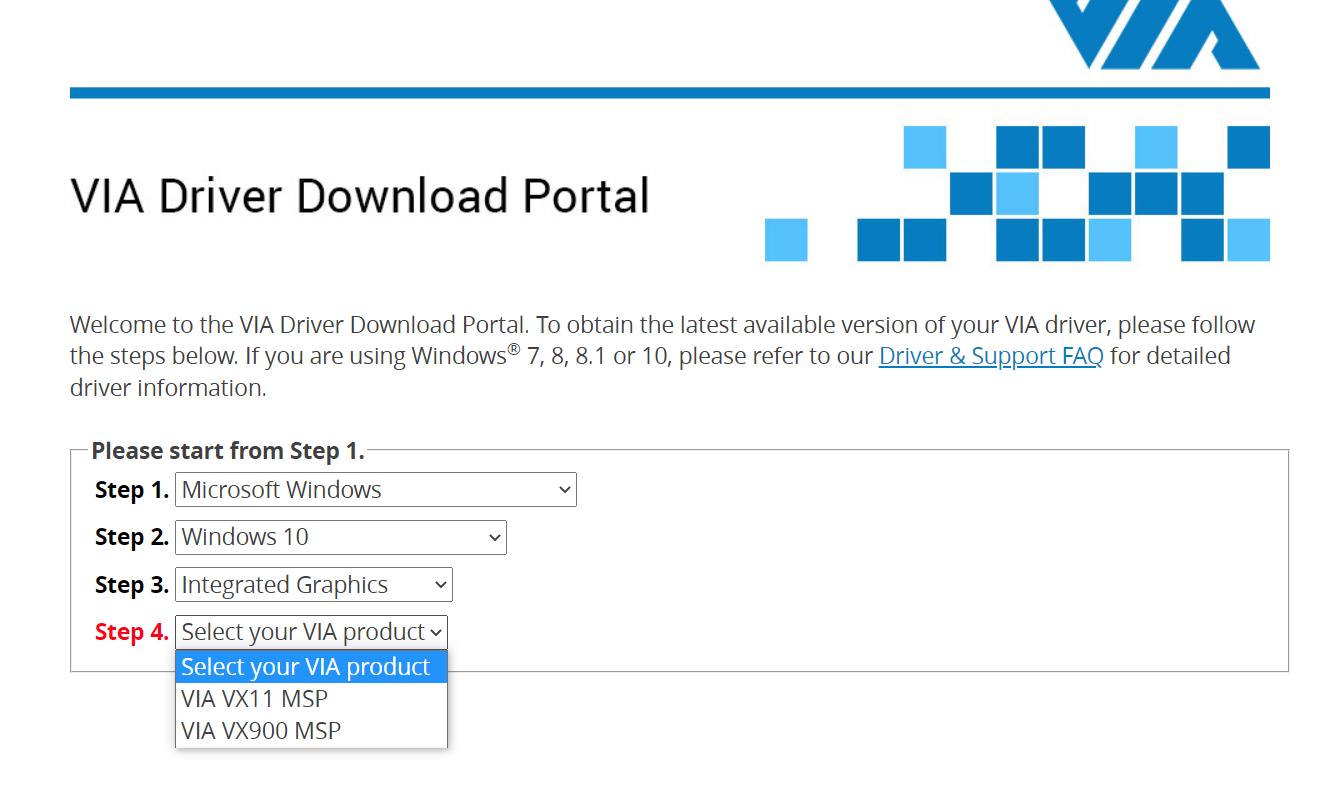
There are several ways to download the VIA HD Audio Deck driver for Windows 10 64-bit.
- One option is to visit the official VIA download portal, where you can select your operating system, driver type, and the VIA product you have.
- Another option is to use a third-party website that offers the latest driver, such as TechSpot, Softpedia, or SasNet.
However, keep in mind that these sites may not be safe or trustworthy, and you should verify the source and file before installing them.
- Once you have downloaded the driver zip file, you need to extract it to a folder and run the installer.
- Follow the instructions on the screen and restart your computer when prompted.
- After rebooting, you should see a VIA HD Audio Deck icon in your system tray or Start menu.
- Click it to open the controller interface, where you can adjust the sound parameters according to your preferences.
VIA HD audio deck does not support this OS version
If you have problems with the VIA HD Audio Deck driver for Windows 10 64-bit, such as no sound, distortion, or errors when opening the application, you can try some possible solutions:
- Verify that your VIA audio device is enabled and set as default in Control Panel > Sound.
- Update your operating system to the latest version available through Windows Update.
- Uninstall and reinstall the driver using a cleaner program like CCleaner or Revo Uninstaller.
- Try an older or different version of the driver if the latest one doesn’t work correctly.
- Copy the Dts2ApoApi64.dll, VDeck.exe and QsApoApi64.dll files from the Present > VDECK64 folder of the driver zip file to the Vdeck folder inside the directory where the driver was installed. This can fix an error that says “Please use 64bits version VDeck.exe”.
VIA HD Audio Deck – Features in Windows 10 or 8.1 or 7
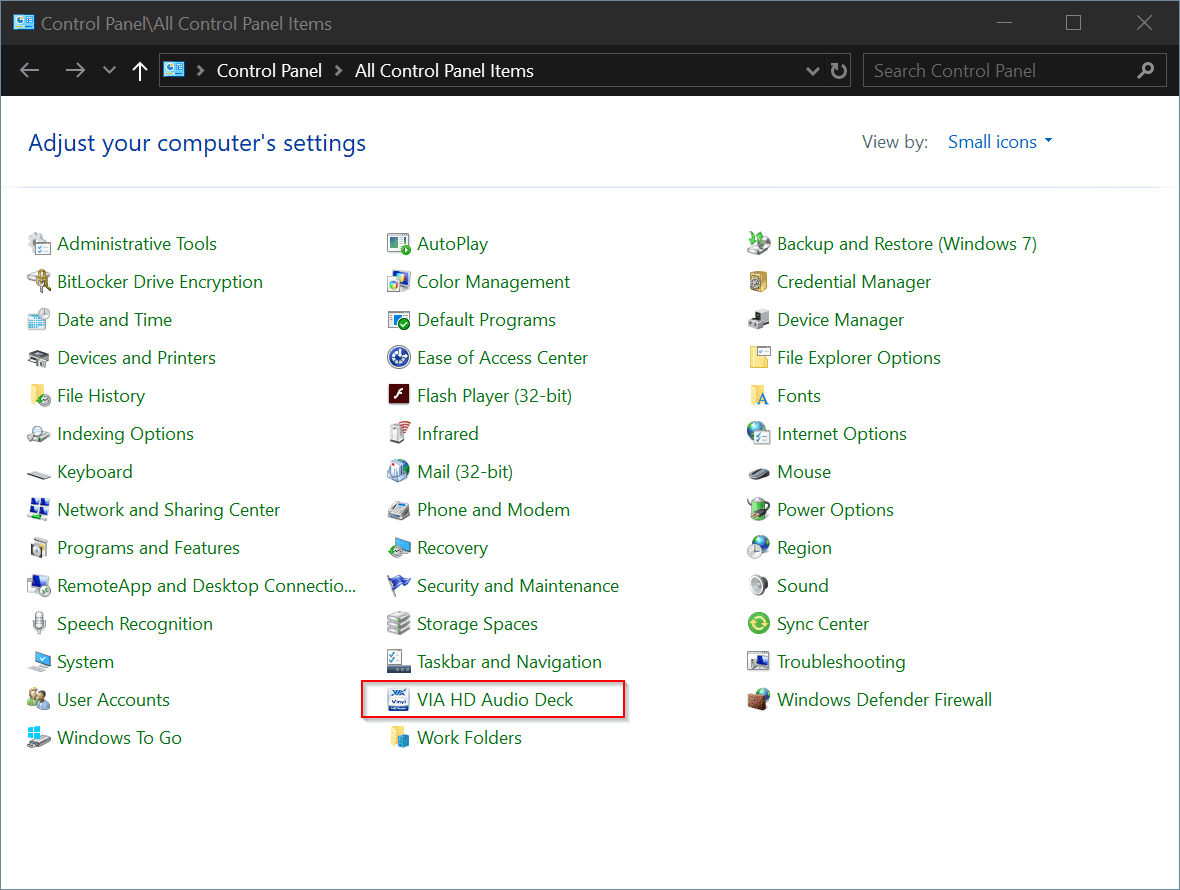
Once the VIA High Definition Audio driver is installed, the audio deck also gets installed. It starts with Windows, if you don’t change the settings. Otherwise, you can invoke it from the Control Panel.
You can increase or decrease the volume using the via audio deck. If you expand the little arrow, below “default device”, you can see several other features for sound card or audio codec.
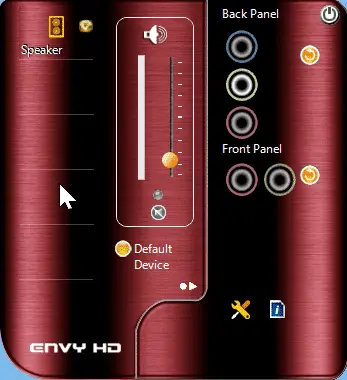
This includes –
1. Speaker Setting and Test
2. Default format – You can set Sample Rate and Bit depth
3. Sound Equalizer
4. Environmental Modeling
You will have different presets for sound equalizer modeling. You can also set custom frequency and can be saved.

In the environmental feature, you have different modes like – Theater, Underwater, Club, Auditorium, Bathroom.
Note: But sometimes these does not work, when you are not using the right audio codec. Also these features may not be supported on your motherboard.
HD Audio Configuration with ac97 windows 10
Is your Windows audio not working? The playback or recording devices may not be working or both.
I have a Creative headset and desktop speakers respectively. Normally in the morning I’d be using the speakers to hear the sound and the headset in the night. I am using the audio-jack or the 3.5mm variant to connect both these devices to my computer.
VIA HD audio codecs Issue
I had only the back-end socket which was working, while the front one was faulty. So every time I had remove the speakers plug and insert the headset jack and do vice versa, whenever I wanted to shift gears.
I’m using the Windows 8.1 64 bit OS. Earlier when I shifted from headset to speakers, I just had to remove one and insert the other, without re-booting. This was in the 32-bit variant and in Windows 7 version.
Related : Fix Windows 8 and 8.1 Slow Boot Issues on 32 and 64 bit [Tutorial]
But in Win 8.1 64 bit version, when I changed from one sound device to other, my audio stopped working.
VIA vt1708s driver and Audio Solution
The normal procedure when sound is not working in Windows is to uninstall the audio driver and scan for hardware changes.
The mother board that I was using was Gigabyte Technology Co., Ltd. G41MT-S2P (Socket 775). The audio driver I was using was VIA HD Audio. When I referred the specs the audio codec driver that is required was – VIA VT2021 codec.

Trouble-shooting Steps to solve this issue
I installed the above codec from VIA and re-started the system. The latest version was 6.0.10.1200. But that didn’t solve the problem. Normally that solves it. But in 64 bit and with my specific devices and drivers, I was still having this problem.
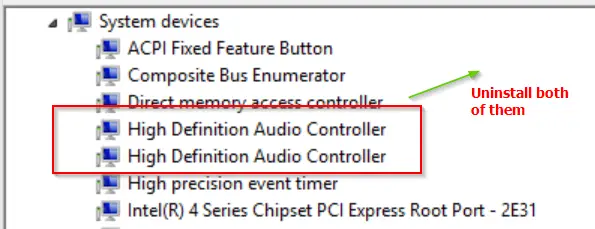
Then I repeated the above steps few times, with no result. Then after reading on the Internet, I found that there is a specific issue with “High Definition Audio Controller”. But I had two such “system devices” in my device manager.
I was using the NVIDIA GeForce 210 graphics card. With the installation of that device, even audio drivers got installed. I also tried to uninstall them, but of no vain.
So, my next step was to uninstall both the “High Definition Audio Controllers” and the “VIA High Definition Audio” driver. Then the PC asked me to restart. After it was done, the above “controllers” and “audio drivers” got automatically installed.
I thought the problem would be resolved by now. I still couldn’t listen to the sound. But when I checked the “Volume mixer” (obtained by right-clicking the sound icon in the System tray), the playback devices were showing indication that the audio is playing.
Then I went to “Sound” item in Control Panel. In the “Playback” tab I could see both the audio devices (headset and speakers) listed.
By default, the “headset” was taken as the default playback device. But still the audio was not coming from headset even. Then, I made the speakers the “default” playback device.
Then I could hear the audio. Ha, finally after some suffering, I fixed this problem.
Conclusion
Hmm. I thought I resolved the problem, but only partially. Whenever I remove the headset jack and insert the speakers jack, I still get the same problem.
In Windows 10, I’m not having any problems related to VIA. You can always shift from headset to speakers, using Sound Settings. I think one can use the “Update Driver” feature for your VIA driver in Device Manager and browse for the correct driver.
So then I had to resort to the same troubleshooting process again, which was little irritating. Sometimes, I had to re-install the audio driver and re-boot the system. So I think VIA, Creative and Microsoft should do something in fixing this issue.

H Palla,
I have what I hope will be a simple solution that works. I do the same thing switching between speaker and headphones all the time and I got smart and bought a cable that’s just like a regular 1/4 inch headphone cable but one end plugs in to the ‘speaker output’ on the back of the computer( or the front wherever you want it) and you LEAVE IT THERE FOREVER. You never unplug it – ever.
The other end of that cable is a ‘female’ plug end (eg then you can plug your headphones OR Speakers directly INTO that end of the cable rather than having to physically plug/unplug the speakers and headphones into the computer all the time).
So I just pulled the cable around the back of the computer desk and leave the end ‘female plug’ end sitting up on the computer desk just under the monitor/screen where I can reach it easily. Then whenever I want to switch between headphones and speakers I just plug or un plug the speaker cable or the headphones cable.
It works great for me… but I might look to find an even better solution where I can leave them both plugged in and install some kind of electronic switch so I can just switch this one orthat one on like a light switch and never need to physically unplug anything.
Hopefully i’l be able to find a cheap way to do this buy getting something from an electronics store or asking around on forums for advice.
I also have a Skype headset which has a single cable with 2 plugs coming off the end as it’s split into audio and microphone. I do a similar thing that I suggested above for the MICROPHONE input. Again – permanently leave it plugged in, and leave a female end of the ‘mic in’ plug on the computer desk aswell (helps to label them).
That way when I want to make a Skype call I just plug the headset AUDIO cable into the female plug for speakers/headphones and the mic is permanently plugged in in the other female cable ready to go. I do a slight variation of this to play my guitar through my computer etc.
If you have any more q’s for computer stuff don’t forget tom’s hardware forums are pretty good!
Let me know how it goes… Hope that helps 🙂
petdevils.