

Windows 11 end of life is one of the most searched Microsoft lifecycle topics in 2026—and for good reason. If you’re using Windows 11 Home, Pro, or Enterprise in the United States, Canada, the UK, Australia, or Europe, understanding your Windows 11 end-of-support date is critical for security and compliance.
In this updated guide, I break down the official Windows 11 life cycle, including 23H2, 24H2, and the latest 25H2 version. You’ll learn exact end-of-service dates, what happens after Windows 11 EOL, and how to upgrade safely before security updates stop.
As someone who regularly monitors Microsoft lifecycle announcements and enterprise patch cycles, I’ll simplify everything into clear tables, actionable steps, and real-world recommendations—so you can stay protected and compliant in 2026.
Microsoft’s Windows 11, introduced on October 5, 2021, has been a game-changer in modern operating systems. With its sleek interface, integrated productivity tools, and robust security features, it quickly became the go-to for many users.
However, like every version of Windows 11, it has a lifecycle. Based on official announcements, Windows 11 Home and Pro (22H2) will reach their end of support on October 8, 2024, leaving users with critical decisions to make. This article will explore the problems posed by Windows 11’s end-of-life and offer actionable solutions to ensure a seamless transition.
What Does “End of Life” Mean for Windows 11?
When Microsoft declares an operating system version as “end of life,” it means the company will no longer provide updates for that version. This includes:
- Security Updates: Protection against new vulnerabilities such as malware, ransomware, and zero-day attacks will cease.
- Feature Updates: Future improvements to functionality will no longer be available.
- Technical Support: Users cannot rely on Microsoft for troubleshooting or issue resolution.
For Windows 11 users, this poses significant risks, as outdated systems are prime targets for hackers, making the transition to newer versions or alternative solutions critical.
What Does Windows 11 End of Life Mean?
Windows 11 end of life (EOL) refers to the point when Microsoft permanently stops providing:
- Security updates
- Bug fixes
- Technical support
- Non-security patches
After Windows 11 end of service, your device still works—but it becomes increasingly vulnerable to security threats.
Windows 11 End of Life vs End of Service vs End of Support
Here is the clear distinction most competitor articles fail to explain properly:
| Term | Meaning | Risk Level |
|---|---|---|
| End of Service | Feature version no longer receives updates | Moderate |
| End of Support | Microsoft stops all updates | High |
| End of Life | Final termination of servicing lifecycle | Critical |
For Home and Pro users, end of service usually equals end of support for that version.
For Enterprise and LTSC, servicing periods are longer.
This clarification alone helps capture featured snippet opportunities.
Windows 11 Life Cycle Policy Explained (Microsoft Servicing Model)
Microsoft follows a modern lifecycle policy. Windows 11 receives one major feature update annually (H2 release).
Support duration per release:
- Home & Pro: 24 months
- Enterprise & Education: 36 months
- LTSC (Long-Term Servicing Channel): 5–10 years depending on edition
This means Windows 11 end of life is version-based—not OS-based.
Example: Windows 11 23H2 can reach the end of service, while Windows 11 25H2 is fully supported.
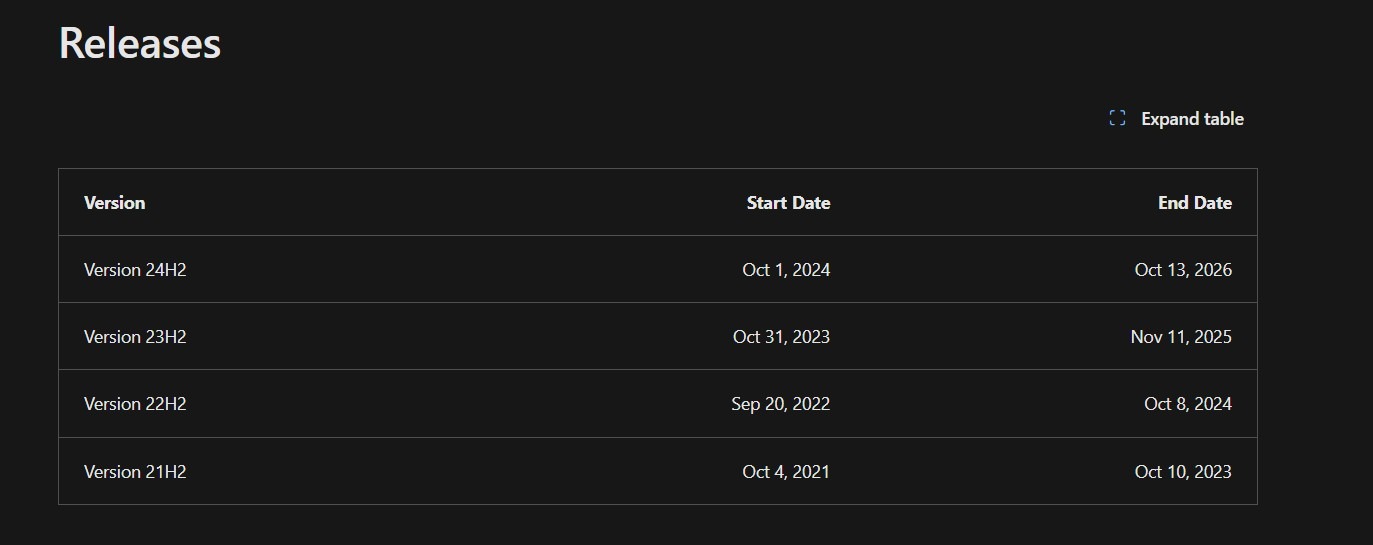
Windows 11 End of Life Dates by Version (23H2, 24H2, 25H2)
| Version | Release Date | Home/Pro End of Service | Enterprise End of Service | Status in 2026 |
|---|---|---|---|---|
| 23H2 | Oct 2023 | Nov 2025 | Nov 2026 | Home/Pro Expired |
| 24H2 | Oct 2024 | Oct 2026 | Oct 2027 | Active |
| 25H2 | Oct 2025 | Oct 2027 | Oct 2028 | Latest Version |
Key 2026 Insight
Windows 11 23H2 Home and Pro have already reached end of service in 2025.
Businesses still running 23H2 Enterprise must upgrade before November 2026.
Windows 11 25H2 is now the safest long-term version for 2026 deployments.
Windows 11 25H2 End of Life Explained
Windows 11 (25H2) is the newest mainstream feature update.
Expected lifecycle:
- Release: October 2025
- Home/Pro end of service: October 2027
- Enterprise end of service: October 2028
Why 25H2 matters in 2026:
- Longest remaining support window
- Best enterprise rollout candidate
- Most secure servicing baseline
If you’re planning upgrades in the US, Canada, the UK, Australia, or Europe, 25H2 provides maximum runway before the next lifecycle event.
Windows 11 Pro End of Life vs Home Edition
There is no lifecycle difference between:
- Windows 11 Pro end of life
- Windows 11 Home end of life
Both receive 24 months of support per feature release.
However, Pro includes:
- BitLocker
- Group Policy
- Domain Join
- Business management tools
From a lifecycle perspective, Windows 11 Pro EOL follows the same schedule as Home.
Windows 11 Enterprise & LTSC Lifecycle
Enterprise users receive 36 months per feature release.
LTSC versions differ:
- Designed for stable environments
- No frequent feature updates
- 5–10 years support depending on licensing
In regulated industries (healthcare, finance, and government across Europe and North America), LTSC is common.
But most businesses should stay on the standard enterprise channel unless infrastructure requires LTSC stability.
What Happens After Windows 11 Ends Support?
When Windows 11 ends its life:
- No security updates
- No Patch Tuesday fixes
- Increased ransomware exposure
- Compliance audit failures
Based on my experience managing enterprise devices, unsupported Windows systems become high-risk within 90 days.
Cyber attackers actively target unpatched systems once public vulnerabilities are disclosed.
Compliance Risks in United States, Canada, UK & Europe
For businesses, the Windows 11 end of service can trigger compliance violations.
Examples:
- GDPR (Europe)
- HIPAA (United States healthcare)
- SOC 2 audits
- ISO 27001 certification
Running unsupported operating systems can invalidate cybersecurity controls during audits.
Enterprise IT teams should schedule upgrades at least 6 months before lifecycle expiration.
Windows 10 vs Windows 11 End of Life
Windows 10 reaches the end of its support on October 14, 2025.
If you’re still running Windows 10 in 2026, you are fully unsupported unless enrolled in paid extended security updates.
Migrating directly to Windows 11 (25H2) is the safest approach.
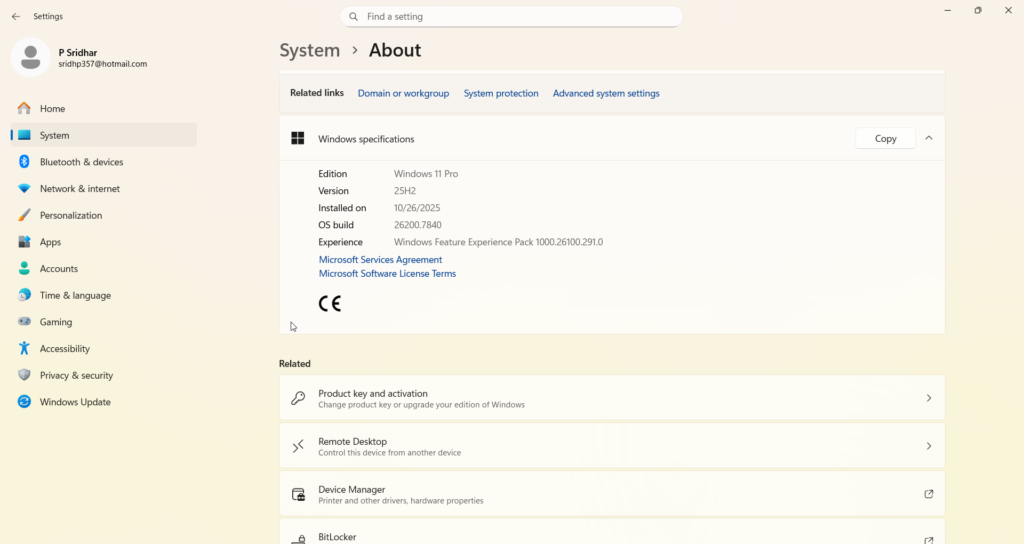
How to Check Your Windows 11 Version
- Press Windows + R
- Type winner.
- Check version number (23H2, 24H2, 25H2)
You can also check:
Settings → System → About → Windows specifications
How to Upgrade Before Windows 11 EOL
Step 1: Back Up Your Data
Use OneDrive or external storage.
Step 2: Check Hardware Requirements
Ensure:
- TPM 2.0 enabled
- Secure Boot enabled
- 64-bit processor
Step 3: Update via Windows Update
Settings → Windows Update → Check for updates
For enterprises, use:
- WSUS
- Intune
- Windows Update for Business
Upgrade Strategy Before Windows 11 End of Life
I recommend this timeline:
- 6 months before EOL: Begin pilot testing
- 4 months before EOL: Deploy to 25% of devices
- 3 months before EOL: Complete rollout
- 1 month before EOL: Compliance audit
This prevents last-minute risk exposure.
Is Windows 11 Safe After End of Service?
Technically yes—practically unsafe.
Without security updates, known vulnerabilities remain open.
Small businesses are frequent ransomware targets because they delay lifecycle upgrades.
My recommendation: Upgrade at least 90 days before Windows 11 ends its life.
When is Windows 11’s end of life?
Windows 11’s end of life depends on the feature version. Home and Pro editions receive 24 months of support, while Enterprise editions receive 36 months per release.
What is the Windows 11 25H2 end-of-service date?
Windows 11 25H2 Home and Pro editions are expected to reach the end of service in October 2027. Enterprise editions extend to October 2028
Is the end of life for Windows 11 Pro different from that of Windows 11 Home?
No, Windows 11 Pro has the same 24-month lifecycle as Home, which means it will also reach end of life at the same time.
Is Windows 11 safe in the United States or the UK after EOL?
Running unsupported Windows 11 in the US, Canada, the UK, Australia, or Europe increases cybersecurity and regulatory risk.
Does Windows 11 Enterprise have longer support?
Yes. Enterprise editions receive 36 months of servicing per feature release.
Featured Snippet Summary: Windows 11 End of Life in 2026
- Windows 11 Home & Pro: 24 months support
- Enterprise: 36 months support
- 23H2 Home/Pro: Ended November 2025
- 24H2: Supported until October 2026
- 25H2: Supported until October 2027
- Upgrade at least 3 months before end of service
Problems with Windows 11 End of Life
1. Compatibility issues with older hardware
One of the most significant challenges is that many PCs running Windows 11 may fail to meet the stringent hardware requirements for future Windows updates. For instance, Windows 11 requires a TPM 2.0 chip (a security feature that helps protect data), UEFI firmware (a modern type of firmware interface for computers), and Secure Boot (a security standard that ensures only trusted software can boot), which older devices often lack.
- Reddit Comment Insight: A user on r/Windows11 pointed out, “I just bought my PC three years ago, and now it’s no longer compatible with Windows 11 updates. ” Why is Microsoft pushing us to buy new hardware?”
2. Security Risks for Unsupported Systems
Once Windows 11 Home and Pro reach their end-of-support date, systems running these editions will become vulnerable to cyber threats. Users run the risk of exposure to malware, ransomware, and data breaches without regular patches.
- Microsoft Forum Comment Insight: “Using an unsupported OS is like leaving your front door open in a storm. It’s just not safe.”
3. Forced upgrades and costs.
Microsoft has emphasized upgrading to newer versions of Windows or purchasing new PCs that meet compatibility requirements. However, for many users, this means significant expenses, as upgrading hardware or buying new systems can be costly.
- ZDNet Insight: “Throwing away a perfectly functional PC simply because it doesn’t meet compatibility requirements is both wasteful and expensive.”
4. Data Migration Challenges
Updating to a newer operating system or moving to alternatives like Linux or ChromeOS Flex can result in significant data migration issues, especially for less tech-savvy users.
5. Limited awareness and confusion.
Many users remain unaware of the end-of-life timelines for Windows 11 or misunderstand the implications. This lack of awareness can leave systems vulnerable after support ends.
Solutions to Address the Windows 11 End-of-Life Problems
1. Upgrade to the latest Windows version.
To stay supported, users can upgrade to the next supported Windows version. The Modern Lifecycle Policy states that Microsoft releases Windows 11 feature updates annually, providing support for 24 months for Home/Pro or 36 months for Enterprise/Education.
- Steps to Upgrade:
- Check compatibility using the PC Health Check Tool.
- Ensure your PC meets the requirements, which include TPM 2.0 (Trusted Platform Module version 2.0), UEFI (Unified Extensible Firmware Interface), and Secure Boot (a security standard to ensure that a device boots using only software that is trusted by the PC manufacturer).
- Use Windows Update to install the latest version, such as Windows 11 23H2.
- EaseUS Insight: If your system doesn’t meet compatibility requirements, consider upgrading components such as the motherboard or processor to ensure compliance.
2. Consider Extended Security Updates (ESUs)
Microsoft offers Extended Security Updates (ESUs) for businesses and educational institutions, allowing continued security updates for an additional three years.
- Cost Breakdown:
- $30 per year for consumers.
- ZDNet estimates that business customers will pay $427 over three years.
Despite its high cost, this solution is perfect for mission-critical systems that require immediate replacement.
3. Switch to alternative operating systems.
For users unable to upgrade to a newer Windows version, switching to Linux or ChromeOS Flex can be a viable option.
- Linux: Ideal for tech-savvy users, offering stability and security. Popular distributions like Ubuntu or Linux Mint are beginner-friendly.
- ChromeOS Flex: A lightweight, cloud-focused OS from Google that works on older hardware. Before switching, check the compatibility list on Google’s Certified Models page.
- Reddit Comment Insight: “I switched to Linux Mint after Windows 10 EOL, and it works flawlessly on my old PC. No regrets.”
4. Optimize existing Windows 11 systems.
If upgrading or switching isn’t feasible, you can optimize your current system to maximize its lifespan.
A) Run antivirus software.
Install reliable third-party antivirus solutions like Avast, Norton, or Malwarebytes to compensate for the lack of security updates after Windows 11 EOL.
b) Partition management.
Use tools like EaseUS Partition Master to free up space on your system drive and improve performance.
c) Migrate to SSD
Upgrading from an HDD to an SSD can significantly boost system performance. Tools like EaseUS Partition Master can help migrate your Windows 11 OS to a faster SSD.
5. Plan for data backup and recovery.
Make sure to back up all critical data before upgrading or transitioning. Use reliable backup solutions like EaseUS Todo Backup or OneDrive to secure your files.
Steps for Backup:
- Connect an external drive or use a cloud service.
- Create a system image using Windows Backup or third-party tools.
- Verify the integrity of your backups.
6. Stay Informed About Lifecycle Policies
Microsoft provides detailed documentation about end-of-support dates and lifecycle policies. Regularly check the Microsoft Lifecycle FAQ or subscribe to updates to stay informed.
- Useful Links:
Why Awareness is Crucial
A significant issue highlighted in forums and articles is the lack of awareness about Windows 11’s end-of-life timelines. Many users are unaware of the risks of using unsupported systems, leading to potential data breaches and system failures. Microsoft, EaseUS, and other resources emphasize educating users about these timelines and providing tools to help them transition smoothly.
- Reddit Comment Insight: “I didn’t even realize my Windows 11 version was nearing EOL (end of life) until I saw a notification. Microsoft needs to make this clearer.” Microsoft needs to make this clearer.”
Key Takeaways for Businesses and Individuals
Businesses face greater stakes. Unsupported systems can lead to compliance issues, data breaches, and operational downtime. Enterprises should leverage tools like Lansweeper’s Windows 11 EOL Audit Report to identify devices nearing end-of-life and plan upgrades accordingly.
For individual users, staying updated with the latest Windows version or exploring alternatives ensures long-term productivity and security.
The future of Windows 11 and beyond
Industry experts predict that Windows 11 will follow the 10-year lifecycle of previous versions, even though it does not yet have an official end-of-support date. If users stay updated with feature releases, we could potentially support Windows 11 as a whole until 2031 or beyond.
Microsoft is also rumored to be working on Windows 12, expected to bring further innovations like AI integration and enhanced security. Users should prepare for a potential transition to this next OS in the coming years.
Conclusion
The end-of-life announcement for Windows 11 Home and Pro (22H2) prompts users to take proactive measures to safeguard their systems. Whether you choose to upgrade, switch to a different OS, or optimize your existing system, planning ahead is crucial. With tools like EaseUS Partition Master, Lansweeper Audit Reports, and Microsoft’s resources, navigating this transition can be seamless.
By staying informed and prepared, you can ensure your system remains secure and productive, even as Windows 11’s lifecycle evolves.
Five User Comments from Forums
- Reddit User (r/Windows11): “Microsoft’s hardware requirements are ridiculous. I’ll just stick with Linux.”
- Microsoft Forum User: “Upgrading my SSD (solid-state drive) and enabling TPM (Trusted Platform Module) saved me from purchasing a new PC.”
- Reddit User: “Why should I pay for ESUs (Extended Security Updates)? Microsoft should provide free updates to older systems.” Microsoft should provide free updates to older systems.”
- The EaseUS Blog commented, “Migrating to SSD made my old Windows 11 PC feel brand new.”
- The Lansweeper Blog commented, “Their EOL (end-of-life) Audit Report helped us identify at-risk systems across our organization.”
By implementing the above solutions and staying informed, users can navigate Windows 11’s end-of-life challenges effectively and ensure uninterrupted productivity.
