

When Microsoft Edge was introduced in Windows 10, it boasted to be the fastest browser. Chrome and Firefox experienced a decline in response and download times. However, after the April and October updates, users discovered that this browser consumes more CPU than usual.
In another forum, this bad reputation is attributed to the lack of proper coding of the browser engine, which has led to increased resource consumption and slower performance compared to its competitors. Though many new features were introduced in Edge, performance issues might have been overlooked. Also, with Windows 10 making some of the updates mandatory, any issues in them can also cause hindrance to the smooth functioning of Edge, potentially leading to slower performance and user frustration.
Personally, I like using Edge (typing this response in Edge), but to do so, you need to have the hardware to support it because it is probably the most hungry web browser out there, even though it was supposed to be an improvement to IE. It works fine on my PC because I’m running a fairly new and high-end Intel processor with 8GB of RAM and a 256GB SSD. If your specs are lower, Edge will be hard to use, even with a few tabs.
From what I can tell, the issue is whatever they may have done to the JavaScript engine. HTML-video-heavy or JavaScript-heavy websites or ads can spin the CPU to over 80%.
Source: https://answers.microsoft.com/en-us/windows/forum/windows_10-performance/high-cpu-and-memory-usage-on-windows-10-with/3f561b71-2b00-44a2-a692-46ceddde5ba7?page=1
I initially suffered from this setback when I was saving bookmarks to Favorites. Microsoft Edge refused to do the task and was hanging until it was closed. It was a little frustrating moment, as it was important to store sites as bookmarks. I resorted to using Chrome as a substitute.
But the browsing speed and the look of Edge tempted me to further solve this issue.
Steps to Solve High CPU usage of Microsoft Edge in Windows 10
- Turn off background apps for the Edge browser.
- Update the BIOS/firmware of your motherboard.
- Turn off “Get tips, tricks, and suggestions as you use Windows” from System > Notifications & action in Windows settings.
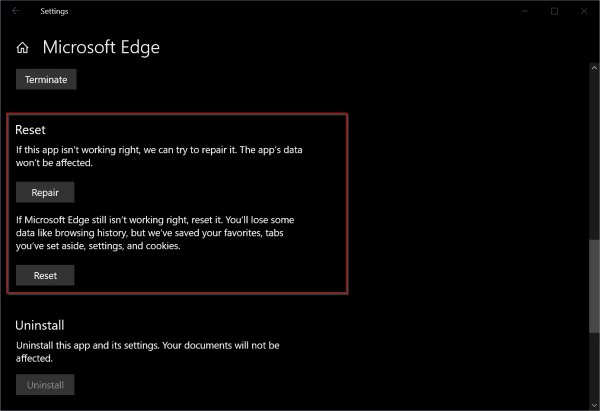
- In Windows Settings, go to Apps & features, then select the Edge app. Click on “Advanced Options.” Use the “Repair” and “Reset” options to bring Edge back to normal.
Note: If you use the “Reset” option, you will lose some data like browsing history, etc.
- Try to disable the “Superfetch” service. This service has been renamed as “SysMain” in the recent upgrades of Windows 10. Type “services.msc” to open the Services window. Please locate the “SysMain” label and double-click it. Click on “Stop.” Then select the “Startup type” as “Disabled.”
- Uninstall any other apps or programs that you think are interfering with Edge. For example, I deleted the Zapya desktop app on my Windows 10, and it reduced my CPU usage far better.
- It’s better to use SSD instead of HDD. Also use a 7th- or 8th-generation i7 processor with a high-end GPU.


Conclusion
The above steps may not reduce CPU usage, but you will likely find a solution. As a general case, we should wait until Microsoft improves the Edge engine. Otherwise, the best bet is to use Internet Explorer 11, which is also available on Windows 10.
But once you start using the Windows 10 Metro browser, the chances of leaving it due to high CPU usage are lower. In one forum a user tells his experience that using a high-end PC with an i7 processor and 16 GB of RAM could solve most of your problems. Also, with an SSD disk, it is far easier to read/write bytes from RAM to disk and thus improve Edge performance.

such a great article thank for sharing realy your blog is awesome in this blog i fond awesome article related to window thankd for share
@Ranjot. Thanks for commenting, your opinion.
The points you made are very useful and help for saving my time. Thank you for sharing these amazing ideas, really looking forward for your further blogs.
Thank you for sharing these tips. I also found very effective to disable the “Use hardware acceleration when available” option on Edge settings.
Reread your text above, paying attention to sentence structure and maintaining consistent tense within a sentence. A
Also, resetting Edge does more than remove browsing history. It also deletes shortcuts. You do users a disservice by suggesting this without a full understanding of the impact.
I mentioned in a note that you will lose browsing history etc. You should always backup your settings before you do a reset.