Blog

  • Kaspersky Security Network Review – Is it Worth Joining it?

    File-viruses are common that attack your computers and personal data. The number of viruses, as per Symantec, has crossed over a million in 2008. Computer users (even mobile users) are more aware of the nuisances of phishing attacks in 2013, compared to a decade earlier. About two-thirds are attacking Microsoft systems and hence need better protection. Mac OS and Unix are comparatively less prone to such attacks, which is why some tech geeks are more interested in buying their systems.

    Most people are willing to buy and install an Anti-Virus software for their computer system in 2014. But is it really worth buying a new one, when one comes pre-installed (like Windows Defender in 8.1) with existing operating systems? The answer is in using cloud-protection tools like Kaspersky Security Network.

    Though my experience shows that Windows Defender was quite successful in eliminating viruses, even when you attach software devices like USB drives, there lurks a problem of new viruses and malware. So I recently bough Kaspersky Anti-Virus 2014 for a meagre price of Rs. 300 in India.

    I will detail in another review about my experiences with KAV 2014. But one feature I really like, which makes Kaspersky and other cloud anti-virus software so powerful, is the KSN (Kaspersky Security Network).

    What is Kaspersky Security Network?

    According to the Kaspersky Lab, KSN is a knowledge-based service tool which uses the powerful knowledge-base of Kaspersky Labs and is useful in assigning authority to files, Internet sources and software.

    KSN makes detection to new threats lot quicker and aids in their quick removal. Its one of the best virus protection which you get free with almost all Kaspersky products.

    KSN consists of a large user base of Kaspersky products and any new threat on a particular user system is quickly shared with the other users of KSN. First of all, you should be willing to join this network of “smart-idiots” for better anti-virus protection.

    Is it Trust-worthy to Participate in Kaspersky Security Network?

    According to the parent website page, it guarantees that no personal data is gathered as part of gathering virus-statistics while submitting information to Kaspersky Lab. 

    The EULA agreement which shows details about the authenticity of this network can be read here.

    What are the Components that use KSN?

    The following are the components that use KSN, once you agree to participate in their network.

    • File Anti-Virus
    • Web Anti-Virus
    • Application Startup Control
    • Application Privilege Control
    • System Watcher
    • Scan tasks

    There is also an option to opt-out of the KSN community.

    Kaspersky Internet Security 2014 (3User) – Affiliate Link on Amazon

    How to Enable/Disable KSN participation in KAV 2014 User Interface?

    Just right-click the “Kaspersky icon” in the system tray and click on Settings. That will pop-up a window. Click on “Additonal” tab in the left pane and then Feedback in the right-pane.
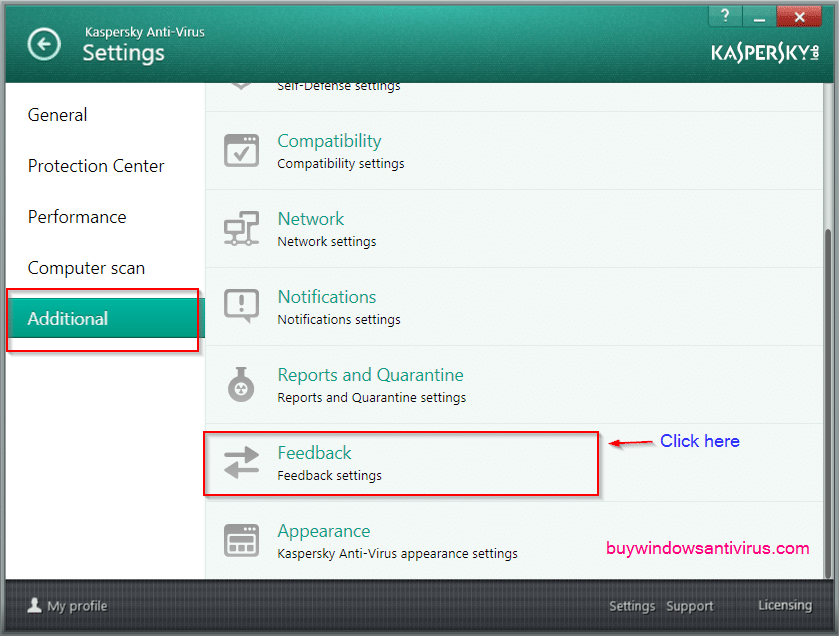
    kaspersky_anti_virus_2014_settings

    Once you click that button, you are taken to the KSN settings.
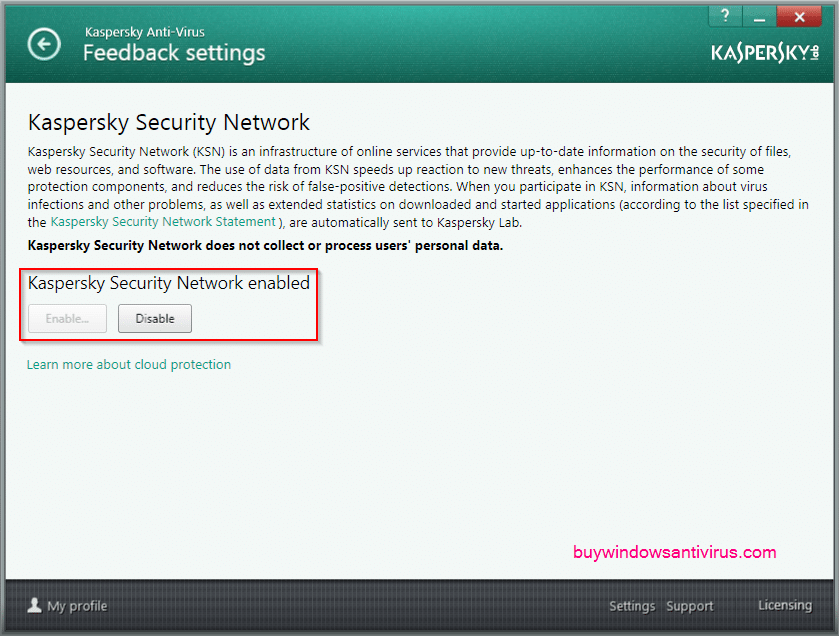
    ksn_settings

    Here you can opt-out/opt-in from the KSN community. As you can see above, its already enabled. You just need to click the Disable button to stop being part of the cloud-protection service. You can learn further things about Kaspersky online-protection using the link below it. 

    How to Check Reputation of a File in KSN?

    This is the significant use of this web-service. Just right-click a file and click on the option “Check reputation in KSN“.
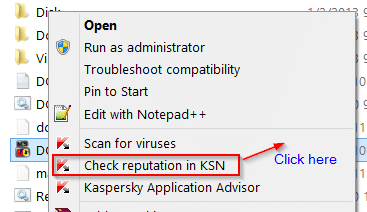
    check_reputation_file_ksn

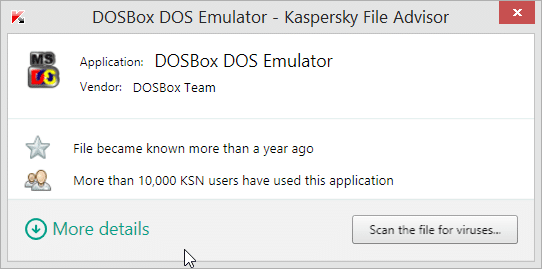
    This will check the file-status online and give a report something like this:
    kaspersky_file_advisor

    As you can see above, the details of the file are displayed. If its a well-known file, you can get the application name and vendor details. You will also know when the file became known (more like the file-age) and also how many KSN users have used this application.

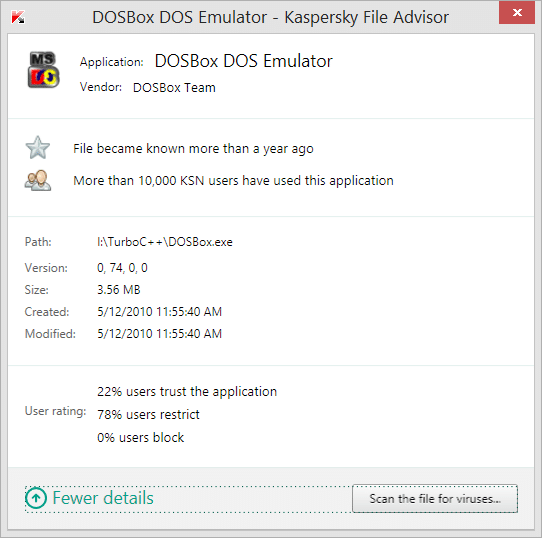
    For example, I checked the file DOSBox.exe for file-reputation with KSN. The details of the online-scan produced the above results. You can also get further details by clicking the “More details” button below.
    DOSBox-DOS-Emulator-Kaspersky-File-Advisor

    You will precise details like the path of the file, its version, size, when created and modified and most importantly the user-rating. For example, 22% users trust this application and 78% users restrict and 0% users block it.

    You can also scan the file for viruses, if you wish in the same pop-up window. This option gives more information about the reputation of the file using the “Kaspersky Security Scan” online. This also gives higher level of computer-protection from all online-threats.
  • Kaspersky Anti-Virus 2014 Review – Must Read Before you Buy

    Kaspersky Anti-Virus 2014 Review – Must Read Before you Buy

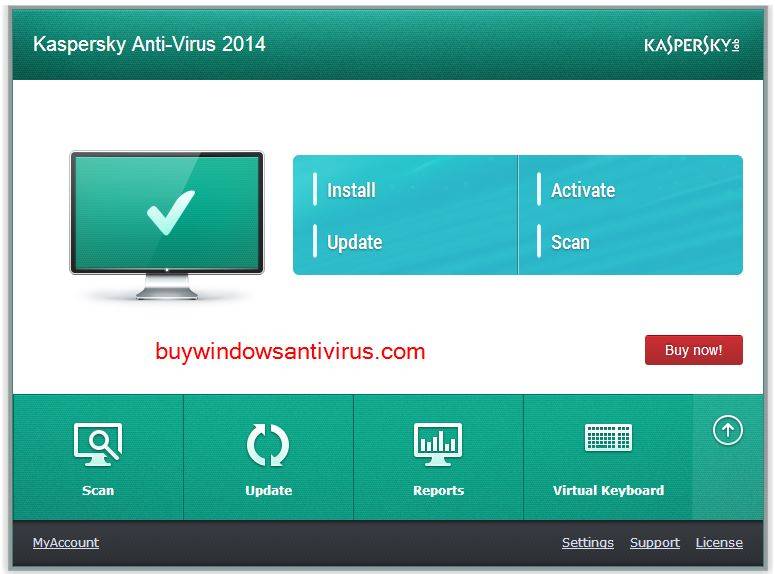
    With better UI and advanced disinfection at install time, Kaspersky Anti-Virus 2014 (KAV) gives computer-protection a new meaning. Cloud-assisted protection, Instant Safety Checks, Support for Windows 8.1, excellent rating from Independent labs are the killer features of this new drone. Customer ratings are good. With a 24/7 support from its help-desk, removing viruses, Trojans, worms, rootkits, spyware is as easy like fishing in a bowl.

    kaspersky_antivirus_2014

    System Requirements

    The simple hardware and software requirements make KAV-2014 installation a breezy task for the common user. One of the noted things is that it still works on Windows XP. But you need to have Service Pack 3 or higher for the 32 bit edition and SP2 or higher for the 64-bit version.

    You can make it work with even your Pentium-IV computer, as only 800 Mhz Processor is required with 512 MB RAM as minimum. If you are sandwiched between Windows 7 and XP with the Vista OS and you are asking Microsoft support whether KAV-2014 is supported? Yes it works for you, as well!!! The only difference in requirement is that you need a 1GHz or higher processor with minimum of 1 GB available RAM for 32 bit system or 2 GB RAM for 64 bit system.

    If you have ventured into the most popular OS (Windows 7) of Redmond, then there is no stopping in the system requirements. It works on the Windows 7 Starter, Home Basic, Home Premium, Professional and Ultimate. But some features only work on the 32-bit operating system.

    The KAV-2014 also supports the Windows 8 and 8.1 OS. It works both on the Pro and Enterprise versions. The hardware requirements are the same, just like the Windows 7 OS. You also need 480 MB free hard-disk space which is mainly required for storing anti-virus database.

    kaspersky_antivirus_2014_version_number

    The hardware requirements for the good-old Netbooks are little different. The Kaspersky home page gives more clear specifications on this requirement.

    • CPU: Intel Atom 1.6 GHz
    • RAM:  1 GB DDR2
    • Hard Disk: 160 GB
    • Video Card: Intel GMA950
    • Screen: 10.1 inch, 1024×600 widescreen
    • Operating System: Microsoft Windows XP Home Edition

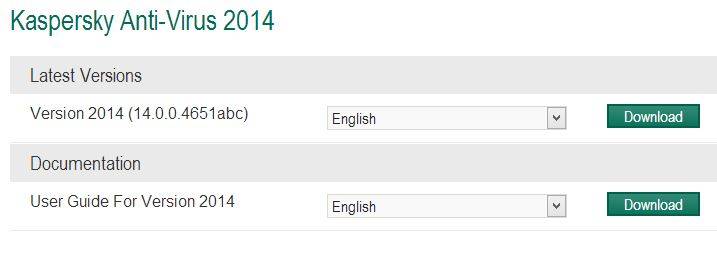
    The latest product version of KAV-2014 is 14.0.0.4651abc. (as on 5th Jan, 2014).

    Pros and Cons

    One of the needy features present in KAV-2014 is its ability to handle active malware. It has accurate phishing protection. Bonus tools are an added advantage. It has improved features like faster GUI speed, low resource consumption, refreshed GUI, easier installation and activation. A new feature in the form of anti-blocker functionality is also introduced.

    According to the AV-test, Kaspersky has the power to detect threats at a 100% success rate. This is only second to Bitdefender AntiVirus plus which scores more points than KAV-2014. It scores 100% on the protection and usability scores for Windows 7 performance on AV-test conducted by toptenreviews.com.

    The help and support from Kaspersky team is good. It has Live-chat, Email and Phone support which is essential in case of troubleshooting a problematic PC.

    Though its full of advantages KAV-2014 isn’t without any drawbacks. Sometimes its difficult to install KAV-2014 on malware-infested systems. On the hands-on test conducted by PCMag, it did not produce great results on the malware blocking test. A user complained that it had some performance and installation difficulties on Windows 8.1. The loading time on start-up was long and gave a false-positive security-risk during installation. The other AV like BitDefender and Free Panda are much quicker than KAV-2014.

    Features

    It has all the important features of the best 10 anti-virus in 2014, which some of them are missing. These include:

    • Anti-malware
    • Anti-virus
    • Anti-Trojan
    • Anti-Spyware
    • Anti-Worm
    • Anti-Rootkit
    • Anti-Phishing
    • Email scans
    • Bootable Rescue CD
    • Auto-clean infected files
    • Scan compressed files
    • Infected File Quarantine
    • Instant Messaging Protection
    • Registry Startup Protection
    • Gamer Mode
    • Auto USB Detect

    Price of KAV-2014

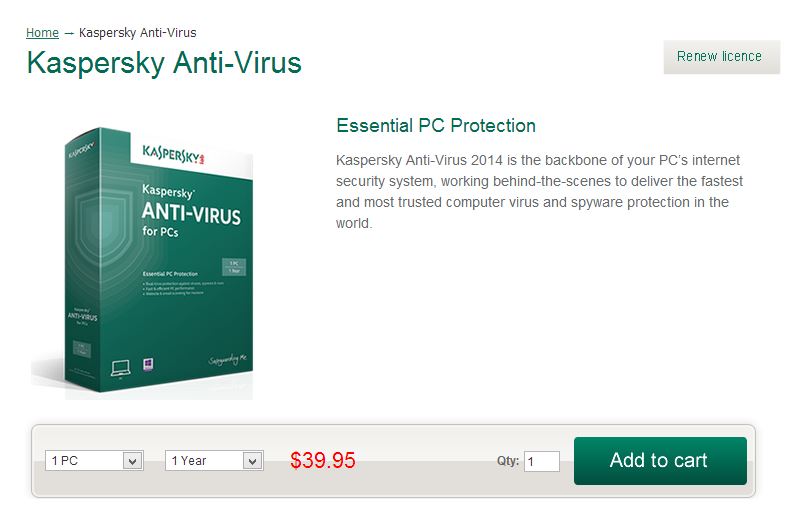
    The price of KAV-2014 in the Indian Market is around Rs 300. It costs $40 (approx) for 1PC – 1 Year Protection. The added advantage with Kaspersky just like some others, is that you can upgrade to the latest version next year with much less price than the original market price. If it’s in the UK, the price is £29.99 from the manufacturer himself. The price is the same in Australia, just like their US counter-parts. There is also 30% off if you renew your Kaspersky AV license. A FREE trial offer for 30 days should be sufficient to test this product.

    kav-2014-price

    So if you can find a good online shop in your country like eBay, Amazon etc, there will be discounts and the offer price will be much less.

     This video tests different web-links with Kaspersky Anti-Virus 2014 software. The power of web-protection and its ability to block malware can be seen in this video.

    Rating for Kaspersky AV -2014 from various websites

    kav-2014-cnet-review

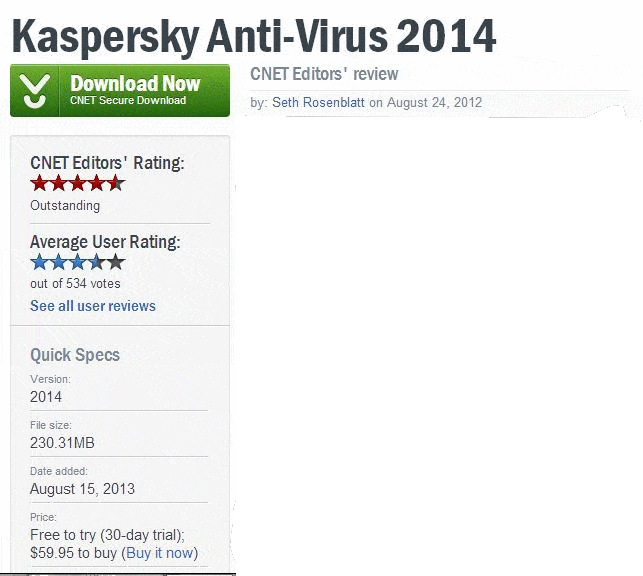
    There are many websites when I searched on Google that have given a good rating for KAV-2014. PCMag reviewer Neil J. Rubenking gave a rating of 4/5. On the US site of Kaspersky, it got a rating of 4.5/5 among 904 votes till date. On CNET, it got 3.5/5 out of 534 reviews.

    Conclusion

    But as a bottom-line, it is recommended by many review websites to buy it. The reason is its cheap price compared to the costly BitDefender AV and protects your computer well from latest and common malware attacks.

  • Top 5 Best Mouse for Excel in 2022 – Logitech and Microsoft

    Top 5 Best Mouse for Excel in 2022 – Logitech and Microsoft

    There may be tons of reasons in choosing a mouse for your Windows operating system!

    But if you are more of an Excel user, you would definitely look for a mouse that suits your spread-sheet application tasks.

    The best mice for excel in Logitech brand are as following.

    •  Marathon Mouse M705
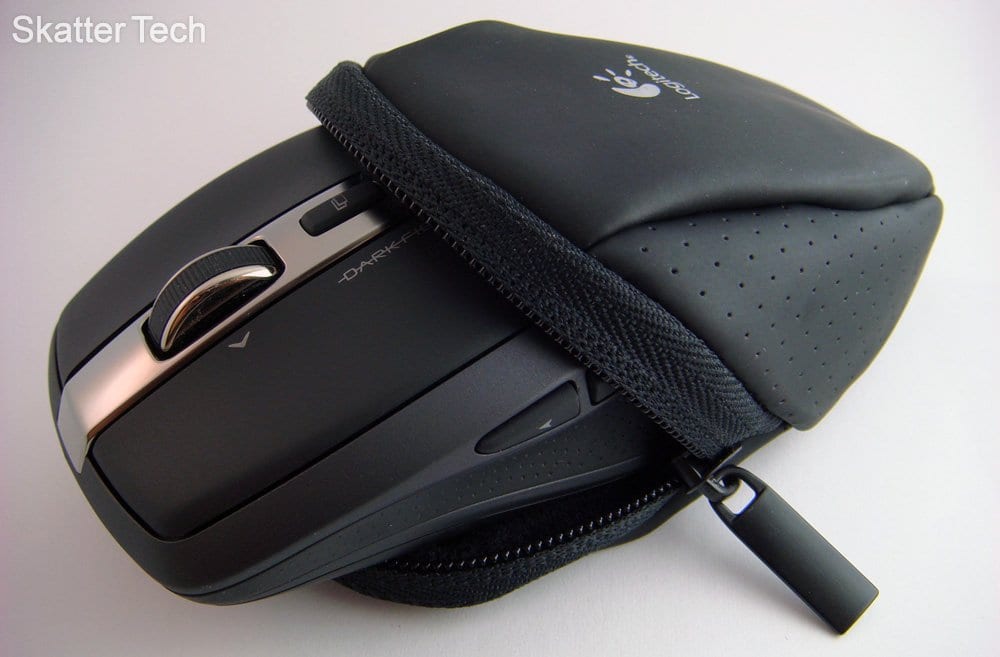
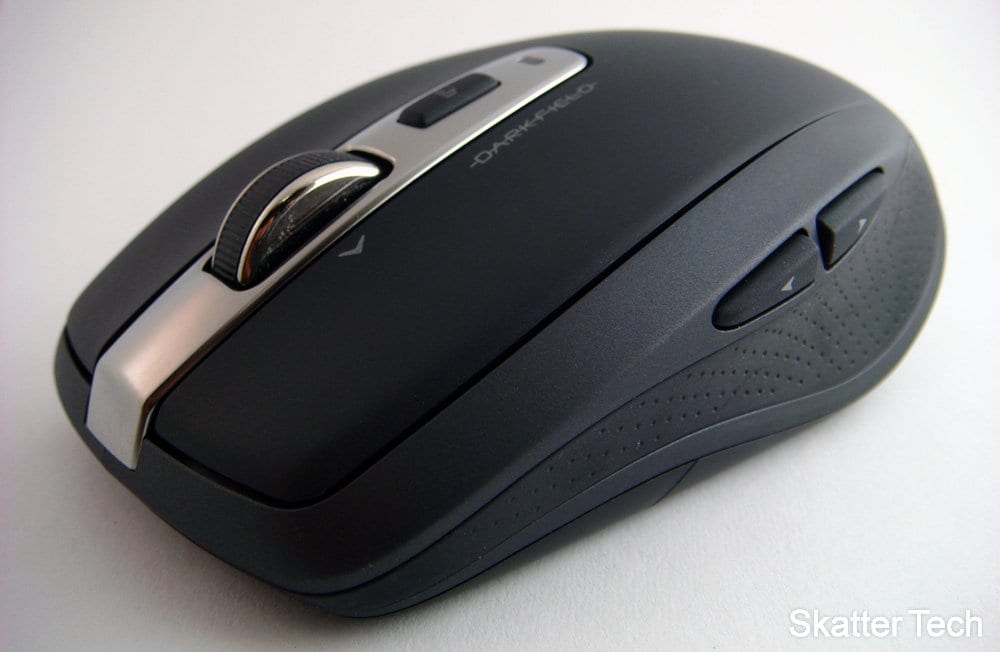
    •  Anywhere Mouse MX
    •  Performance Mouse MX

    The other day I was searching an Logitech forum, and an user came up with these astonishing needs.

    The mouse should fulfill the basic requirements, like a nano usb and be wireless, be very precise at doing regular tasks like getting to cells in spreadsheets and selecting points on charts, attach programmable tasks to buttons on the mouse and should be easy enough to move between excel tabs.

    Out of these three, the M705 was accepted by the user.

    But all the 3 mice have unifying receiver,  advanced 2.4 GHz wireless connections, hyper-fast scrolling, can be programmed to use Logitech SetPoint Software,  forward and backward button at the thumb-side for assigning keystrokes.

    logitech_marathon_mouse_m705

    Logitech Marathon Mouse M705

    The Logitech Corded Mouse M500 is a more affordable substitute for users who more frequently use Office apps, like Excel and Word.

    The price of this mouse is around £20.

    The 3 most important features of this mouse are a laser sensor, the scroll which is with or without notches and 2 buttons to facilitate internet browsing  | Buy Now

    Logitech_Anywhere_Mouse_MX 

    Logitech Anywhere Mouse MX

    The Anywhere MX is regarded as the best wireless mouse, according to the “Wirecutter.com“.

    This works out really well as a full-on desktop mouse and has all the features of a solid general-purpose mouse.

    $50 best Excel mouse. Travel mice.

    good mouse for excel from logitech

    The ergonomics are simple and symmetrical.

    There have been changes from the 2012 version and its matte surface has changed to a more glossier plastic.

    But there are little flaws like the lack of a dedicated middle mouse button and some battery issues . | Buy Now

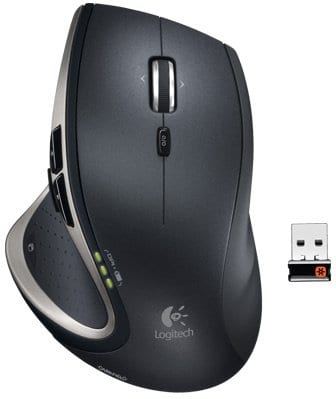
    Logitech Performance Mouse MX

    According to “Engadget”, it gives a critic score of 8.1.

    Even other review sites like CNET, Gizmodo, PCMag, Digital Trends have good reviews about this mouse.

    It is a laser-type, right-handed, scrolling device with 9 buttons.

    Connected using wireless with the help of RF/Radio signals.

    Users have given a score of 9.4 and 9.3 in ergonomics and design respectively. | Buy Now

    best mouse for excel from logitech

    You can see the specs here.

    The highlights are it has an “Under Thumb button“, which is a natural position for a button.

    Advantages of Logitech Performance Mouse MX

    • No thumb motion required.
    • Just press the button and it’s good to go.
    • One can charge it using USB cable.
    • No battery required.
    • Connected wirelessly using 8mm USB receiver.
    • Battery life is very good.

    You can use it for 14 days with an average of 8-12 hours per day, per charge .

    Conclusion

    Multiple devices sync to one USB, comfortable form factor, high precision, smooth scroll wheel, unified technology are the significant features of Marathon Mouse 705, according to PCMag.

    Usage by right-handed persons only, is its disadvantage.

    The M705 as a gaming mouse can track speeds up to 3200 dpi, scroll-wheel can move horizontally through pages, 3.7 out of 5 rating on the Logitech website and plug-n-play feature.

    The horizontal scroll makes it an ideal choice for one of the best mouse for excel which makes it move across large number of columns.

    The Microsoft Sculpt Touch Mouse  costs around $50. It is an apt choice for Microsoft Excel usage

    Vertical and horizontal scroll. Mac compatible.

    The BlueTrack technology yields smooth tracking.

    For the touch enabled and tiled interface of Windows 11 or 10 or 8.1 Metro interface, this compact wireless mouse is more useful.

    Note: Some of the links above are Amazon affiliate links. With no additional cost incurred for the user, I will get a small commission if you buy from the link above.

  • [Tutorial] – A Complete Review on Kaspersky Rescue Disk 10 with Pros and Cons

    When computers are infected with hard-to-remove viruses, then we need to boot the system from a rescue disk. The best way to remove trojans, viruses and malware is when they are in a weak state. Booting into “safe mode” can be one of the options of removing viruses.

    Another way of eliminating viruses is by checking the malware load points for signs of infections. Once your PC is disinfected from malware you need to regain control of your Task Manager, Folder Options menu in Windows and other system changes by resetting them.

    Why do you need Kaspersky Rescue Disk ?

    Kaspersky Antivirus and Kaspersky Internet Security are anti-virus and internet security products developed by Kaspersky Lab for your computer protection and internet safety. The developer also released another product which can be used for emergency cases of virus removal.

    Kaspersky Rescue Disk is another form of virus removal tool that can be burned on a CD/DVD or removable thumb (USB) drive which can be launched anytime when needed.  A regular anti-virus program sometimes fails to remove the dreaded viruses and for critical situations like these, Kaspersky Rescue Disk is needed.

    [Some affiliate links are provided in this post which will earn me some commission if you buy. No other hidden costs are involved and you will not be charged anything extra if you buy through these links]

    Sometimes the viruses/malware start-up when the system boots up. Theses cannot be removed by normal anti-virus programs, though not totally impossible. In such cases, booting from a rescue disk can alienate such un-removable viruses.

    Download Kaspersky Rescue Disk 10

    How does Kaspersky Rescue Disk Works?

    Before we can use any type of CD/DVD/USB drive, it’s best to set the system to boot up from Kaspersky Rescue Disk which can be used to restart the system and fix the virus problems.

    Once the rescue disk is inserted, you will be asked to select which objects, like disk boot sector, local hard drive or hidden start up objects, would you like to process with Kaspersky. It will scan all the selected items and deliver a complete report on viruses, trojans, spyware etc. which are detected on the system.

    Kaspersky Rescue Disk then facilitates you to quarantine, disinfect or remove all those deep-rooted infections so you can be sure that your system is virus-clean and is running fast and smooth as normal it would be.

    What are the Pros of using it?

    The additional advantage with Kaspersky Rescue disk is that you can configure settings for your computer’s security level, scanning, optimization and more. You can also set regular updates and notifications. This will automatically detect or modify system errors, obsolete databases and others.

    It is highly recommended that you update your anti-virus databases of Kaspersky Rescue Disk 10 (which is the latest version) to get safety-protection for new viruses, spyware and malware.

    How to Remove Viruses from your Computer using Kaspersky Rescue Disk?

    The first thing in this process, is to download the latest version of Kaspersky Rescue Disk and use any of your favorite CD/DVD/USB burning application to burn the ISO image file to an optical disc or external thumb drive.

    How to Use a USB Drive to load Kaspersky Rescue Disk?

    • In order to use a USB device, you have to first make sure that the device is FAT or FAT32 formatted.
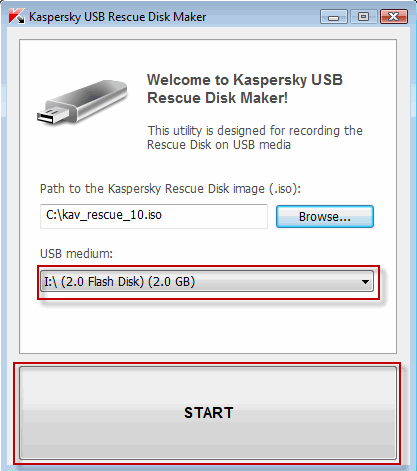
    • Download a special utility Kaspersky USB Rescue Disk Maker (rescue2usb.exe).
    • On the USB Rescue Disk Maker window, click Browse… and select the iso image of Rescue Disk.
    • Select the required USB device from the drop-down menu. and click on the big START button.
    • Wait until the process is complete.
    Install Kaspersky Rescue Disk on a USB

    How to Clean an Infected Computer?

    Insert the USB device containing the rescue disk software and boot from it. You may need to change your BIOS options to make this work.

    A message appears asking you to press any key to enter the menu. You need to do this in the next 10 seconds.

    A menu appears which has options to choose whether you want a Graphical mode or Textual mode. Generally the Graphic mode is simpler and easy to understand.

    What are the further Options?

    You then need to accept the End User License Agreeement to move forward. After than it scan your computer for connected devices and searches for file systems of your local and external disks.

    Note:

    If you are in sleep mode or hibernate mode or if the operation has been completed incorrectly, you will be asked to mount the file system or restart the computer.

    In order to boot from hard drive and shut down the operating system correctly, choose the option Restart computer. Other options like Continue, Skip will cause a high risk of file system damage. 

    Now you can see the full working status of Rescue Disk. The next thing to do is to switch to the My Update Center tab and download the latest anti-virus definitions as already told before.

    After updating to the latest file definitions, switch to Objects Scan tab. Select the drives you want to scan, and click the Start Objects Scan button. It will start scanning and clean any viruses it finds.

    If the rescue disk scanning finds any virus, you will have the option to clean or quarantine files.  There are finer tools included with Kaspersky Rescue Disk, which can be accessed by right-clicking the icon on the task bar, to do further research.

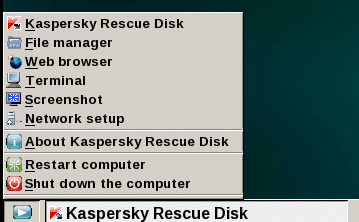
    Utilites included are a file manager, fully working web browser, command line (Terminal), screenshot tool and network setup.

    kaspersky_rescue_disk_tools

    [Image Credit : mytechguide.org]

    User Reviews on Kaspersky Rescue Disk Functioning – Pros and Cons

    These are some users comments on the working nature and troubleshooting performance of Kaspersky Rescue disk. There are some advantages and disadvantages as mentioned from 16 reviews from 2009 to 2013.

    • One ransom virus locked the UI and it was important to look into the system or C: drive. The user complaints that the rescue disk couldn’t recognize the C: drive.
    • One user tried running from a bootable USB device. He got block-read errors after the boot. But the rescue disk worked flawlessly when booted from a CD-ROM.
    • Another user complains the lack of options for different keyboard layouts, as the default option is the US keyboard. Also to use the Windows Unlocker tool, one has to use the Bash terminal. So he requests for a GUI option.
    • Another user’s system showed an error –  ata2:SRST failed (errno 16).  This caused – bootable device not found.
    • Sometimes, the cursor movements are too fast using the current drivers.  User Profile App Data folderis the place where the rescue disk files are generally kept, which may cause problems. The root directory, for e.g C:\KAV-RescueDisk, is the right place where these files are to be kept for rectification of this problem.
    • For another user, the process of scanning took more than 48 hours.
    • There were some issues with USB mice for another user and pointing device on notebooks.
    • Another user had a rogue virus that removed Microsoft Security Essentials anti-virus.  It held the computer hostage to force him to buy some unfamiliar virus scan software. But Kaspersky Rescue disk was able to scan the system and delete the virus files.
    • The rescue disk was able to pick up malware that escaped the Windows Malicious Software Removal tool and MS Security Essentials anti-virus software.
  • [Solved] – Fix Office 2010 SP2 Update (KB2687455) Failure Problems

    [Solved] – Fix Office 2010 SP2 Update (KB2687455) Failure Problems

    Recently Microsoft released the Service Pack 2 update for Office 2010. I earlier wrote an article giving manual links to download this update. Most of the times running Windows update is sufficient enough to renew your 32-bit or 64-bit version of Office 2010 with this KB2687455 update. But sometimes you may face problems in installing this update and I’m here to help in such a scenario.

    Read More : Fix BOOTMGR is Missing Error During or After Windows 7 Install – Causes and Solutions

    If you are on Windows XP and failed to do this update, you can do a few things before doing the last solution. You can apply the Microsoft Automatic Fix (Mr.Fix) for Office products upgrade. One user found 4 registry commands to implement in fixing this problem in the concerned knowledge article. Suppose the KB2687455 update fails then you can follow this process.

    • Download the Office 2010 SP2 update manually from the Microsoft page. Links are already given in my earlier post.
    • Check whether you are running 32-bit or 64-bit version of Office 2010. Here is the link to check.
    • Try updating in a clean boot state. What is “clean boot”? In order to troubleshoot error messages and other issues you can start your Windows OS (Vista/7/8) by using minimal set of drivers and startup programs. This type of startup is known as “clean boot”. Here is a link on how to do it.
    • Office updates sometimes can fail if the update files are looking for the original installation source files of the Office Product. Downloading the full installation file and the updates can solve some problems. You can also put the installation source files on the installation drive or network source where the update tries to search.

    Ultimate Solution to all Problems of Office 2010 SP2 UPDATE Installation:

    If everything else fails it is better to perform a repair install. After researching several problems on the forums, blogs and microsoft support groups, I find this solution clearing most of the Office 2010 SP2 installation problems.

    Sometimes Intel Express chipset drive updates can interfere with Office 2010 SP2 update. Better install your Office update without the Intel chipset update.

    Sometimes you may have problems with Language settings. You administrative account language settings may be in other language then English. Changing temporarily to English and then updating may solve the problem.

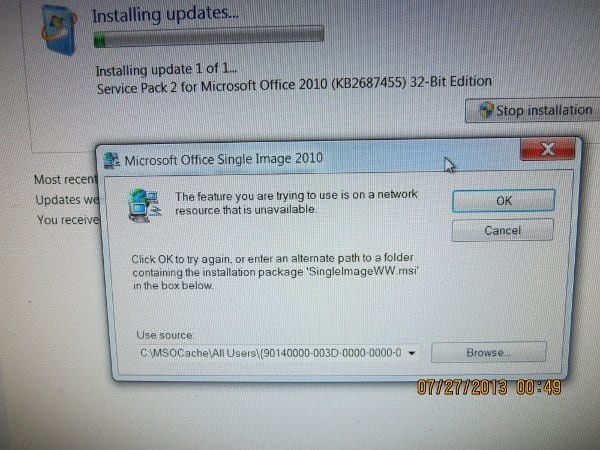
    Sometimes deleting your MSOCache can cause these problems. Using the installation media in this case to find the MSOCache files may sometimes not work with Office 2010 SP2. So its better to retain the MSOCache after installing MS Office. This is generally advised in many threads and forums.

    MSOCache_failure_Office_2010_SP2_update

    How to Perform a Repair Install ?

    This is very easy.

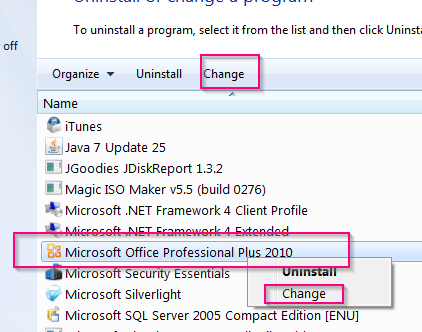
    • Goto Control Panel > Programs and Features. (View by small icons)
    • Find and Select your Office 2010 product.

    perform_repair_install_Office_2010

    • Right-click and from the context menu select “Change”. You can also click the same label at the top. This will pop-up the following window.

    repair_office_2010_screen

    • Select “Repair” and click the Continue button.
    • During the process it may ask the location of some source files present on Office 2010 installation media.
    • When finished, reboot your machine.

    That should complete the repair process. You are done!

    There are also some known issues detailed by Microsoft when you install Office 2010 SP2 and Sharepoint 2010 SP2. The solutions to these issues are detailed in this article.

    Some Other Office 2010 SP2 Update Problems (KB2687455) are listed below from Microsoft forums, blogs and communities.

    Service Pack 2 KB2687455 due to failure code 80070643. Automatic Trouble Shooter unable to fix problem. Suggestions?

    Microsoft Windows Update failed Error Code: 0xB56 for Office 2010 Service Pack 2 for
    Microsoft Office

    i already downloaded the update, but it does not want to complete the installation, keep on getting error 8024002D please help!

    I can’t download the update either, I keep getting error code 80070652. I have tried over 20 times to download this update. PLEASE HELP !!!

    I also have a Windows 7, 64 bit machine. My original installation was without SP1 which had been added by Windows Update. I used a 2010 plus SP1 version and ran the .exe when it came to the question of what was needed I selected Repair. After this was complete I then retried the Windows Update to update to SP2. This worked.

    When I try to activate the suite using any of the installed applications (word, excel, outlook or powepoint) I get the error “An unspecified error has occurred. Your request cannot be processed at this time. Please try again later. (0x80070190)”. If I repair the install then try the activation again it works right away.

    When I went and ran the install, I got the dialog box as shown in Picture #2. For reference, the full path to where the file “ProPlusWW.msi” is suppose to be is

    I have no idea what “SingleImageWW.msi” is..

    Sources : answers.microsoft.com, social.technet.windows.microsoft.com, dslreports.com

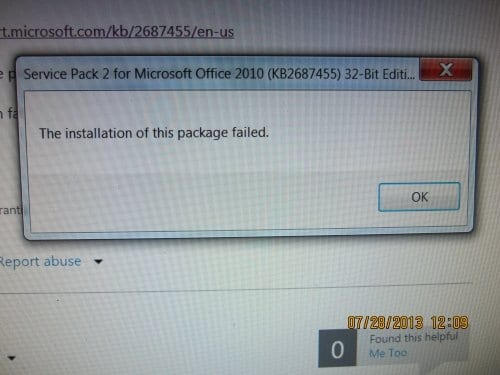
    Office_2010_SP2_installation_failed

    Office_2010_SP2_for_64bit_edition_failed

    In conclusion, I’d like to deduce from reading all the above forums and threads that “repair install of Office 2010” will maximum solve your SP2 update problems. Sometimes you need to have your source for the Office 2010 installation media.

    If you still face any problem relating to Office 2010 SP2 update (KB2687455 failing), please let me know in the comments. I spent almost half-a-day researching this topic, so sharing this post and images on your social network would be useful. You can also subscribe to my Feedburner Feed or Mailchimp Weekly Newsletter.

  • Office 2010 SP2 update – Manual Download Links (July 2013)

    Office 2010 SP2 update – Manual Download Links (July 2013)

    Talking about updates, Microsoft releases SP1, SP2, SP3 for its products. Recently it released the Office 2010 SP2 update. If you are using a genuine OS from Windows, then these updates are automatically installed when you click on the Windows Update icon in the control panel.

    Related – KB2687455 Failure Problem – Office 2010 SP2 Update (Solution)

    But many of the users in Phillipines, Malaysia and India who couldn’t afford a genuine version resort to a pirated version of Office products. For this reason or any other reason, if you want to install the updates for Office 2010, these are the download links.

    office_2010_sp2_download

    What are the File Names and Sizes of Office 2010 updates?

    1. officesp2010-kb2687455-fullfile-x86-en-us.exe – 638.2 MB
    2. officesp2010-kb2687455-fullfile-x64-en-us.exe – 730.4 MB
    3. officesuite2010sp1-kb2460049-x86-fullfile-en-us.exe – 362 MB
    4. officesuite2010sp1-kb2460049-x64-fullfile-en-us.exe – 439.8 MB

    As you can observe the update file sizes have increased from SP1 to SP2. The 32 bit version update increased from 362 MB to 640 MB. Similarly the 64 bit based update increased from 440 MB to 740 MB. The support articles are also mentioned above.

    Read More : Windows 7 64 bit BSOD Errors – Some Solutions

    What are the System Requirements for the SP2 update?

    The following are operating systems that can be updated with Service Pack 2 for Office 2010.

    • Windows 7
    • Windows 8
    • Windows Server 2003
    • Windows Vista
    • Windows XP

    What are the fixes included in Office 2010 SP2 update?

    This service pack basically includes the following 2 types of fixes.

    • Previously unreleased fixes that are included in this service pack. In addition to general product fixes, these fixes include improvements in stability, performance, and security.
    • All the public updates that were released through May 2013, and all the cumulative updates that were released through April 2013.

    If you are interested in buying this product, here is my affiliate link from Amazon using which you can download the Home & Student version of Office 2010 for PC. The contents include a disc.

    If you want to see the introduction and features of Office 2010, here is an YouTube video, that comes from Windows7Forums.com

    I hope that using the above resources should be very easy updating your Office 2010 product. If you face any problem after SP2 UPDATE, please let me know in the comments.