

In the 2020 PC world, only 2 OSs are competing for the top spot. Windows 10 and Windows 7. But which gives better benchmarks in terms of performance, like RAM, memory, and gaming?
During the initial release of Windows 10 of 2015, it was lagging in many of the speed aspects as compared to Windows 7.
But in 2020, there has been tremendous improvement in terms of Windows updates, Microsoft Defender, security, operations, support for the Unix kernel, and fewer viruses.
Unless you are in the Insiders, you may receive unstable builds. Windows 10 is fast enough in doing normal functions like opening files, opening of different apps, moving from one window to another, etc.
Since Windows 7 is no longer supported now, you have only one OS that gets the real updates—Windows 10. Though Windows 8.1 is still supported, it has a small share of the PC market.
For example, the HTC One for Windows is faring better than Android, not only in battery life, but also is faster. Furthermore, IE10 and IE11 are having better JavaScript experiences in Windows 10.
Windows 7 vs 8.1 vs 10: Resource Usage and Performance in 2015
PCWizKids did some performance tests to compare Windows 7 vs. Windows 8.1 vs. Windows 10 Technical Preview in memory usage, gaming, and FPS. He initially used a dual-boot setup with Windows 8.1 and Windows 10 technical preview but later added Windows 7 to compare the three operating systems.
The system configuration was as follows:
- Processor – AMD A10-6700 (Richland)
- Motherboard – ASUSTek Model F285-V PRO
- Memory: 4 GB.
- Graphics Card—NVidia GeForce GT 740
- Hard Disk – Minimal
Windows 7 vs 8.1 vs 10 RAM Usage
Windows 7 was using around 800 MB of memory, which is about 20% of the total memory for the normal processes.
10 and 8.1 used about 17% of the memory, which comes to around 700 MB.
Though it’s very early to compare the 10 technical preview memory usages, 17% is better than 20%.
So with fewer resources, it can run the processes, while the remaining resources can be used for gaming and other memory-intensive programs.
The Asus T100 machine running Windows 10 used less idle RAM than when it ran Windows 8.1 (Mar. 2015).
It depends on various factors, including RAM size and the beta build version. For example, v10041 had problems with RAM usage compared to v10130.
[Source: http://www.tenforums.com/general-discussion/5007-windows-10-memory-usage-asus-t100.html]
But there are also contrary reports about RAM usage on the same forum. In another forum post (recently in May 2015), users found that Win 10 was using 90% RAM.
But in another post, a user posted a comparison of RAM usage for Windows 10 vs Windows 8.1.
He didn’t find much difference. (Feb. 2015). But the noticeable difference is that Windows 10 has more free memory, instead of standby memory.

[Image Source: tenforums.com]
Windows 7 vs 8.1 vs 10 BenchMark Tests




The AIDA64 Cache & Memory Benchmark tests produced the following results.
Windows 10 copy memory bandwidth usage was slightly higher than the others.
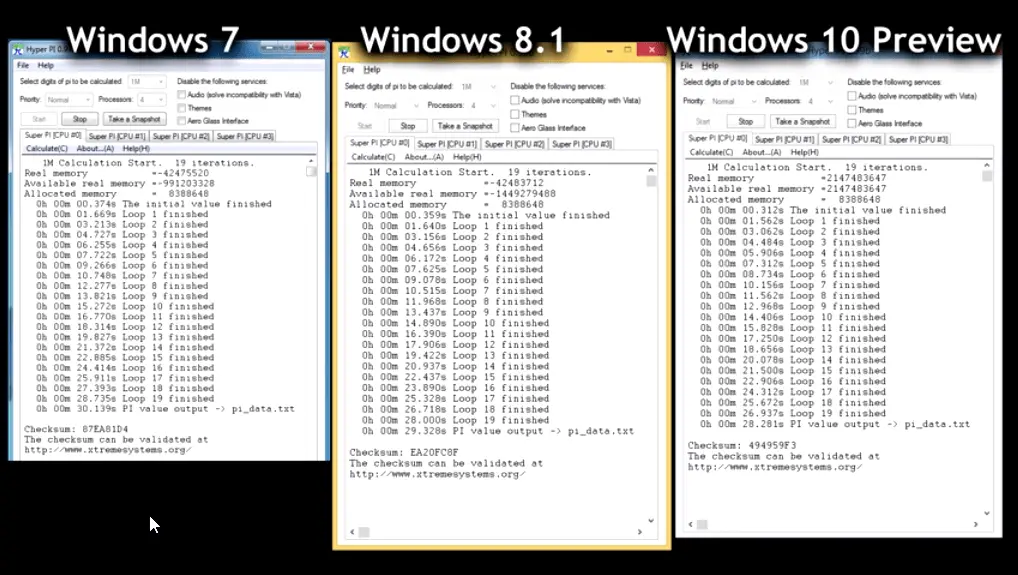
With driver improvements we can see better benefits. Windows 10 was the winner in the competition to calculate Pi to 1 million decimal places.
It took 28 seconds to complete, while Windows 8.1 took 29 seconds and Windows 7 took 30 seconds.
On the CPU Queen Scores, Windows 10 achieved a higher score of 21,203.
The other two OS scored 21168 and 21079, respectively.
The overall system performance test on PCMark 8 Home tests indicated that Windows 7 and 8 scored 2743 points.
But Windows 10 achieved a better score of 2768.
In 3DMark, doing the SkyDiver test, Windows 7 scored 6544, while Windows 8.1 scored a bit less (because of the physics score, probably) at 6483.
But Windows 10 made improvements over 8.x with 6510.
Though 7 outscored all three, it can be seen that 10 had improvements, and we can see better scores in the final versions.
The drivers are identical in all three scenarios.
In the Unigine Heaven Benchmark 4.0 tests, there was not much difference in the average FPS score.
The FPS speed was 20 in Windows 7, while in Windows 8.1 and 10, there was only a half-frame-second difference.
The FPS scores were also almost identical at around 503. With better driver improvements, we can see more benefits.
Windows 10 vs 8.1 vs 7 Gaming Performance
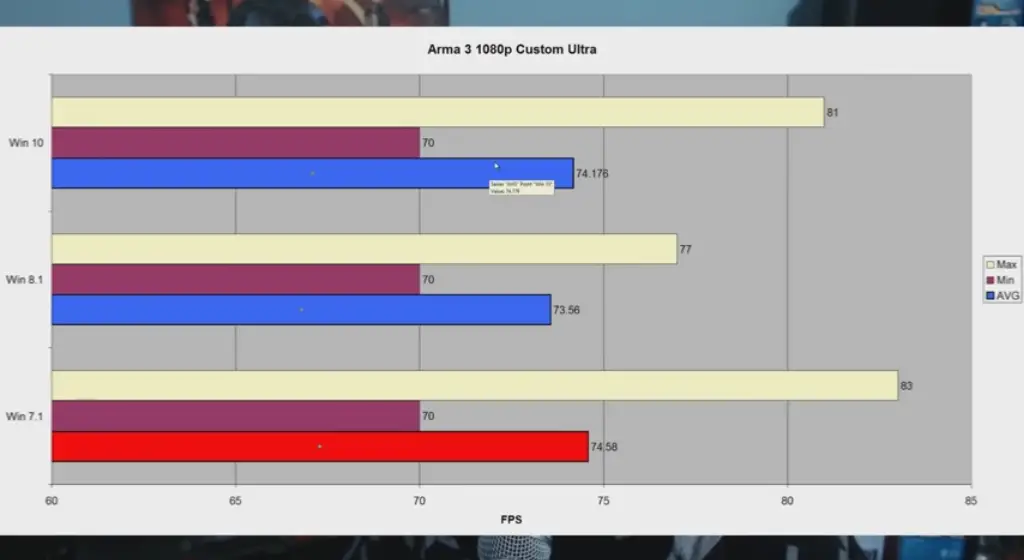
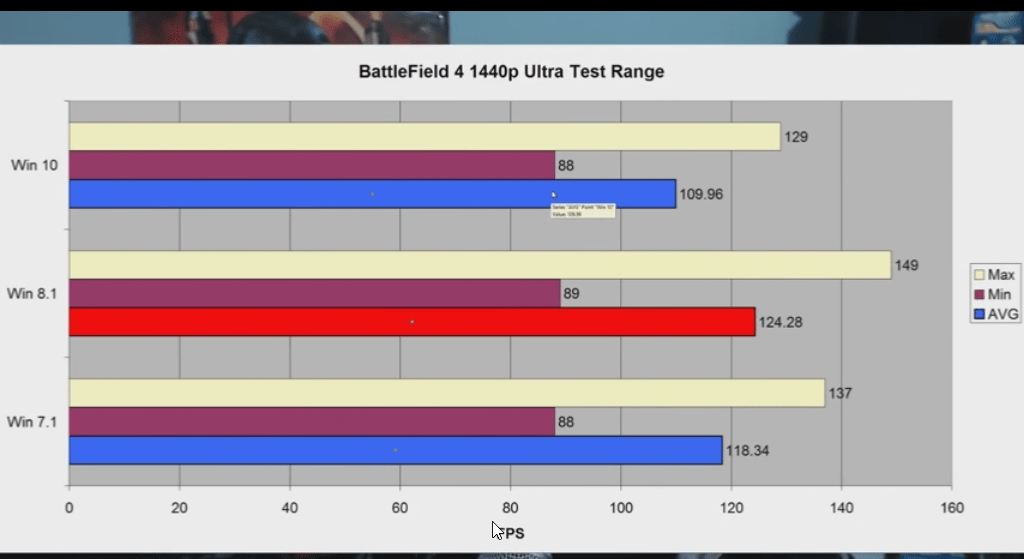
Tech YES City conducted benchmark comparisons of three commonly used games on Windows 7, Windows 8.1, and the Windows 10 technical preview.
Specs:
- 5.820k @ 4.2ghz / 3.3ghz cache ratio.
- DDR4 memory at 2133 MHz default speed.
- GTX 970 at default speeds.
- X99S SLI Plus MSI Motherboard
The following games and software were tested. (Battlefield 4 / Skyrim / Arma 3) / Adobe CS6 Premiere Pro benchmark (rendering times) and a startup (boot) time test.
The final conclusion was that all three games fared equally well on all three OSes.
But there were minor advantages with two of the games in Windows 8.1.
But with DirectX 12 coming soon, Windows 10 may show some significant improvements. Crysis 3 didn’t work on Windows 10, but the performance score was the same in 7 and 8.1.
“Ocaholic” also did a vast comparison of some other games.
Test Setup
| Motherboard |
|
| CPU |
|
| Memory |
|
| Graphics Cards |
|
| Drivers |
|
| Games and OS |
|
| System Drive |
|
| PSU |
|
In the Unigine Heaven 4.0 Extreme Present benchmark test, Windows 7 scored a higher FPS rate with different resolutions.
For a 1080p mode, the average FPS was 66.7 in Windows 7, while it was 66.0 and 65.2 in Windows 10 and 8.1, respectively.
The Battlefield 4 performance tests showed a neck-and-neck comparison within all three OSes.
One did well with one resolution, and the average FPS rates were similar. Windows 10 scored an average FPS rate of 88.72 with 1080p mode.
In the Watch Dogs benchmark comparison, Windows 8.1 was almost the clear winner with different resolution modes of 1080p, 1440p, and 2160p.
It gave around 2 to 6% improvement scores in the average FPS rates.

Tomb Raider also showed that Windows 8.1 is better at FPS rates.
Though the difference is only marginal, it can be seen that games go well with 8.1 OS.
The average FPS rates for Windows 10 were 53.10, 33.00, and 14.20 in different resolution modes.
The website also conducted power consumption tests.
With idle mode as the parameter, Windows 10 was using less power compared to 8.1 and 7.
It used only 68 watts of power, 5% less compared to Windows 7.
The FurMark benchmark tests indicated that Windows 10 used 221 watts, only a 2% decrease compared to Windows 7.
Anyhow, you can see that if you want normal performance of games with little power usage, then Windows 10 is the winner.
Many a time, Windows 7 and 8.1 showed a minor performance increase in the game’s average FPS rates, but they can outscore others.

Thanks for the review, its a good read, ive just installed win 10 and im just installing battlefield 4 now so going to be interesting to see how it compares to win 7, I know it very early day but im liking it so far i think its a big improvement on win8
Apple development environment – $99.00
Windows dev. – over $1000.00
I’m on the fence because of that.
Apple Development Env = $99.00
MACBOOK PRO: $8,000
A superb Dell with Windows OS: 2,000.00
Windows Dev Kit: 50.00
I can’t agree with you regaring just COST.
Where do you get $8,000?!
You can get a good Mac $1,500. It’s what I use as my dev laptop, and its perfectly fine.
8 years experience with a team of mac users showed me that you can’t compare Macs with PCs. They All went back to the store frequently for repairs. Memory upgrades were very expensive and the “dev” was limited compared to what’s available on Windows. Worse part is apple uses a lot of parts that PCs use yet can’t get more then 11% of sales yearly. Shall I go on ?
>>Windows dev. – over $1000.00
You can get Visual Studio for free and do all the Windows development you want.
A Windows app that you develop will have roughly 5-10 times the number of available users that IOS will.
Oh, and with Visual Studio you can develop apps in parallel for IOS and Android.
I’ll be sticking to WIndows
Disk space for each Operating system is missing from the article. This is important to me because my next laptop will have an SSD. I expect that information is not available yet.
Many ISSUES with this comparison.
1) 17% is NOT “better” than 20%. – the purpose of system memory is to buffer programs and data for quick access. You want as much as possible used until that becomes an issue in itself. Windows can also REMOVE programs and data to free up space when needed so trying to compare this is rather POINTLESS, at least in this fashion.
2) CPU performance – W10 isn’t even running everything that the final version will which can easily account for the small difference here. It’s too soon to declare a “winner.”
3) Video – Is Windows 10 using the same EXACT driver version? (I wasn’t sure what you mean by “identical”; was that the driver or the scenarios tested?). Also I had issues with some games and not with others so trying to analyze gaming is pretty difficult.
@Jeffrey: As you know Windows 10 is still in beta stage. So it’s hard to come out with comparisons so early. So this review is only at an abstract level.
With what app did you write captions on screenshots?
@Arty: Those images were taken from Google. But you can use Snagit or Greenshot if you want.
how did you manage to run arma 3 with that fps using a GTX 740 and 4gb of ram on 1080P !!?!?!?!, i think this is a big fat lie
@tomas: The facts in this article are taken from different YouTube videos and websites. So if you want I can find the sources little later.
Most writers take citations as they accumulate the resource material. You guys are just pathetic.
This was painful to read. Learn how to write.
I totally agree, but was reluctant to reply as such. But this is really typical of most articles I read these days from all sources. Proper English usage is on the decline from both native-born and foreign speakers.
But regardless, thanks to the author for his work putting the articles together.
Bob
Thanks for the efforts, gives me something to think about as 10 is readied for the public.
Sorry about people putting you down for trying to help us all out, that’s pretty weird. I found your article informative.
@Scot: Thanks for your feedback. You just understood my hardwork in writing such an article before the release of Windows 10.
What about stability?
Windows 10 is only TP. So this issue is to be addressed only after the final release. But the current builds are not perfect or imperfect. It depends a lot on program, app usage and gaming. So better wait for the final release and then we can comment on it.
I must say that there won’t be any real difference probably… especially between Windows 8.1 and Windows 10… if you are thinking to upgrade then you probably should do that because you like the features of new Windows 10.
Thanks for all your useful information, but about the way W10 saves disk space by reducing its footprint, I don’t really understand this “So users with old devices or SSDs are at a loss, due to the current indows 10 system requirements.”
Does this mean that SSD is not advised because their lifetime will be reduced due to frequent write operation with Windows decompressing its system files ?
@jpnn80: Sorry for my English. But what I meant was that the “CURRENT” system requirements occupy more disk space. So naturally SSDs which have less disk space will be at loss. But after disk savings, we can have better disk space usage on SSDs or old HDDs like 40GB, 80GB. etc. Regarding lifetime of SSD, there is no such info I know about.
Popups. Sigh. Baby-blue background with pink boxes. Huge fonts. On a tablet it’s common for Drags to be interpreted as Taps which means having to press Back to get back to the page to read on, but then you get yet another popup pleading to turn off the addblocker. Scrolling on, accidentally ‘tapping’ close to a text box which is secretly a picture which links to another page. Other page loads. Press back again, get anóther popup about adds, popup barely fits in screen so it’s a royal pain in the ass to get it from your screen on a tablet.
This site truly is a horrible experience.
and of course, after sending it refreshes the page giving me one final popup. omg.
Dear User,
Sorry for the trouble you are having.
Actual my site is maintained through Adsense earnings only. So thats why the pop-up. Also my site is more targeted towards desktop users, and less towards mobile users.
Anyhow I’m going to remove the pop-up. Please let me know your feedback after that.
Thanks for the review. Looks like there is no reason to not upgrade to W10 from W8.1, when it comes to performance. I am going for it.
“scored 2743 points. But Windows 10 made a better score of 2768”
better? how many tests you did? have you ever heard of statistical significance testing? confidence intervals? Two tests is never enough to make a conclusive test if x is faster than y.
All tests above are like this. That’s not a scientific comparison.
You also have know at least sigma (standard deviation) of each test to calculate confidence interval and test your hypothesis if Win7/8 is faster/slower than Win10.
Using around 90% of RAM?? Seriously, that’s sounds crazy. Maybe he is using a Laptop/PC with 1GB of RAM?
windows 10 is a lie the new printer does not work in windows 10 and my software does not work in windows 10 and the church videos do not play in windows 10 and microsoft has forgot the churchs that use windows for the church videos and the companys that use windows for the work they have come out with crap
Good blog post. I absolutely love this site. Stick with it!
After the set up has been completed, now you can run and play Pirate Kings on your laptop computer (windows pc) or home windows tablet.
What of a review on packet(internet) data consumption of Win 8.1 and win 10. It’s driving me crazy. I’m presently on win8.1. I’ve not been ale to keep the Internet cost low. Anyone with help?
The results do differ from hardware to hardware though. For example: On my iGPU GTA V would crash on Windows 8. But, on Windows 10, it runs at a stable 30 FPS.
The review was useful to decide whether Windows 10 can be used over 8.1 and 7.
I still feel Windows 7 is quicker performance wise, with legacy hardware.
But with security patches being stopped from Jan 2020, I think we have no other option than Windows 10.
Windows 8.1 has drastically improved on performance, but the interface is little odd.
Thanks for such nice benchmark charts that help in understanding each OS.