

In today’s PC world, the question is SSD vs. HDD boot time. 10 years back, people were not aware of the benefits of SSD. Also, the price difference between an HDD and SSD was too high.
In 2019, OEMs of both PCs and laptops have included SSD as an OS booting device. HDD serves the purpose of a storage device. In this way you can optimize both speed and price.
Since Windows 10 takes a maximum of 40GB storage for its system, program, desktop, personalization, etc. files and folders, a 120GB SSD disk is enough to save costs. This upgrade will not only improve boot times but also program and app performance.
In the below case study, we will see the results of my tests conducted using SSD disks. A legacy computer configuration with an Intel Core 2 Duo processor, 8GB DDR3 RAM, and an NVIDIA GeForce 210 graphics card was used.
You will be astonished at the results. If you want to find out how much time it takes to boot up in Windows 10 and Windows 7, keep reading on.
Note: If the boot results with a Core 2 Duo CPU are so blazing fast, then you can imagine how your computer will boot up using 8th- or 9th-generation i3, i5, or i7 processors.
Boot Time Testing Software
I used the BootRacer from Greatis Software to test the boot times. The test for both Windows 7 and Windows 10 versions utilized the latest version, 7.70.
This tiny software is very easy to install. You just have to click a few buttons to know the boot time. There are two options. 1. Full boot time 2. Clean boot time.
Once you click the “New Test” button, the computer will restart and will measure the boot time from BIOS startup. There are 4 stages in the boot process according to BootRacer software.
2. Windows Boot
3. Password Timeout
4. Desktop
Primarily (2) and (4) are considered in the calculation of boot time. The other options are neglected. Windows Boot is the time taken to load system resources, drivers, services, logon display, etc. Desktop is the boot time required for startup programs, preparing the desktop, etc.

Computer Configuration
The following test setup is used to see the boot time performance improvement using SSD.
Summary
Operating System
- Windows 10 Pro 64-bit
CPU
- Intel Core 2 Duo E7500 @ 2.93GHz 49 °C Wolfdale 45nm Technology
RAM
- 8.00GB Dual-Channel DDR3 @ 533MHz (7-7-7-20)
Motherboard
- Gigabyte Technology Co. Ltd. G41MT-S2P (Socket 775) 46 °C
Graphics
- P225HQ (1920×1080@60Hz)
- 1024MB NVIDIA GeForce 210 (ASUStek Computer Inc) 56 °C
Storage
- 74GB Seagate ST380211AS ATA Device (SATA ) 45 °C
- 111GB Western Digital WDC WDS120G2G0A-00JH30 ATA Device (SATA (SSD)) 46 °C
- 223GB Western Digital WDC WDS240G2G0A-00JH30 ATA Device (SATA (SSD)) 44 °C
- 1397GB Seagate Expansion SCSI Disk Device (USB (SATA)) 37 °C
- 28GB Kingston DT microDuo 3.0 USB Device (USB )
Optical Drives
- No optical disk drives detected
Audio
- High Definition Audio Device
Windows 10 64-bit 1903 version
The latest OS build of 18362.239 was used to test the boot times. Several iterations were done to test the efficiency of SSD, specifically measuring how quickly the operating system could load and become usable after powering on the device. On average, Windows 10 took only 35 seconds to boot from BIOS startup.
The Windows boot time took 10 s, and the desktop boot time was 24 s.
This method is far quicker than using an HDD. Earlier I installed Windows 10 on a 74GB Seagate ST380211AS ATA Device. The boot time was 3-5 minutes.
I disabled all the startup programs except Greenshot, OneDrive, and Windows Security. But the amount of time required to initialize the desktop was more than 5 minutes when using an HDD.

In another check, the 1809 version booted up more quickly than the 1903 version, using an SSD. Though I could not check the boot times using HDD and the 1809 version, it is clear that SSD with the October 2018 update had the fastest boot time.
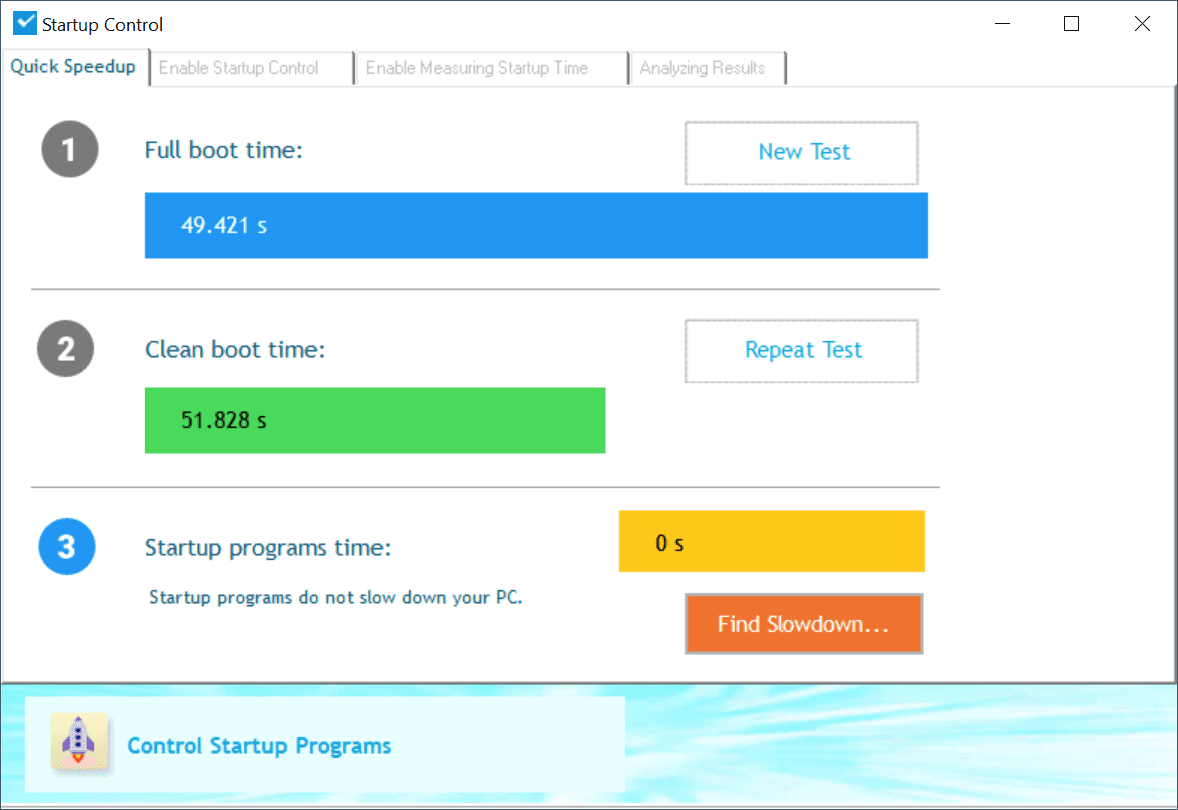 Also, the startup programs were quick to initialize after using an SSD.
Windows 7 64-bit
The latest OS build of 7601 was used to check the boot time using an SSD. Service Pack 1 was installed. As of July 2019, all the KB updates were installed.
The Windows boot time took around 18 s, and the desktop boot time was approximately 6 s.
The startup programs included Greenshot, Microsoft Security Essentials, and OneDrive. In this version of the Windows OS, both the full boot time and clean boot time were checked.
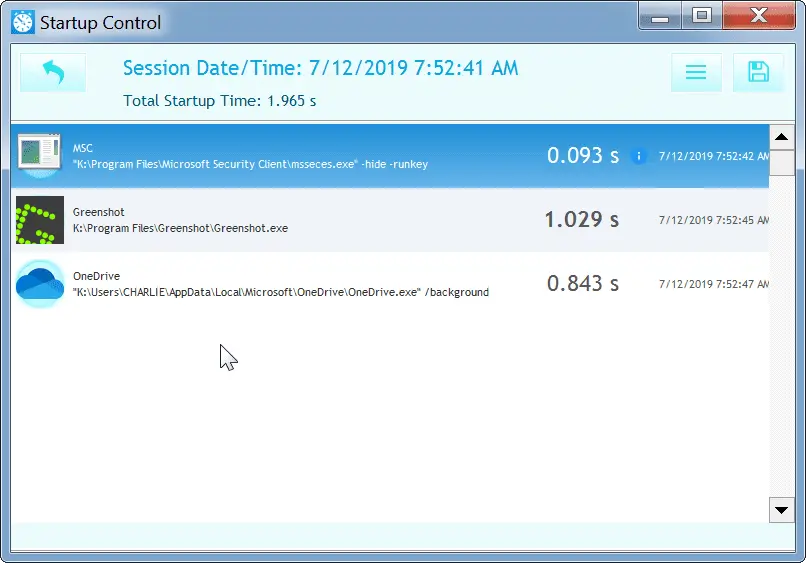
I was shocked to learn that Windows 7 took 20 to 25 seconds to boot up. Greenshot took the major part of 1.138 s. Still, the total startup time of all 3 programs was only 2.137 s.
The desktop initialization and startup programs were quick to respond. Even OneDrive and MSE were fast enough to work with. Menus and programs were quick to open and close. There was no lag or delay in program response.
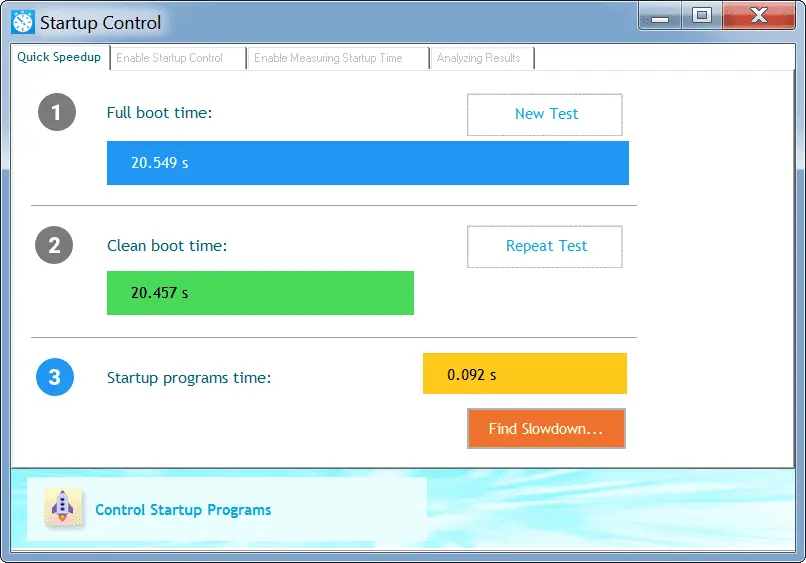
Windows 10 vs Windows 7 Boot Time Comparison: Using SSD
In my experience, I observed drastic improvement in boot times after using SSD in both Windows 7 and Windows 10.
I used 64-bit versions for both.
My old Phenom II X6 1045T system, with a standard SATA Samsung 860 EVO, went from a minute or two boot time on HDD to like 10 seconds boot time on SSD.
My new HP bargain basement laptop that I upgraded with an HP EX920 NVMe SSD (NVMe/PCIe is much faster than SATA) is now basically instant-on (under 3 seconds to boot). Prior, it was probably 30 seconds to a minute with the cheap 5400 RPM HDD it came standard with.
Source: quora.com
While the SSD vs. HDD comparison showed a slight improvement in Windows 7 boot times, subsequent program operations were sufficiently quick after using the SSD.
Using an SSD significantly improves boot times in Windows 10. As mentioned before, the boot times have come down from 3 minutes to 35 seconds with HDD and SSD, respectively.
Another intriguing fact was that Windows 7 booted up more quickly than Windows 10. I used the same computer configuration for both OSs, except that Windows 7 was installed on a 120GB SSD and Windows 10 on a 250GB SSD.
I used a Western Digital SSD for installing both Windows 10 and 7. The models were also the same, except for the capacity.
Conclusion
It can be said that using an SSD (solid-state drive) and Windows 7 will quickly boot up your computer in 2019. But as we know that its support is ending in Jan 2020, Microsoft is deliberate about pushing Windows 10 as an upgrade.
But not to worry!
Even Windows 10 on an SSD was quick enough. Though the difference was only 10 to 15 seconds in boot times, the desktop, drivers, programs, services, and other components were quick to initialize compared to using an HDD (hard disk drive).
